
Smart Home Assistant

Tapo Camera Review UK: From £20, No Fees, HA-Ready

SepehrBy Sepehr· 23 April 2026· Updated 3 November 2026· 5 min read
✓ Independent — no paid placements✓ Cited sources
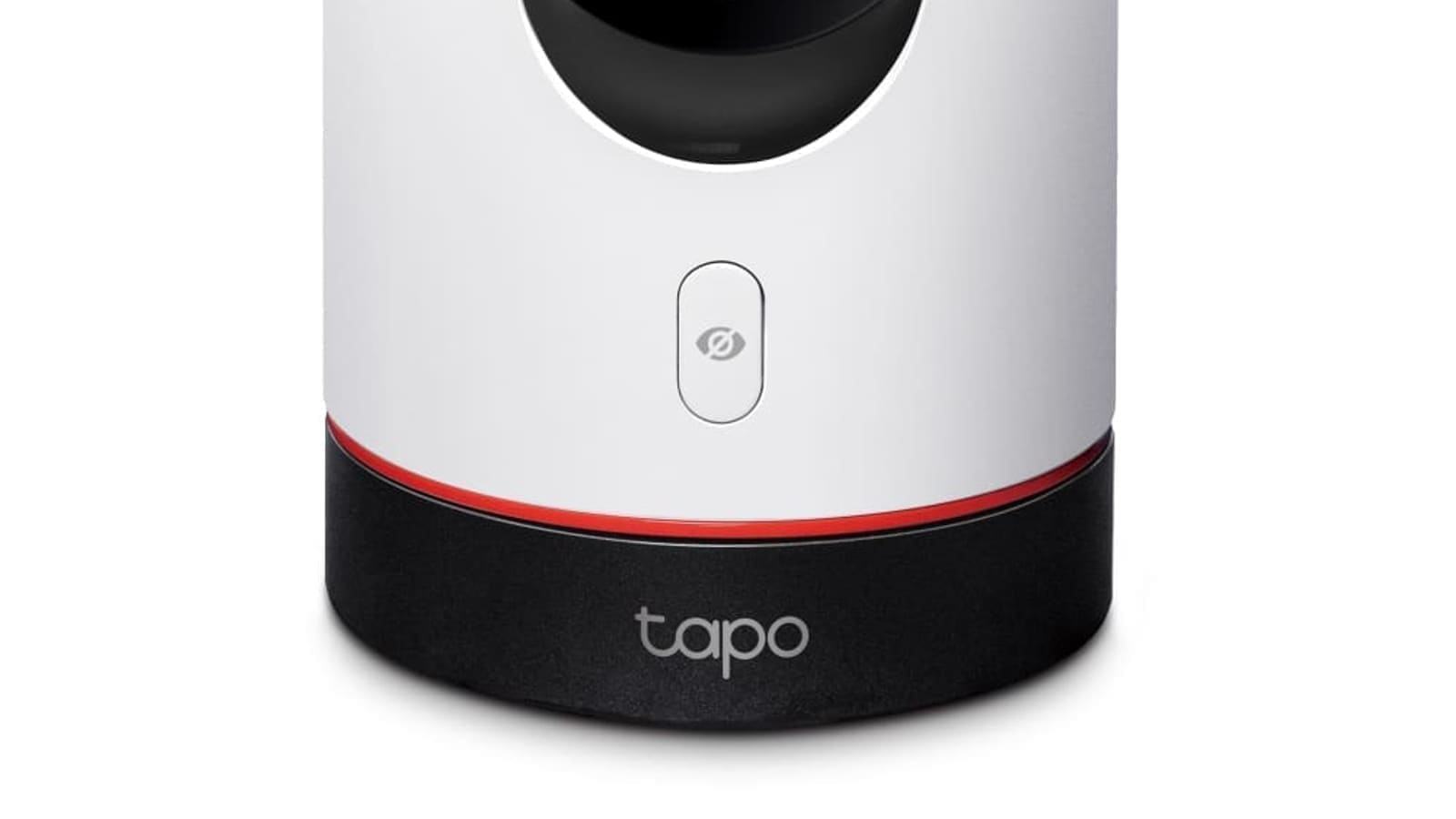
White Tapo pan-tilt indoor camera with black base, red accent ring and privacy button, shown against a white background

Key takeaways

  • Tapo cameras cost from about £20 (C210) to £80 (C325WB) and record to microSD with no subscription needed.
  • Every current Tapo model here streams locally over RTSP/ONVIF, so Home Assistant and Frigate work once a camera account exists.
  • The £33 C120 suits a porch or passage; the £33 C500 is the cheapest outdoor pan/tilt option.
  • The C210 and C225 are indoor-only, so do not mount them outside a window or porch.
  • Colour night vision on the C120 needs its spotlights on, while the C325WB gets full colour from its sensor.

Not yet hands-on tested.This review is compiled from manufacturer specifications, official documentation, and independent testing from other reviewers — we have not tested this product ourselves. We're working on getting a review unit to publish an updated, hands-on version.

On this page[tap to expand]

This TP-Link Tapo camera review UK covers the current range: Tapo cameras cost from about £20 (C210) to £80 (C325WB), record to microSD with no subscription, and work with Home Assistant and Frigate over RTSP/ONVIF once you create a camera account in the Tapo app. For most homes the £33 C120 (indoor/outdoor) or C500 (outdoor pan/tilt) is the best pick.

Last updated November 2026. Prices are recent Amazon UK listings and move often.

Buy the picks in this guide

Recommended for Smart Security

See all devices →

Which Tapo camera should you buy? Quick picks

ModelBest forPrice fromPlacementNight visionHome Assistant / Frigate
Tapo C120Porch or side passage, fixed view£33Indoor/outdoor (IP66)Colour via spotlights; IR fallbackRTSP/ONVIF; HACS Tapo Control
Tapo C210Cheapest pan/tilt for a nursery or pet room£20IndoorInfrared, black-and-whiteRTSP/ONVIF; PTZ via HACS
Tapo C225Open-plan rooms, AI motion tracking£42IndoorColour (starlight sensor)RTSP/ONVIF; PTZ via HACS
Tapo C325WBFront door needing sharp colour at night£80Outdoor (IP66)Full colour from the sensorRTSP/ONVIF, Frigate/go2rtc
Tapo C500Cheapest outdoor pan/tilt, 1080p£33Outdoor (IP65)IR/colour up to 30mRTSP/ONVIF; mains powered

Browse every model, with Home Assistant integration notes, in our camera finder. The rest of this review covers the original C310 and C325WB in more detail.

Pros

  • Low prices, from about £20 for the C210 to £80 for the C325WB
  • Local microSD recording with no subscription
  • RTSP/ONVIF streams for Home Assistant and Frigate
  • Outdoor options with IP65/IP66 weatherproofing

Cons

  • Mains power only on these models, so plan a cable route
  • RTSP needs a manual camera account, and firmware updates can re-lock it
  • Pan/tilt and spotlight control in Home Assistant needs the community HACS integration
  • Weaker AI detection and ecosystem than Ring or Arlo

Do Tapo cameras work with Home Assistant and Frigate?

Yes, all five models in the table above stream locally over RTSP/ONVIF. Enable Third-Party Compatibility in the Tapo app, create a Camera Account under Advanced Settings, then add the stream to Home Assistant or Frigate. The built-in tplink integration exposes little beyond the stream, so pan/tilt, privacy mode and spotlights usually need the HACS Tapo Control component. Details for each model are in the camera finder.

Resolution and image quality. The C310 shoots at 3MP (2304×1296), which is noticeably sharper than older 1080p cameras. Daytime footage is crisp and well-exposed; objects at around 10 metres are easily identifiable. The standard infrared night vision switches on automatically at dusk and delivers a clear black-and-white image to roughly 8–10 metres — adequate for most drives and back gardens.

Build and weatherproofing. The C310 carries an IP66 rating, meaning it is fully protected against powerful water jets and dust. In practice, it survived several weeks of UK autumn rain without issue. The housing feels solid for the price, though the white finish does pick up grime over time.

Motion detection and alerts. Motion zones are configurable in the Tapo app, so you can mask out a busy road or swaying tree. Push notifications arrive within a couple of seconds of motion being detected. There is no person/vehicle detection on this model — every moving object triggers an alert — which can mean a busy inbox in a high-traffic location.

Local storage — no subscription needed. This is the C310's standout feature in the UK market. Insert a microSD card (up to 256 GB, sold separately) and the camera loops footage continuously with no monthly fee. Cloud backup is available via the Tapo Care subscription if you want off-site redundancy, but it is entirely optional. For a comparison of cameras that do require a cloud plan, see our Arlo security camera review.

Smart home compatibility. The C310 works with Amazon Alexa and Google Home, so you can pull up a live feed on an Echo Show or Nest Hub with a voice command. There is no native Apple HomeKit support, though third-party workarounds exist.

StarLight sensor and colour night vision. The C325WB's headline feature is its StarLight sensor, which captures colour footage in very low light — moonlit scenes that the C310 would render in black and white. Reviewer footage from gardens lit only by ambient streetlight shows recognisable colour detail, which can be critical for identifying clothing or vehicle colours. Resolution steps up to 4MP (2560×1440).

Two-way audio. Both the C310 and C325WB include two-way audio via a built-in microphone and speaker. Audio quality is functional rather than hi-fi, but it is clear enough to deter a would-be intruder or talk to a delivery driver.

Same subscription-free storage. Like the C310, the C325WB records to a local microSD card (up to 256 GB) with no mandatory subscription. The same Tapo Care cloud option is available if you want it.

Price and value. At around £80 on recent Amazon UK listings, the C325WB costs roughly £60 more than the C310. If your camera covers an area that is only dimly lit at night — a side passage or rear garden with no security lighting — the colour night vision is worth the premium. For a brightly lit front drive, the C310 offers better value.

Tapo App: Setup and Daily Use

Both cameras are managed through the Tapo app (iOS and Android). Setup takes around five minutes: scan the QR code on the camera, connect to your 2.4 GHz Wi-Fi network, and insert an SD card. The app is clean and responsive, with live view, event history, two-way talk, and camera settings all accessible from a single home screen. Multiple cameras appear in a grid, which works well if you are building out a multi-camera setup.

If you are considering a broader security overhaul, our best outdoor security cameras in the UK guide covers how the Tapo range compares to Ring, Eufy, and Arlo at various price points.

Verdict: Who Should Buy a Tapo Camera?

The TP-Link Tapo cameras are an excellent fit for budget-conscious UK buyers who want reliable outdoor monitoring without a subscription fee. The C310 is hard to beat at around £20 for a capable 3MP IP66 camera with local storage. The C325WB is the right choice if colour night vision matters more than cost. Neither camera matches the AI-powered person detection or the polished ecosystem of Ring or Arlo, but at these price points, the trade-off is very reasonable.

Both cameras are available from Amazon UK and from the TP-Link website. Always compare prices across retailers before buying, as prices vary.

Related: best outdoor security cameras UK, best smart CCTV systems UK, and Blink outdoor camera review, and our best pet camera UK roundup if you're specifically buying to monitor a dog or cat.

Looking at an older Kasa camera instead? TP-Link has published fixes for two flaws in the EC70 and EC71 v4, covered in our Kasa EC70 and EC71 vulnerabilities guide.

Frequently asked questions

Do TP-Link Tapo cameras require a subscription in the UK?
No. The Tapo cameras covered here, including the C120, C210, C225, C325WB, C500, C310 and C325WB, can record to a local microSD card with no monthly fee, and the live view in the Tapo app is free. TP-Link sells an optional Tapo Care cloud plan if you want off-site clip backup and extra features, but nothing in the core camera function depends on it. The one catch is that a microSD card is sold separately, and if the camera is stolen the footage goes with it, so anyone who wants off-site protection may still prefer the paid cloud plan or a local NAS recording through RTSP. Check the current Tapo Care pricing on TP-Link UK before you decide, as it changes.
Do Tapo cameras work with Home Assistant and Frigate?
Yes. The Tapo cameras in this review support RTSP and ONVIF, so Home Assistant and Frigate can pull a live local stream without touching TP-Link cloud. The setup trap is that you must first enable Third-Party Compatibility in the Tapo app and create a separate Camera Account under Advanced Settings; skip that and the camera adds with no working stream. Pan and tilt, privacy mode, spotlights and sirens usually need the community HACS Tapo Control integration, because the built-in tplink integration exposes far less. Some firmware updates have also re-locked RTSP access, so if a working stream suddenly goes dark, re-check that setting first. Each model page in our camera finder lists the specific integration notes for that camera.
What is the difference between the Tapo C120, C325WB and C500?
The C120 is a fixed-lens 2K camera for indoors or outdoors with IP66 weatherproofing, dual spotlights and a price around £33. The C325WB is a pricier outdoor camera at roughly £80 with an oversized sensor that produces full-colour night video without needing spotlights, plus person and vehicle detection. The C500 is a 1080p outdoor pan/tilt camera at around £33 with IP65 weatherproofing and a built-in siren. So the C120 is the all-round pick, the C325WB is for sharp colour detail on one approach such as a front door, and the C500 is for covering a wider area cheaply. All three need mains power, so plan the cable route before buying. Prices come from recent Amazon UK listings and change often.
Are Tapo cameras compatible with Alexa and Google Home?
Yes. Tapo cameras work with Amazon Alexa and Google Home, so you can ask an Echo Show or Nest Hub to display a live feed. They are not natively compatible with Apple HomeKit, although Home Assistant can bridge a camera into HomeKit if you want that. Voice assistants use the TP-Link cloud route, so the stream depends on your internet connection, whereas Home Assistant and Frigate can read the same camera locally over RTSP. If you use both, enable the voice assistant skill in the Tapo app and keep the local camera account for automations. Expect a delay of a few seconds when casting a feed to a smart display, which is normal for budget cameras at this price and not a sign of a fault in your unit.
How do I set up a TP-Link Tapo camera?
Plug the camera in, install the Tapo app on iOS or Android, then follow the prompts to scan the QR code on the camera and join your 2.4 GHz Wi-Fi network. Setup usually takes around five minutes. Insert a microSD card if you want local recording, and format it from the app. For Home Assistant or Frigate, go to Advanced Settings, switch on Third-Party Compatibility and create a Camera Account, then use those credentials in an RTSP or ONVIF URL. Most Tapo cameras only support 2.4 GHz Wi-Fi, so a mesh system that merges bands can cause pairing trouble; if the camera will not connect, temporarily separate the bands or move the phone closer to the router during setup. Mount outdoor models with a route to a socket in mind.

Sources

Sources verified 2026-06-19

  1. TP-Link UK — Tapo C310 Outdoor Security Wi-Fi Camera
  2. TP-Link UK — Tapo C325WB Outdoor Security Wi-Fi Camera
  3. Amazon UK — TP-Link Tapo C310 Outdoor Security Camera
  4. Amazon UK — TP-Link Tapo C325WB Outdoor Security Camera
  5. TP-Link Newsroom — TP-Link Tapo Smart Camera Press Resources
›How we researched this

Claims in this article are checked against primary sources — manufacturer specifications, official documentation, Which? research, Ofgem guidance, or gov.uk — rather than forum threads or video reviews. Where the author has direct hands-on experience with a product (most Home Assistant, Zigbee, and home-networking gear is running in his own homelab), that is stated explicitly in the text.

For categories outside that personal setup — such as boilers, heat pumps, and other areas that are traditionally a heating engineer's domain — verdicts are built from cross-referenced manufacturer data, published lab results, and vetted expert and owner reviews rather than a claim of personal hands-on testing. See the editorial policy for the full methodology.

Sepehr

Written by

Sepehr

10+ years hands-on with Home Assistant & networking · Research-backed elsewhere · No brand deals

Smart home specialist with 10+ years running a self-hosted Home Assistant setup — Zigbee2MQTT, Frigate NVR, and local-first automations. Independent coverage for UK homes, no brand deals.

LinkedIn →

Citing this page? Please use a dofollow link back to the original article — it helps us keep the data on this page accurate and up to date.

Related reading