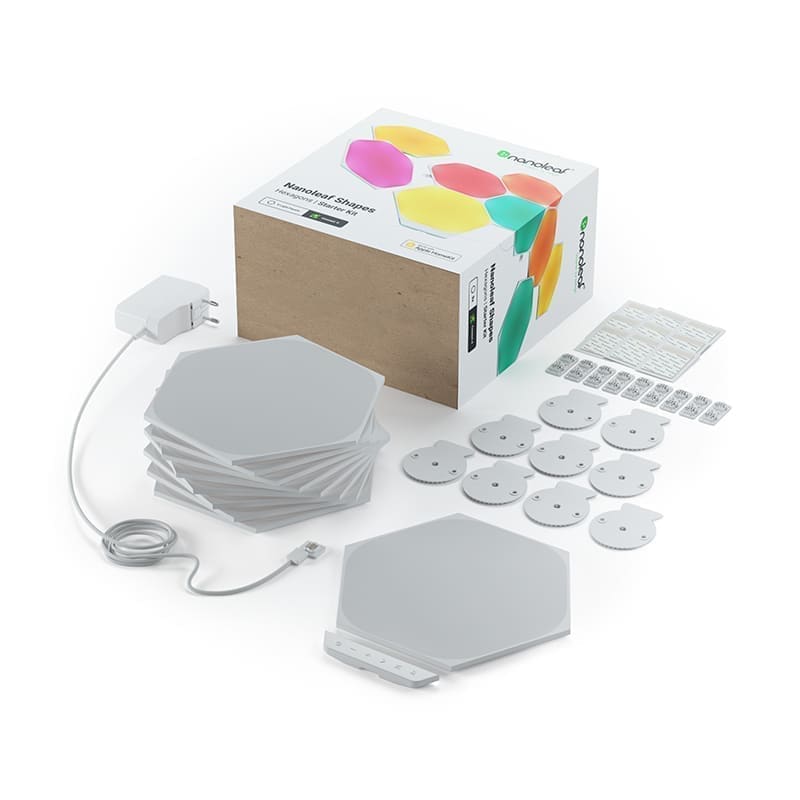
Nanoleaf
Nanoleaf Shapes Hexagons starter kit (9 panels)
- Native integration
- Local control
- Wi-Fi
Prices verified September 2026
See more smart lighting picks on our Amazon storefront →Our verdict
The wall-panel category's benchmark, and unlike most decorative RGB tat it has a proper native Home Assistant integration with local control. Nine 20x23cm hexagons cover roughly 1.3m² out of the box, and the Connect+ system scales to 500 panels per controller — though a second 42W supply is needed past about 20-22, since each hex draws up to 2W. Install is a genuine 15-20 minutes with peel-and-stick tape and linkers, no tools needed. Best suited to a single feature wall or gaming/streaming setup, not whole-room lighting. Buy on discount: UK street price swings between about £110 and £170.
What can Home Assistant control on the Nanoleaf Shapes Hexagons starter kit (9 panels)?
| Control | Type | What it does |
|---|---|---|
| Light | Light | On/off, brightness, colour and effect selection for the whole fixture as a single unit — no individual-panel control from the core integration. |
| Effect | Select | Lists scenes already downloaded to the controller via the Nanoleaf app; a scene must be synced to the device in-app before it appears here. |
| Swipe gesture | Event | Fires swipe up/down/left/right events on panel touch — usable directly as an automation trigger without polling. |
| Identify | Button | Diagnostic action on the controller device, separate from the light entity. |
| Music sync | Not exposed as a trigger | Rhythm-reactive effects run locally on the controller's onboard mic; HA only sees the resulting colour state via the light entity, with no dedicated music-sync-active sensor. |
The native integration exposes light, button and event entities — but control is whole-fixture only; there's no per-panel addressing in core HA, so per-hexagon effects need a third-party HACS add-on or raw local API calls. Scenes built in the Nanoleaf app do sync into HA's effect list, but only after they've been downloaded to the controller from the app first — anything not yet pushed to the device won't show up as a selectable effect. The panels also fire swipe gestures (up/down/left/right) through an event entity, so a touch swipe can drive an automation directly, though single/double-tap detection is patchier and largely undocumented. A recurring community complaint is a local token that intermittently stops authenticating, forcing a full remove-and-re-add of the integration rather than a simple reload.
Specs
| extras | touch reactive, music sync (onboard mic), screen mirror, LayoutDetect |
|---|---|
| panels | 9 hexagons, expandable — Connect+ system supports up to 500 panels per controller |
| mounting | adhesive mounting tape, rigid linkers and mounting plates included — no tools required |
| controller | 1x Nanoleaf Shapes controller included (handles Wi-Fi and power distribution to the chain) |
| power supply | 100-240VAC universal power supply included |
| coverage area | ~1.3m² of wall covered by the 9-panel starter kit |
| panel dimensions | 20cm height x 23cm width, ~208g each |
| power consumption | up to 2W per panel at full brightness (~18W max for the 9-panel kit); included 42W PSU supports ~20-22 panels before a second supply is needed |
How does the Nanoleaf Shapes Hexagons starter kit (9 panels) compare?
| Product | From | Protocol | Local control | Integration |
|---|---|---|---|---|
| Nanoleaf Shapes Hexagons starter kit (9 panels) (this product) | £135.99 | Wi-Fi | Yes | Native |
| Athom WLED WS2812B LED strip controller (pre-flashed) | £6.5 | Wi-Fi | Yes | Native |
| Govee Flow Plus RGBICWW light bars H6056 (twin pack) | £69.99 | Wi-Fi, Bluetooth | Yes | Native |
| Govee RGBIC LED Strip Light H619A (5 m, protective coating) | £39.99 | Wi-Fi, Bluetooth | Yes | Native |
Frequently asked questions
- Does the Nanoleaf Shapes Hexagons starter kit (9 panels) work with Home Assistant locally?
- Yes. The Nanoleaf Shapes Hexagons starter kit (9 panels) is controlled locally in Home Assistant through a built-in Home Assistant core integration (nanoleaf), so it keeps working if your internet connection or the Nanoleaf cloud goes down. Control and state updates stay on your own network.
- Which protocol does the Nanoleaf Shapes Hexagons starter kit (9 panels) use, and do I need a hub?
- The Nanoleaf Shapes Hexagons starter kit (9 panels) uses Wi-Fi. To pair it with Home Assistant you need no hub — it joins your Wi-Fi network directly. Nanoleaf's own hub is not required when you integrate through a built-in Home Assistant core integration (nanoleaf).
- How much does the Nanoleaf Shapes Hexagons starter kit (9 panels) cost in the UK?
- The lowest price we have listed for the Nanoleaf Shapes Hexagons starter kit (9 panels) is £135.99 at Amazon UK. Prices were last checked in September 2026 and change often, so confirm on the retailer's page before buying.