Download Speed: How Much Does a Smart Home Need?
For most UK households, the honest answer is: less than you'd think. Smart bulbs, plugs, thermostats, and sensors use almost no bandwidth — they're sending tiny status updates, not streaming. The download load in a smart home comes mainly from video: doorbell and camera live-view, plus whatever else the household is streaming at the same time.
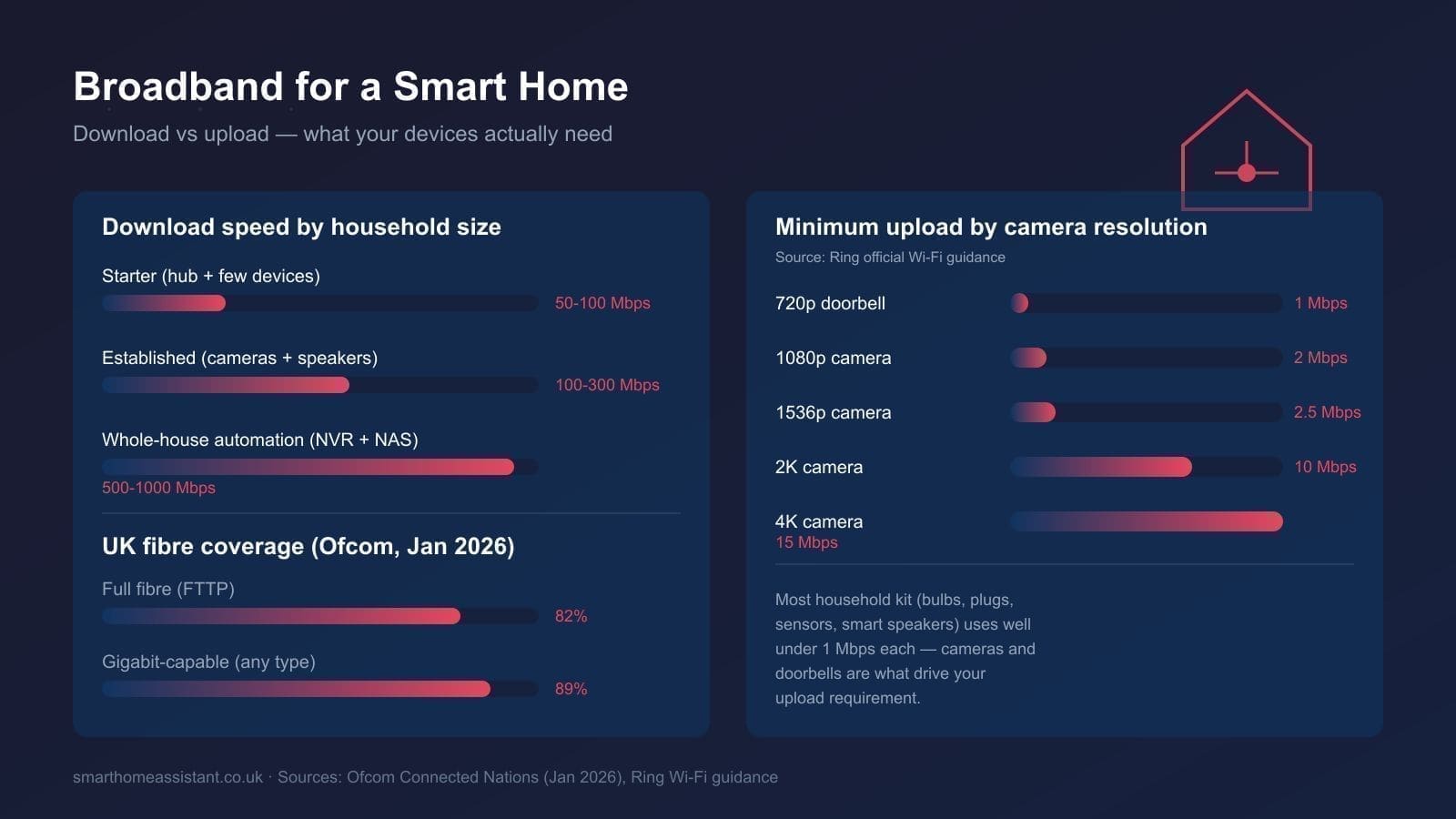
- Starter smart home (a hub, a handful of bulbs and plugs, one video doorbell): a standard 50–100 Mbps fibre package is comfortable, even alongside normal household streaming.
- Established smart home (multiple cameras, a video doorbell, smart speakers, a Home Assistant or SmartThings hub): aim for 100–300 Mbps, mainly to give cameras and household streaming headroom at the same time.
- Whole-house automation (NVR-recorded CCTV, multiple 4K cameras, NAS backups, several people working from home): a full-fibre 500 Mbps–1 Gbps tariff removes download as a bottleneck entirely.
Note that none of these numbers are about raw streaming need — Netflix itself recommends just 15 Mbps for a single Ultra HD stream. They're about headroom: enough spare capacity that a security camera waking up and a video call starting at the same time as a Sunday-night Netflix binge doesn't cause anything to stutter.
Upload Speed Is the One Providers Don't Advertise
This is the figure that actually limits a smart home, and it's the one most UK broadband ads bury in the small print. Cameras, video doorbells, and cloud-backed sensors all send data constantly — to view a live feed on your phone, the footage has to leave your house first. Ring's own support documentation sets out minimum upload speeds by video resolution: 1 Mbps for 720p devices, 2 Mbps for standard 1080p doorbells and cameras, 2.5 Mbps for 1536p models, 10 Mbps for 2K devices, and 15 Mbps for 4K cameras. Run several cameras at once and those minimums stack — three 1080p cameras alone need roughly 6 Mbps of upload just to function, before accounting for anything else trying to use the connection.
This is where the broadband technology matters more than the headline speed. Many standard fibre-to-the-cabinet (FTTC) and cable packages offer asymmetric speeds — fast download, much slower upload, sometimes under 20 Mbps even on a "fast" package. Full fibre (FTTP) connections are typically symmetric or close to it, so a 300 Mbps full-fibre package usually means roughly 300 Mbps in both directions. If your smart home includes more than one or two cameras, check the upload figure on any package before you buy — not just the download number on the box.
Full Fibre vs Cable vs FTTC: What's Actually Available
UK fibre coverage has expanded quickly. According to Ofcom's January 2026 Connected Nations update, full fibre (FTTP) is now available to 82% of UK premises — 24.9 million homes — and gigabit-capable broadband of any kind (full fibre or upgraded cable) reaches 89% of premises, around 27.1 million homes. If you haven't checked your address recently, it's worth re-checking: many streets that were FTTC-only a couple of years ago now have a full-fibre option.
Where full fibre genuinely isn't available, cable broadband is usually the next best choice for a smart home — its upload speeds are typically better than FTTC, even if not symmetric. FTTC ("fibre broadband" that actually runs over a copper line from the street cabinet to your house) is the weakest option for a device-heavy smart home, because upload speed on FTTC degrades sharply with distance from the cabinet.
Choosing a Router and Wi-Fi Setup for a Smart Home
Speed on paper means little if the signal doesn't reach your hallway camera or garden sensor. Most ISP-supplied routers are adequate for a small flat but struggle once you add more than 20–30 connected devices, particularly older 2.4 GHz-only smart home kit that doesn't roam well between access points. If your home has more than one floor or solid internal walls, a dedicated mesh system will do more for reliability than upgrading your broadband speed tier. Our best mesh Wi-Fi systems UK guide covers options for different property sizes, and our best routers for smart homes UK guide looks at standalone routers if a single unit covers your space. Whichever you choose, putting smart home devices on their own Wi-Fi band or VLAN — covered in our home network VLAN guide — keeps a misbehaving IoT device from saturating the connection your laptop or TV relies on.
Practical Checklist Before You Switch Provider
- Check the upload speed on any package, not just download — most comparison sites show it if you look past the headline number.
- Confirm whether your address has a full fibre (FTTP) option; many UK postcodes gained one in the last 12–18 months.
- Count your cameras and doorbells, then add up their minimum upload requirements to sanity-check a package before signing a contract.
- If you run a Home Assistant hub with cloud backups or remote streaming, treat it the same as an extra camera for upload planning.
- Prices vary significantly by provider, contract length, and promotional offers — always compare at least two providers' current deals rather than relying on list price.
What If You Can't Get Full Fibre Yet?
Not every UK address has a full-fibre option, even with coverage now above 80%. If you're stuck on FTTC or a slower cable tier, there are still ways to keep a smart home reliable. First, prioritise wired Ethernet for anything stationary and bandwidth-hungry — an NVR, a Home Assistant hub, or a hardwired doorbell chime — so it isn't competing with Wi-Fi devices for airtime. Second, check whether your provider offers a separate "business" or "upload-boost" tier; some ISPs sell asymmetric FTTC packages with better upload allocation specifically for households running cameras or home offices. Third, consider 4G or 5G home broadband as a backup connection for critical devices like a security system, so a fixed-line outage doesn't leave the house unmonitored. Finally, if a full-fibre rollout is scheduled for your street — checkable via Ofcom's broadband coverage checker — it's often worth waiting a few months rather than locking into an 18- or 24-month contract on an inferior connection.
Real-World Bandwidth: What Common Devices Actually Use
Once a device is idle, most smart home kit barely registers on a router's traffic graph. The load comes in short bursts:
- Smart bulbs, plugs, and sensors: a few kilobits per second when idle; negligible even with dozens installed.
- Smart speakers (Alexa, Google Home): brief spikes when processing a voice command or streaming audio; under 1 Mbps in normal use.
- Video doorbells and cameras: the main load — see the Ring upload figures above, multiplied by however many devices you run simultaneously.
- Home Assistant or SmartThings hub: minimal on its own, but cloud backup, remote access, and any cloud-connected integrations add modest, regular upload traffic.
- NAS or local video storage: heavy on local network bandwidth between devices, but doesn't touch your internet connection unless you're accessing it remotely.
The practical takeaway: a smart home rarely needs as much raw download speed as a household of streaming devices and gaming consoles. What it needs is dependable upload headroom and a Wi-Fi network that reaches every room — both of which matter more than chasing the highest gigabit number a provider will sell you.