What Is Pi-hole and Why Does It Work So Well?
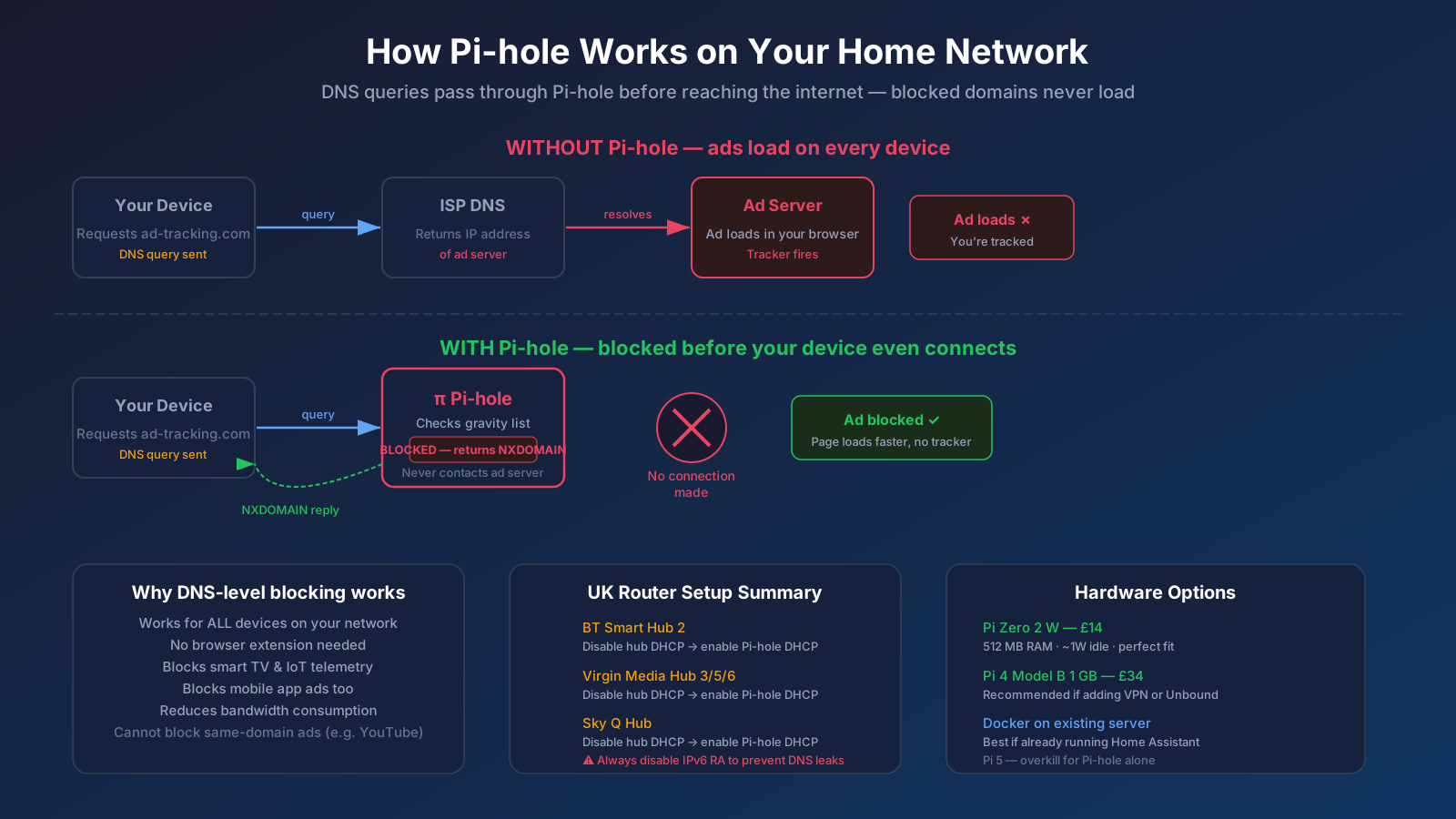
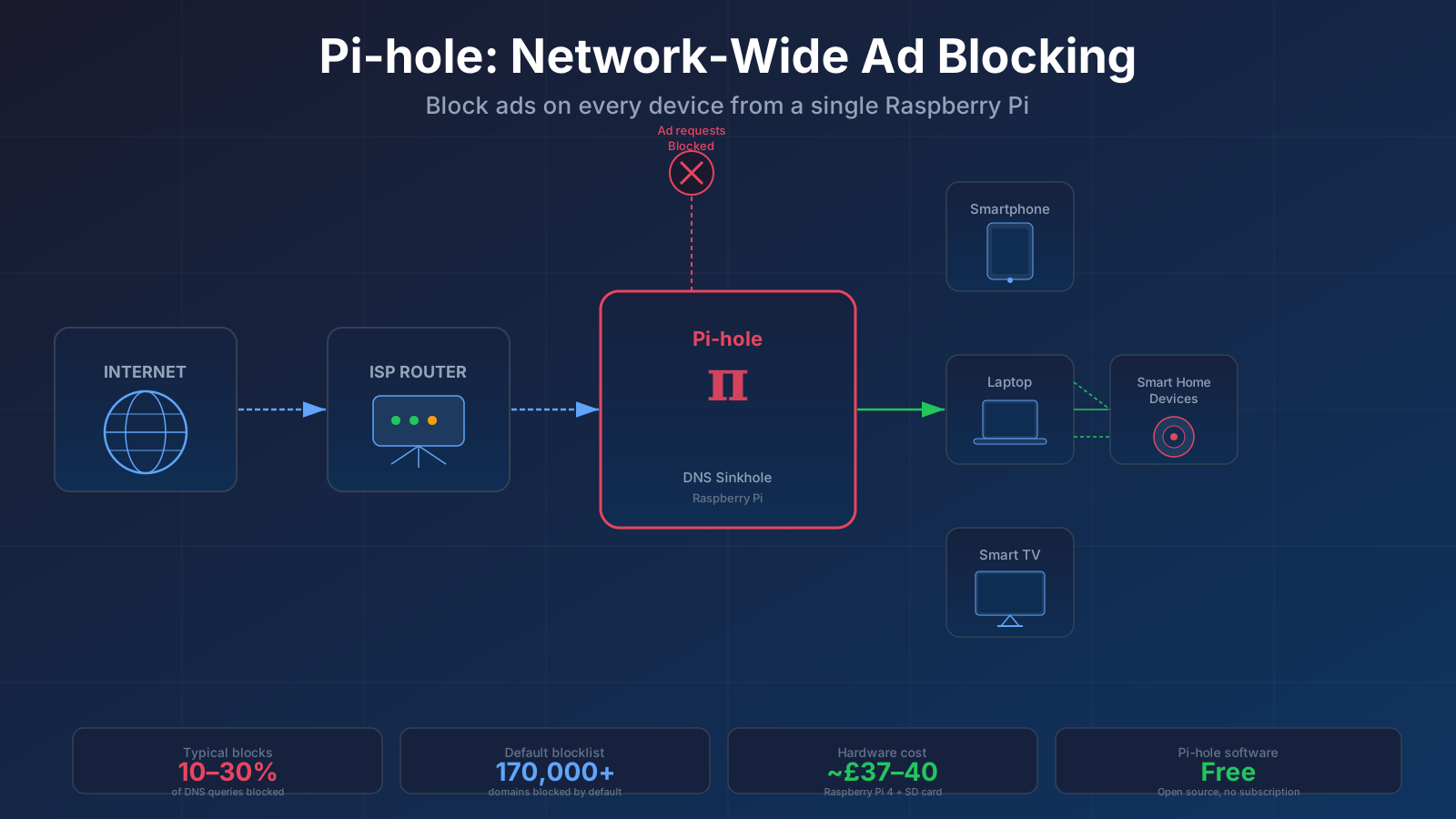
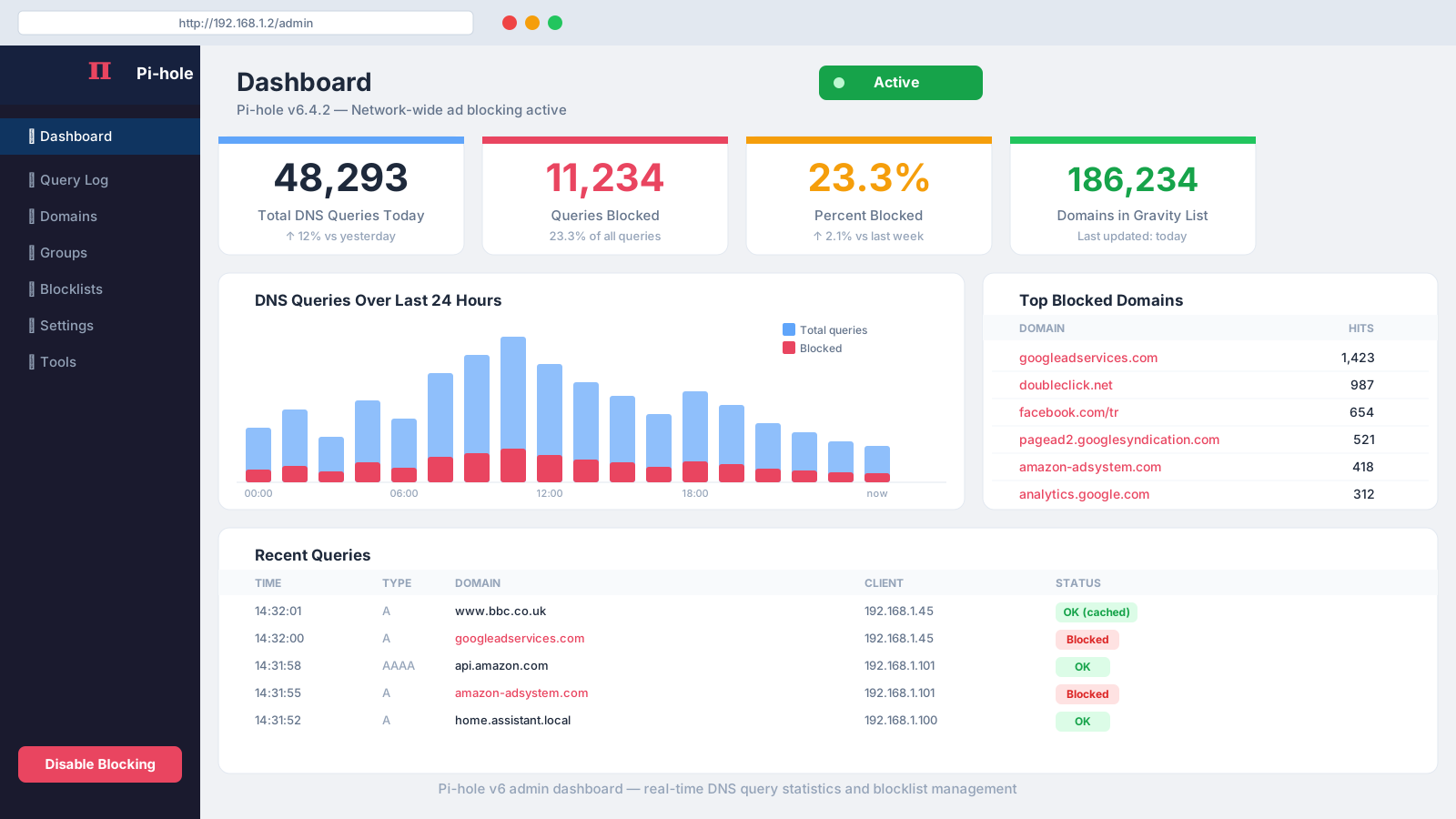
When your browser (or any app) wants to load a webpage, it first asks a DNS server to translate the domain name into an IP address. Pi-hole sits between your router and every device, acting as the local DNS resolver. If the requested domain is on a blocklist — say, doubleclick.net or amazon-adsystem.com — Pi-hole returns a "nothing to see here" response before the connection is ever made. No request leaves your network, so no ad, tracker, or telemetry packet is downloaded.
The default blocklist covers around 170,000–200,000 domains. Active users run multiple community lists pushing that figure well past one million entries. In a typical UK household, Pi-hole blocks between 10% and 30% of all DNS queries — the exact proportion depends heavily on which devices are active and which lists you enable. The percentage itself is a poor metric; what matters is whether ads visually render, and for most sites they do not.
Pi-hole v6, released in February 2025, was a significant architectural change: the older lighttpd/PHP web stack was replaced by a self-contained binary. Many older tutorials referencing lighttpd.conf edits are now obsolete — use the v6 documentation only.
What Do You Need to Get Started With Pi-hole?
Hardware. Any device running Linux will host Pi-hole, but most UK users reach for a Raspberry Pi. The Raspberry Pi Zero 2 W (~£14 where available) is the leanest option — its quad-core Cortex-A53 and 512 MB RAM comfortably exceed Pi-hole's minimum requirements, and it idles at around 1 W. If you plan to run Pi-hole alongside a VPN tunnel or local DNS resolver such as Unbound, a Raspberry Pi 4 Model B 1 GB (~£34 at UK retailers) gives ample headroom. A 16 GB Class 10 microSD card (~£4–£6) completes the setup. Prices vary by retailer; The Pi Hut and Pimoroni are both authorised UK resellers.
View Raspberry Pi Zero 2 W on Amazon UK → · View Raspberry Pi 4 Model B (1GB) on Amazon UK →
Pi-hole is also available as a Docker container, which suits anyone already running a home server or NAS — no dedicated Pi required.
Software. Pi-hole is completely free and open source. Supported operating systems include Raspberry Pi OS, Ubuntu, Debian, and Fedora. The minimum system requirement is 512 MB RAM and 2 GB of free storage.
How Do You Install Pi-hole?
The quickest path is the official one-line automated installer:
- Flash Raspberry Pi OS Lite onto your microSD using the Raspberry Pi Imager. Enable SSH and set your Wi-Fi credentials in the imager's "Advanced" settings before writing.
- Boot the Pi, SSH in, and assign it a static IP address — or better, create a DHCP reservation for its MAC address in your router's admin panel so its address never changes.
- Run the installer:
curl -sSL https://install.pi-hole.net | bash. The interactive wizard lets you choose an upstream DNS provider (Cloudflare's 1.1.1.1, Google's 8.8.8.8, or Quad9 for a privacy-respecting option), enable the default blocklist, and set an admin password. - Note the admin URL shown — typically
http://<your-pi-ip>/admin. - Point your router's DHCP DNS setting at the Pi's IP so every device automatically uses Pi-hole. This step varies by router — see the next section for UK-specific guidance.
Prefer containers? The official Docker Compose template takes about five minutes to configure. Set your timezone to Europe/London and map persistent volumes so your query history and blocklists survive image updates.
Setting Pi-hole Up With UK Routers
This is where most UK users hit friction. The three major ISP-supplied routers each handle DNS configuration differently.
BT Smart Hub 2
The residential BT Smart Hub 2 firmware deliberately removes the option to set a custom DHCP DNS server. The workaround: disable the Hub's built-in DHCP server entirely (under Advanced → Home Network), then enable Pi-hole's own DHCP server. Clients renewing their leases will receive Pi-hole as their sole DNS resolver. Also disable IPv6 RA on the Hub where possible — unchecked IPv6 will hand devices a separate DNS address that bypasses Pi-hole entirely.
Virgin Media Hub 3, 5, and 6
Hub 3 has a Static DNS field, though some firmware versions have a known save-hang bug. Hub 5x and Hub 6 are more locked down. The cleanest approach for any Virgin Hub is identical to BT: disable the Hub's DHCP server, enable Pi-hole's. Alternatively, Hub 3 and later support Modem Mode, which disables all routing and lets a third-party router take over with full DNS configuration freedom.
Sky Q Hub
Sky's hub is the most restricted — the standard UI offers no DNS field at all. Disable the Sky Q Hub's DHCP server and enable Pi-hole's. Android users should also disable IPv6 on the Sky hub where the option exists; Android devices follow IPv6 Router Advertisements rather than DHCPv4 DNS settings and will bypass Pi-hole silently if RA is left active.
Important for all three ISPs: BT Family Shield, Virgin Web Safe, and Sky Broadband Shield are DNS-based parental controls. Pointing devices at Pi-hole with a third-party upstream (1.1.1.1, 8.8.8.8) bypasses these filters. If your household relies on them, replicate the blocked categories using Pi-hole's own blocklists instead.
For more on network segmentation for smart home devices, see our home network VLAN guide and the dedicated IoT VLAN setup with Home Assistant walkthrough — both complement a Pi-hole deployment by isolating IoT traffic onto its own subnet.
Connecting Pi-hole to Home Assistant
Pi-hole has an official, built-in Home Assistant integration that works with the Pi-hole v6 REST API. Once configured in Settings → Devices & Services, it exposes a set of sensors — queries blocked, percent blocked, total queries today, domains on the gravity list, active clients — and a switch entity that lets you temporarily disable ad-blocking from a dashboard button or automation. Pi-hole's query log is only one piece of the picture — for device discovery, bandwidth graphs, and self-hosted uptime tracking too, see our home network monitoring tools guide.
To configure the integration in Pi-hole v6: navigate to Settings → API/Web Interface → Expert mode, then create an application password. Use that in Home Assistant's integration setup rather than your main admin password. For context on structuring your Home Assistant configuration alongside network tools, see our Home Assistant network setup guide.
Recommended Blocklists for 2026
Pi-hole ships with the StevenBlack Unified Hosts list (~170,000–200,000 domains) enabled by default. To expand coverage, add lists via Settings → Blocklists in the admin UI, then run Tools → Update Gravity to download and merge the new entries. Widely used additions:
- OISD blocklist (
https://big.oisd.nl) — broad coverage, maintained daily, low false-positive rate. One of the most recommended single-list additions in the Pi-hole community. - HaGeZi Multi Pro — balanced blocking with a strong focus on telemetry and tracking. Available at hagezi.dns.de.
- Smart TV blocklists — manufacturers send home telemetry regardless of on-screen opt-out settings; dedicated lists target these beacons specifically.
Pi-hole's regex and wildcard matching lets you refine rules for false positives without removing an entire list.
Pi-hole vs AdGuard Home
AdGuard Home is the main alternative and runs on similar hardware. The headline differences:
- Setup ease: AdGuard Home is simpler — DNS-over-HTTPS upstream support is native, with no need for a separate cloudflared or Unbound installation.
- Features: AdGuard Home includes built-in parental controls, safe search enforcement, and per-service toggles (block WhatsApp, TikTok, etc. with a checkbox). Pi-hole replicates most of these through blocklists but requires more manual configuration.
- Community: Pi-hole's community is significantly larger, meaning more tutorials, more UK-specific router guides, and more responsive troubleshooting threads.
- Home Assistant integration: Both have official integrations. Pi-hole's exposes more sensor entities and is more mature.
For most UK users, Pi-hole is the better-supported starting point. AdGuard Home is worth considering if you specifically want DoH to clients without a separate proxy.
Common Issues and Quick Fixes
Some devices still see ads. Almost always an IPv6 DNS leak — your router is handing out its own IPv6 resolver via Router Advertisement even after you changed the DHCP DNS setting. Disable IPv6 RA on your ISP router, or configure Pi-hole to handle RA.
A site is broken or unavailable. Check the Pi-hole query log for the domain (Queries → Blocked), then add it to your whitelist under Domains → Allow.
Pi-hole does not block YouTube ads. Google serves YouTube ads from the same CDN domains as the video content itself. DNS blocking cannot distinguish the two. Browser extensions such as uBlock Origin remain the only reliable fix for YouTube specifically.
Dashboard shows 0 queries. Your devices are not using Pi-hole's DNS. Confirm the DHCP DNS change saved on the router and that devices have renewed their DHCP leases — disconnecting and reconnecting to Wi-Fi forces a renewal.