What Are Powerline Adapters?
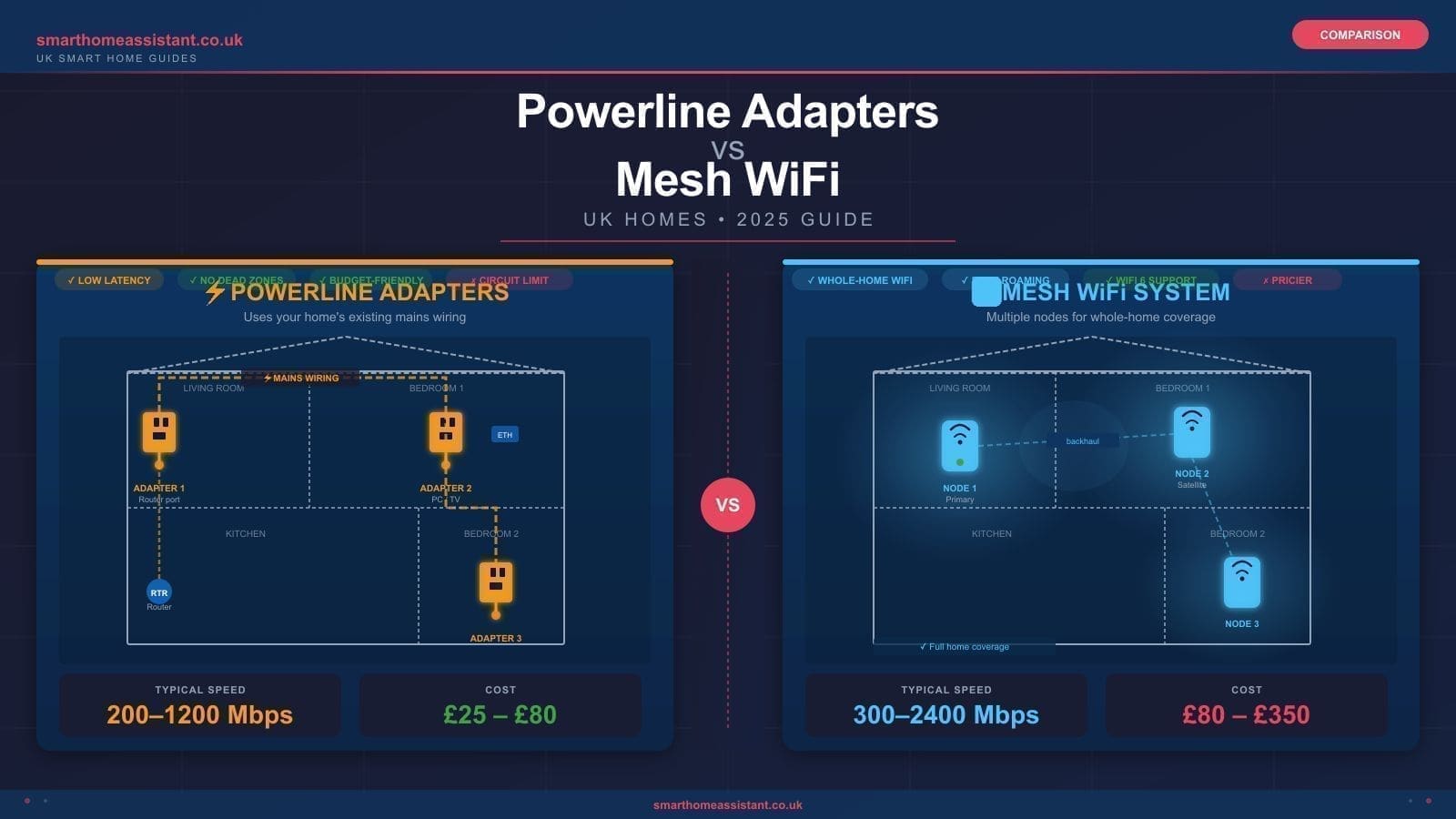
Powerline adapters send your broadband signal through your home's existing electrical wiring. You plug one adapter into a wall socket near your router and connect them with an Ethernet cable; you plug a second adapter into any other socket in the house, and it delivers a wired (or WiFi) connection in that room. No drilling, no cable runs, no new infrastructure required.
How fast are they? Powerline adapters are sold with theoretical speeds of 500 Mbps to 2 Gbps depending on the standard (HomePlug AV, AV2, or the newer G.hn standard). In real-world conditions — accounting for wiring age, circuit layout, and interference from other appliances — most users see between 100 Mbps and 400 Mbps. That is more than enough for 4K streaming, gaming, or a smart home hub, but lower than a direct Ethernet run.
Advantages of powerline adapters:
- Use existing wiring — no new cables needed
- Low latency compared to WiFi extenders
- Stable, consistent connection (wired physics, not radio waves)
- Much cheaper upfront: a quality 2-pack typically costs around £60–£100
- Excellent for wired-only devices: smart TVs, games consoles, NAS boxes, desktop PCs
Disadvantages of powerline adapters:
- Performance degrades if adapters are on different electrical circuits
- Surge protector strips and extension leads block the signal — must plug directly into wall sockets
- Speeds drop over very long wiring runs or in homes with older aluminium wiring
- WiFi-capable powerline adapters create a separate, fixed WiFi network — not seamless roaming
For a detailed look at the best models available right now, see our guide to the best powerline adapters in the UK.
What Is Mesh WiFi?
A mesh WiFi system replaces your ISP's router with a set of nodes that work together to create a single, seamless wireless network. Each node communicates with the others — either wirelessly via a dedicated backhaul band, or via Ethernet if you wire them up — and your phone, laptop, or smart home device connects to whichever node offers the strongest signal, without you ever noticing the handoff.
How fast is mesh WiFi? Modern tri-band mesh systems, especially those using WiFi 6E, can deliver real-world wireless speeds well above 500 Mbps per device in close range. The wireless backhaul between nodes does consume some of the available bandwidth, which is why premium kits offer a dedicated 6 GHz backhaul channel — keeping the main 2.4 GHz and 5 GHz bands free for your devices. Entry-level dual-band mesh systems share backhaul and client traffic, which can limit throughput under heavy load.
Advantages of mesh WiFi:
- Seamless roaming — one SSID, automatic handoff between nodes
- Covers multiple floors and large areas effectively
- Ideal for mobile devices: phones, tablets, laptops
- Centrally managed via app — easy guest networks, parental controls, device prioritisation
- Scales easily: add more nodes as needed
Disadvantages of mesh WiFi:
- More expensive — quality kits start around £200–£350 for a 2-pack
- Wireless backhaul can struggle through very thick walls (solid brick, concrete)
- Requires good node placement to perform well
- Overkill for a small flat or single-storey home
Our in-depth best mesh WiFi UK guide covers the top-rated systems across every budget.
Speed and Performance Compared
On paper, mesh WiFi can deliver higher peak speeds to wireless devices. In practice, the comparison depends heavily on your use case:
For a games console or smart TV in a distant room, a powerline adapter with a Gigabit Ethernet port will almost always outperform a wirelessly backhauled mesh node placed in the same room. Wired connections offer lower, more consistent latency — which matters for gaming — and are not affected by wireless congestion.
For a household of phones, tablets, and laptops moving between rooms, mesh WiFi wins outright. Powerline adapters with a built-in WiFi access point create a separate SSID or rely on band steering that does not roam seamlessly — your devices may cling to a weak signal rather than switching cleanly to the nearest access point.
For raw download speeds through a sub-500 Mbps broadband connection (still the majority of UK households), both technologies are fast enough. Where they diverge is latency, reliability under load, and coverage consistency.
Which Is Better for UK Homes?
This is where UK-specific housing stock makes a real difference. A large proportion of UK homes — particularly in London, the Midlands, and northern cities — are Victorian or Edwardian terraced houses built with solid brick walls 225 mm or more thick. These walls absorb WiFi signals dramatically, often reducing a 5 GHz signal to nothing between floors or across a single party wall.
Powerline adapters tend to perform better in:
- Victorian and Georgian terraced houses with thick solid-brick walls
- Homes with solid concrete floors between storeys (common in 1960s–1980s flats and estates)
- Situations where you only need to connect one or two wired devices in a specific room
- Properties where you cannot or prefer not to drill holes or run Ethernet cables
Mesh WiFi tends to perform better in:
- Open-plan modern new-builds with stud walls and minimal RF obstruction
- Multi-storey homes where you need coverage on every floor
- Households with many wireless devices — especially when everyone is in a different room
- Homes where you can place nodes with a clear line of sight or via a wired Ethernet backhaul
It is also worth noting that the quality of your electrical wiring affects powerline performance. Pre-1990s ring main wiring in UK properties is generally fine, but very old installations with aluminium wiring or significant circuit separation can limit throughput. Equally, plugging a powerline adapter into a socket on a different ring to your router — common in larger UK homes — often reduces performance substantially.
The Hybrid Approach: Powerline Backhaul + WiFi Node
The best of both worlds is increasingly popular: use a powerline adapter to carry a wired Ethernet connection to a room that WiFi cannot reach, then plug in a mesh node or a standalone wireless access point in that room. The mesh node gets a clean Gigabit feed via the powerline link and broadcasts strong WiFi locally without any wireless backhaul penalty.
This approach suits Victorian terrace owners particularly well. Run powerline adapters from the router in the front room to an adapter in the rear kitchen extension or upstairs landing, then connect a mesh satellite node via Ethernet. The result is a single seamless network with full-speed wired backhaul — effectively the same as running a cable, without the drilling.
Systems such as the TP-Link Deco range explicitly support Ethernet backhaul on their nodes, making this configuration straightforward. See our TP-Link Deco review for more on how to set this up.
For more on designing a robust whole-home network, our best home network setup guide covers cabling, router placement, and access point strategies in detail.
Our Recommendation
Choose powerline adapters if: you live in an older UK property with thick walls, you only need to connect one or two wired devices in a specific room, and budget is a priority. A kit such as the TP-Link TL-PA9020P (around £80 for a 2-pack) delivers reliable Gigabit-capable performance for TVs, consoles, and smart home hubs without any rewiring.
Choose mesh WiFi if: you have multiple floors, a modern or open-plan property, and primarily wireless devices. A system such as the TP-Link Deco XE75 Pro (around £349 for a 2-pack) or the Amazon Eero Pro 6E (around £299 per unit) will give you whole-home WiFi 6E coverage with a single, seamlessly managed network. Our Eero mesh WiFi review covers the Eero Pro 6E in depth.
Consider the hybrid approach if: you have a Victorian terrace or any property where WiFi cannot penetrate between floors or rooms. Powerline adapters carrying Ethernet backhaul to strategically placed mesh nodes is the most reliable solution for difficult UK properties — and often cheaper than buying extra mesh nodes with wireless backhaul that struggle through your walls.
If you are also considering a simpler single-room fix, WiFi extenders are a third option — lower cost but with more limitations than either powerline or mesh.
Related: best mesh WiFi systems UK, best powerline adapters UK, and best home network setup UK.