Home Network Setup: At a Glance
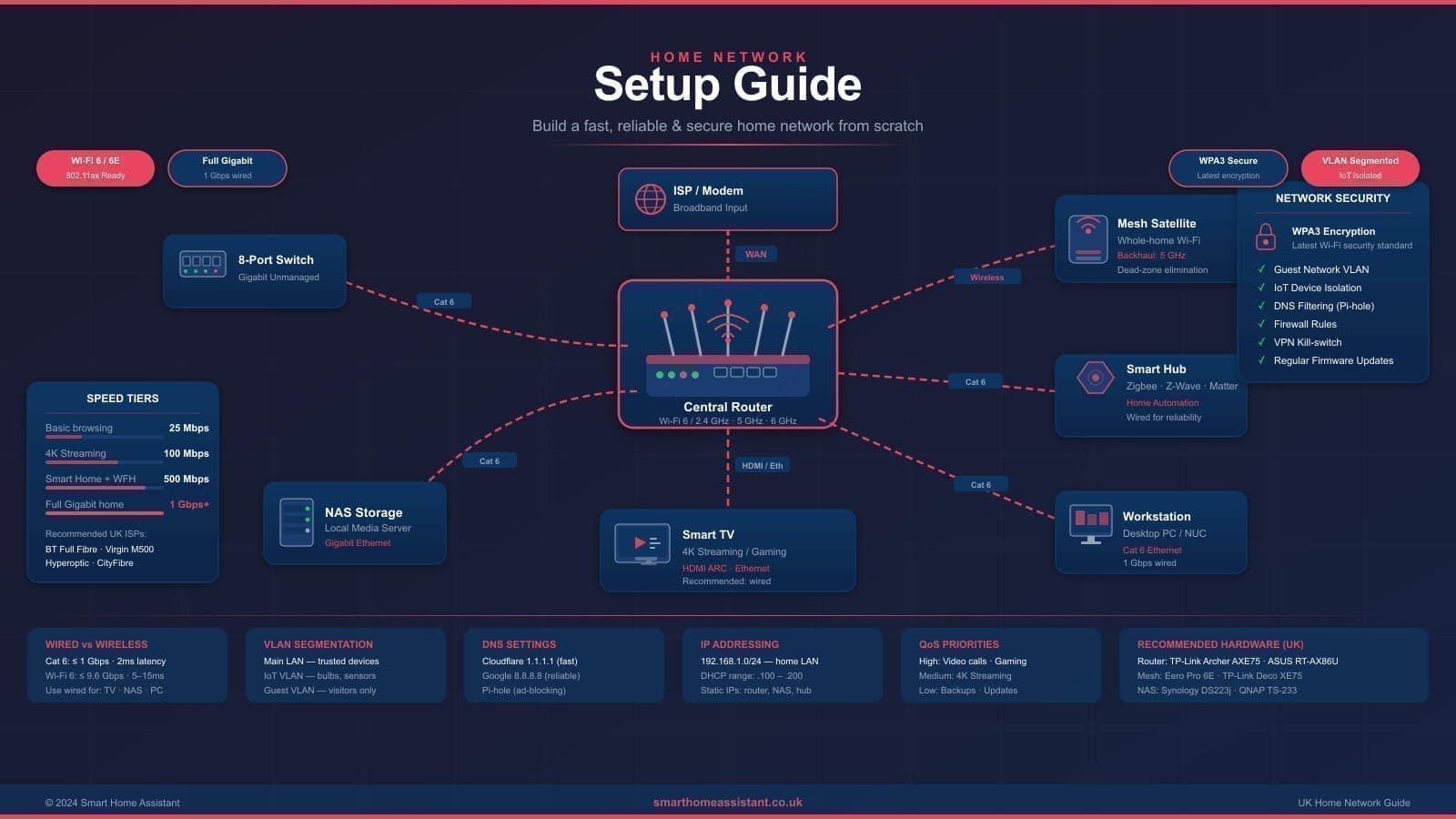
A home network connects your router, switch, and Wi-Fi access points (or mesh nodes) so every device in the house shares one internet connection and can reach each other securely. For most UK homes, the fastest path to networking a house properly comes down to four parts:
- Router: handles your ISP connection, Wi-Fi broadcast, and firewall — replace the ISP-supplied box if you want VLAN support, a 2.5G+ WAN port, or better range.
- Switch: a wired hub (from around £18) that connects stationary devices — NAS, smart TV, desktop, Home Assistant server — via Ethernet, taking load off Wi-Fi.
- Mesh Wi-Fi or access points: extend coverage to every room; essential for homes over 100 m², multiple floors, or thick walls where a single router falls short.
- IoT VLAN: a separate network for smart plugs, cameras, and sensors, so a compromised device can't reach your laptops or NAS.
Below we cover our top-rated hardware combinations, a full step-by-step setup process, and budget-by-budget builds for UK homes.
What Makes a Good Home Network?
Layered architecture is the foundation. A robust home network has three tiers: the router (handling your ISP connection and routing), a switch (distributing wired Ethernet throughout your home), and wireless access points or a mesh system (delivering Wi-Fi to every room). Most ISP-supplied routers combine all three roles into one box — and do all of them poorly. Separating these functions gives you far more control and significantly better performance.
For smart home users, there is a fourth consideration: network segmentation. Keeping IoT devices on a dedicated VLAN (Virtual LAN) prevents compromised smart plugs or cameras from reaching your laptops and NAS drives. Our guide to IoT VLAN setup with Home Assistant covers this in detail.
Our Top Home Network Setups for UK Homes
1. Best Overall: ASUS ZenWiFi Pro ET12 + Gigabit Switch
Price: around £599 for a two-pack (ASUS UK RRP). The ASUS ZenWiFi Pro ET12 is a tri-band Wi-Fi 6E mesh system that combines 6 GHz backhaul with strong 5 GHz and 2.4 GHz coverage. Each node has a 2.5 Gbps WAN/LAN port, making it future-proof for multi-gig broadband connections that are increasingly available from providers such as Hyperoptic and BT Ultrafast. ASUS's AiMesh technology means you can add further ASUS routers as nodes later. The built-in ASUS Router app supports VLAN tagging, guest networks, and parental controls — all from a well-designed mobile interface.
For wired connections, pair it with a TP-Link TL-SG108 8-port gigabit switch (around £18) to serve desktop PCs, smart TVs, and any wired Home Assistant server. This combination covers homes up to roughly 600 m² according to ASUS specification data.
Pros: Excellent 6 GHz backhaul speed, future-proof 2.5G ports, mature firmware with VLAN support.
Cons: Premium price, overkill for smaller flats, app-first setup can frustrate power users who prefer a full web UI.
2. Best Value Mesh: Amazon Eero Pro 6E
Price: around £299 for a two-pack. The Eero Pro 6E is among the simplest mesh systems to set up in the UK, and Amazon's ongoing software support has been consistently strong. It supports Wi-Fi 6E across three bands, has a 1 Gbps WAN port (adequate for most UK broadband connections), and uses the Eero app to guide you through setup in under ten minutes. Eero Plus (£9.99/month) adds content filtering, VPN, and advanced threat detection — useful for households with children or anyone wanting a managed security layer without a dedicated firewall appliance.
The trade-off versus the ASUS ET12 is the lack of a 2.5 Gbps port and less granular VLAN control. For a straightforward whole-home Wi-Fi deployment without advanced networking needs, the Eero Pro 6E is the best-value option available in the UK today.
Pros: Exceptionally easy setup, reliable performance, strong Amazon ecosystem integration.
Cons: Limited VLAN features, subscription for advanced security features, no 2.5G ports.
3. Best for Smart Home Enthusiasts: TP-Link Deco XE75 Pro + Managed Switch
Price: around £299 for a two-pack (TP-Link UK RRP). The TP-Link Deco range has earned a strong reputation for reliability and value. The XE75 Pro brings Wi-Fi 6E support with a 2.5 Gbps port on the main node — useful if you're on a multi-gig broadband plan. Deco's HomeShield security feature provides IDS/IPS scanning and can quarantine suspicious IoT devices automatically. For users running Home Assistant who want basic IoT isolation without setting up Ubiquiti UniFi, the Deco XE75 Pro with a TP-Link TL-SG108PE managed PoE switch (around £55) is an accessible combination.
Pros: Good performance for the price, 2.5G port, IoT isolation via HomeShield.
Cons: HomeShield security features require a paid subscription after the trial period.
4. Best Prosumer Setup: Ubiquiti UniFi Dream Router + UniFi Access Points
Price: from around £450 for a starter kit (Dream Router + one access point). If you want enterprise-grade network management at home — full VLAN support, detailed traffic analytics, and granular firewall rules — Ubiquiti UniFi is the gold standard. The UniFi Dream Router bundles a router, switch, and Wi-Fi 6 access point into one unit, and you can expand with additional UniFi U6 Lite or U6 Pro access points wired back via Ethernet. Every device is managed through the UniFi Network application, which runs locally and gives you complete visibility into every client on your network. IoT VLANs are straightforward to configure, and you can set firewall rules to prevent your Zigbee coordinator from communicating with anything outside your Home Assistant server.
Pros: Unmatched control and visibility, rock-solid reliability, scales from a flat to a multi-storey home.
Cons: Steeper learning curve, requires more initial setup time, higher upfront cost than consumer mesh systems.
Do You Need to Replace Your ISP Router?
For most UK households, yes. ISP-supplied routers from providers such as BT, Sky, Virgin Media, and Vodafone are designed for ease of support, not performance or security. They typically lack VLAN support, have limited firewall capabilities, and use shared Wi-Fi channels that perform poorly in dense environments. However, some providers — notably BT with its Smart Hub 2 — include reasonable Wi-Fi performance for standard homes. If your home is under 100 m² and you have fewer than 20 devices, your ISP router may suffice. For anything more demanding, especially a smart home with many IoT devices, replacing or supplementing it is worthwhile.
Wired vs Wireless: Getting the Balance Right
Wired Ethernet remains the most reliable medium. Where possible, run Cat 6 cable to stationary devices: smart TVs, NAS drives, Home Assistant servers, and desktop PCs. A basic 8-port gigabit switch costs under £20 and will serve a typical living room or office. For rooms where cable is impractical, consider powerline adapters, which use your existing mains wiring to extend a wired connection — though performance varies significantly depending on wiring quality and distance. If you're weighing up running cable to every room versus paying someone to do it, see our home network installation cost UK guide for a full DIY-vs-professional price breakdown.
IoT VLAN: Why It Matters
Separating smart home devices onto a dedicated network is a security best practice. IoT devices — smart plugs, cameras, doorbells, and Zigbee bridges — often run older firmware with unpatched vulnerabilities. Placing them on a VLAN that cannot initiate connections to your main network prevents a compromised device from becoming a gateway to your personal data. The ASUS ZenWiFi ET12 and TP-Link Deco XE75 Pro both support guest networks that approximate VLAN isolation, while UniFi offers full, configurable VLAN separation. See our dedicated home network VLAN guide for step-by-step configuration instructions.
What Broadband Speed Do You Actually Need?
Ofcom's 2026 Connected Nations data puts the UK's average fixed broadband download speed at 157 Mbps, with average upload at 27 Mbps and median latency of 14 ms. Full-fibre (FTTP) connections average 218 Mbps — considerably faster than the 47 Mbps average on older FTTC (fibre-to-the-cabinet) lines, which is why replacing an FTTC connection with full fibre where available is one of the single biggest upgrades most UK homes can make. For a typical UK home with 4K streaming, video calls, and smart home devices, a 100 Mbps connection is generally sufficient — though multi-gig plans from providers like Hyperoptic, Community Fibre, and BT Ultrafast now make gigabit home broadband viable and affordable in covered areas. Ensure your router and switch can handle the speeds your ISP delivers; a router with only a 100 Mbps WAN port will bottleneck a gigabit connection.
Step-by-Step: Setting Up Your Home Network
Buying the right hardware is only half the job — how you physically install and configure it determines whether you actually get the coverage and reliability you paid for. Here is the process we recommend, in order:
- Map your home before you buy anything. Walk the property and note thick walls, multiple floors, and the rooms where reliable Wi-Fi matters most (home office, living room, any room with a smart hub or NVR). This tells you whether a single router will do, or whether you need a two- or three-node mesh system.
- Separate the modem from the router where possible. Many UK ISP boxes combine a modem and router in one unit. If your ISP supports modem-only ("bridge") mode — most FTTP providers do — enable it and let your own router or mesh system handle routing and Wi-Fi. This typically improves both range and security over the stock combined unit.
- Position the main router or primary mesh node centrally. Avoid corners, cupboards, and locations right next to the front door. A central, elevated position (not on the floor, not inside a cabinet) gives the best starting coverage before you even add extra nodes.
- Run Ethernet to stationary, bandwidth-heavy devices first. Connect your Home Assistant server, NAS, desktop PC, and smart TV via a wired gigabit switch rather than relying on Wi-Fi for them. This alone removes a large chunk of load from your wireless bands.
- Add mesh nodes or access points where your walkthrough identified weak spots. Wire mesh nodes back to the switch with Ethernet ("wired backhaul") wherever you can run a cable — this gives noticeably better and more consistent throughput than wireless backhaul, especially through multiple floors or thick walls.
- Set up your SSIDs. Most modern mesh systems merge 2.4 GHz, 5 GHz, and 6 GHz under one network name and handle band-steering automatically — leave this on unless you have a specific reason to split bands. Set a strong Wi-Fi password (not the default printed on the router) and change the router's admin login from its default credentials immediately.
- Create a separate network for IoT and smart home devices. Use your router or mesh app's guest network feature, or configure a proper VLAN if your hardware supports it (see our home network VLAN guide for step-by-step VLAN configuration). Move smart plugs, cameras, sensors, and any device you don't fully trust onto this network so a compromised device can't reach your laptop or NAS.
- Update firmware on every device before finishing setup. Routers, mesh nodes, and switches often ship with firmware that's already several months old. Apply updates through the manufacturer's app or web UI, then check for and enable automatic security updates where offered.
- Test coverage room by room. Use a free Wi-Fi analyser app to walk the house and check signal strength and actual throughput in each room, not just next to the router. Reposition nodes if any room falls noticeably short of the rest of the house.
- Document your setup. Keep a note of your network names, the admin login (stored somewhere secure, not written on the router itself), and which devices sit on which network. This saves considerable time the next time you add a device or troubleshoot an issue.
Recommended Budget Builds
Budget (under £100): Keep your ISP router, add a TP-Link TL-SG108 gigabit switch (£18) and a TP-Link RE600X Wi-Fi 6 range extender (around £60) for a secondary coverage point. Adequate for smaller homes under 80 m².
Mid-range (£200–£350): Replace your ISP router with an Eero Pro 6E two-pack (£299) or TP-Link Deco XE75 Pro two-pack (£299). Add a basic gigabit switch for wired devices.
Premium (£450–£700): ASUS ZenWiFi Pro ET12 two-pack (£599) or a Ubiquiti UniFi Dream Router starter kit (from £450). Full VLAN support, multi-gig ports, and enterprise-grade analytics.
Buying Tips for UK Shoppers
Always check stock at John Lewis (two-year guarantee as standard), Amazon UK, and directly from manufacturer websites such as the ASUS UK store or TP-Link UK store. Prices fluctuate significantly around Amazon Prime Day and Black Friday. Wi-Fi 6E devices require a compatible client device (smartphone, laptop) to use the 6 GHz band; Wi-Fi 6 clients will still benefit from improved congestion handling on 5 GHz. Ensure any mesh system you purchase is sold on the UK frequency plan — most major brands ship UK-specific SKUs that comply with Ofcom's radio licensing requirements.
Related: best router for smart home UK, best mesh Wi-Fi systems UK, and IoT VLAN setup for smart home.