The Short Answer
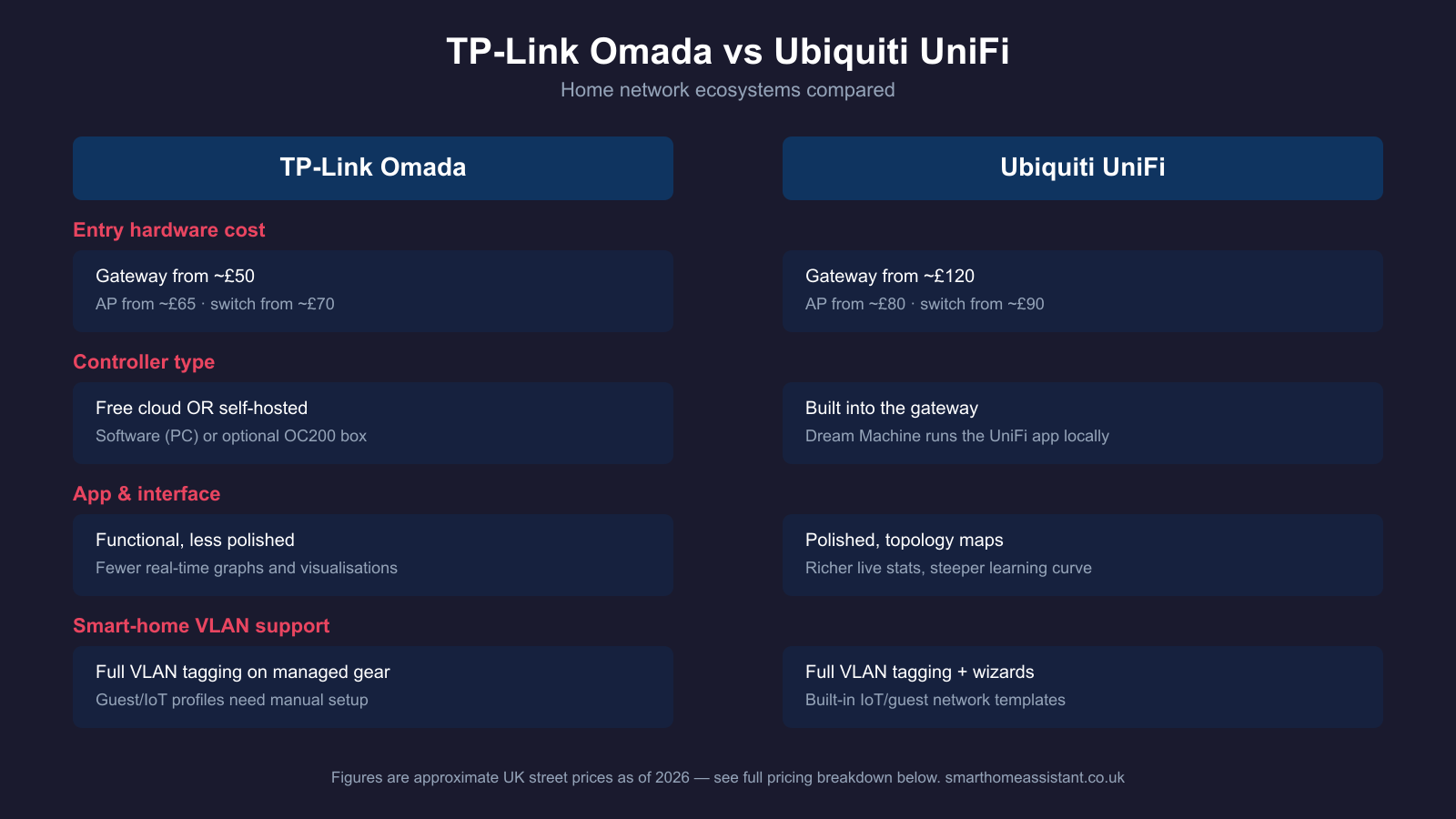
TP-Link Omada is the cheaper way into a managed, multi-AP home network — entry gateways start around £50 and access points from around £65, with a genuinely free controller. Ubiquiti UniFi costs more at every tier but pairs its higher-end hardware with a noticeably more polished app, richer real-time network visualisation, and a slightly larger community of UK integrators and forum support. Neither ecosystem is objectively better for Home Assistant — both support the VLAN tagging and firewall rules a segmented smart-home network needs — but the right pick depends on budget and how much you value the software experience over the hardware price.
Hardware Ecosystem and UK Pricing
Both TP-Link and Ubiquiti sell three core product families: a gateway/router, managed switches, and access points, all administered from the same app.
TP-Link Omada. The entry-level Omada gateway, the ER605, is a 5-port multi-WAN VPN router that typically retails around £45–55 in the UK, according to TP-Link's own Omada product page. Smart-managed PoE switches such as the 8-port SG2008P (4 PoE+ ports, 62W power budget) sit around £70–95, and access points like the EAP623-Outdoor HD (Wi-Fi 6, indoor/outdoor rated) run roughly £140–175. Omada's range spans right up to rack-mount campus switches and multi-gig gateways for larger deployments, but for a typical UK home the ER605 plus one or two EAP-series access points and an SG2008P switch is a common starting kit.
Ubiquiti UniFi. UniFi's gateways sit at a higher price point: the Dream Machine Pro (UDM-Pro) — a combined router, 8-port switch, and controller in one box — lists around £300–390 on Ubiquiti's official UK store and third-party resellers, with the higher-spec Dream Machine Pro Max around £475. On the access point side, the WiFi 7 U7 Lite starts at roughly £80–100 and the flagship U7 Pro around £140–180 depending on retailer discounting. UniFi switches such as the 8-port Switch Lite 8 PoE sit around £90–120. UniFi's product range also extends into cameras, access control, and VoIP phones that share the same app — useful if you want your network and security cameras managed in one place, which our best PoE switch for home UK guide covers in more detail for the switch side specifically.
Broadly, a like-for-like starter kit (gateway + one AP + one small PoE switch) costs roughly £250–320 with Omada versus £350–450 with UniFi — Omada is consistently the cheaper entry point across every product tier.
Controller Software: Cloud, Local, or Hardware
This is where the two ecosystems differ most in day-to-day use.
Omada gives you three ways to run the controller that manages all your devices: a free cloud-based controller hosted by TP-Link (no extra hardware needed), a free software controller you install on an existing PC or server, or a dedicated hardware controller (the OC200), which is a one-off purchase with no ongoing subscription. All three are functionally the same controller — you're just choosing where it runs.
UniFi takes a different approach: the controller (the UniFi Network application) runs directly on the gateway itself. Buy a Dream Machine and the controller is already built in and running as soon as you set it up — no separate PC, no separate hardware controller to buy. You manage everything through the UniFi mobile or desktop app, either locally on your network or remotely via a Ubiquiti account. Ubiquiti does sell an optional "Enhanced Cyber Security" add-on subscription for extra threat-detection features, but the core UniFi Network controller itself is free and has no subscription requirement.
App and Day-to-Day Usability
Both apps let you see every connected device, configure Wi-Fi networks and VLANs, set up port forwarding and firewall rules, and monitor bandwidth per client. In practice, the UniFi Network app is widely regarded as the more polished of the two: it renders a live topology map of your network, shows more detailed per-client and per-port statistics, and has a more consistent design language across gateway, switch, and Wi-Fi settings. Omada's app is functional and covers the same core ground — VLANs, guest networks, port profiles, client insight — but with fewer of the real-time visualisations and a slightly more utilitarian layout. If a slick interface matters to you as much as the underlying network capability, that's a point in UniFi's favour; if you just want the settings to be there and don't mind a plainer app, Omada's controller does the same job at a lower hardware cost. For a wider view of monitoring options beyond either app — device discovery, DNS-level visibility, and self-hosted uptime tracking — see our home network monitoring tools guide.
Ease of Initial Setup
Both ecosystems are built around one-app, whole-network configuration rather than logging into each device individually, so the setup pattern is similar: adopt the gateway, adopt each switch and access point into the same controller, then configure networks and Wi-Fi SSIDs centrally. UniFi's setup wizard on the Dream Machine range is generally considered slightly more guided for first-time users, since the controller and gateway are the same physical box and the app walks you through initial Wi-Fi and network creation on first boot. Omada's cloud controller setup is also straightforward, but because the controller is logically separate from the gateway (even when running in the cloud), there's an extra step of adopting the gateway into the controller before you can configure anything — not difficult, but one more step than UniFi's all-in-one box.
VLANs and Smart-Home Network Segmentation
For Home Assistant users, this is usually the deciding factor that matters more than app polish: can you cleanly separate IoT devices, guest Wi-Fi, and your trusted home network onto different VLANs? Both Omada and UniFi support full 802.1Q VLAN tagging on their managed switches and access points, multiple SSIDs mapped to different VLANs, and inter-VLAN firewall rules to control what an IoT segment can and can't reach. UniFi's app includes slightly more guided VLAN and guest-network wizards baked into the setup flow, which can make the segmentation itself faster to configure correctly the first time. Omada supports the same underlying capability — VLAN tagging, port profiles per switch port, and SSID-to-VLAN mapping — but expects a bit more manual configuration to get IoT and guest segments set up the way you want. Either ecosystem is capable of the segmented network our home network VLAN guide and IoT VLAN setup guide for Home Assistant walk through — the difference is how much hand-holding you get along the way, not what's ultimately possible.
Which Is Better for Home Assistant Users?
Neither ecosystem integrates directly with Home Assistant in the way a smart plug or thermostat would — you're not adding "Omada" or "UniFi" as a Home Assistant integration for control, though both have community-maintained integrations that can pull network statistics (connected devices, bandwidth, client counts) into Home Assistant dashboards and automations. For most Home Assistant users, the network's job is simply to be reliable, cover the whole house in Wi-Fi, and support VLAN segmentation so IoT devices sit on their own isolated network — both Omada and UniFi do all of that. If budget is the main constraint, Omada gets you a comparable segmented, multi-AP network for meaningfully less money. If you're already invested in other Ubiquiti gear (UniFi Protect cameras, UniFi Access door control) or you specifically want the more polished monitoring and topology view, UniFi's tighter ecosystem integration across networking, cameras, and access control is the stronger pick.
Which Should You Choose?
Choose TP-Link Omada if: you want the lowest-cost route into a proper managed, multi-AP network with VLAN support, you're comfortable with a slightly less polished app in exchange for cheaper hardware, or you're setting up a first home network and don't need enterprise-grade extras.
Choose Ubiquiti UniFi if: you want the most guided setup experience and richest live network visualisation, you're planning to add UniFi cameras or access control later and want everything in one app, or the hardware price premium isn't a major factor for your budget.
Whichever ecosystem you pick, our best router for smart home UK guide covers simpler all-in-one alternatives if you decide a full managed ecosystem is more than you need.