How much does Nest Thermostat installation cost in the UK?
There are two main cost scenarios:
- DIY installation: You pay only for the hardware — roughly £120–£220 depending on the model. No labour cost.
- Professional installation: Hardware plus a typical labour fee of £80–£120, giving a total of £200–£340. Google connects you with vetted Pro installers via the Google Store at store.google.com/gb.
These are ballpark figures; installer prices vary by region, and retailers often run promotions, so the hardware cost can dip below RRP. Always get a written quote before booking an installer.
DIY installation — is it right for you?
DIY is perfectly feasible for a confident homeowner whose existing system uses standard 2-wire or 3-wire wiring on a Y-plan or S-plan boiler. The job typically takes 1–2 hours: you remove the old thermostat, photograph the existing wiring for reference, connect the wires to the Nest base, and follow the in-app setup. No specialist tools are needed beyond a screwdriver.
However, DIY is not recommended if:
- You are unfamiliar with low-voltage wiring or unsure which wires carry mains voltage.
- Your existing wiring does not match any of Nest's supported configurations (check at nest.com/uk before buying).
- Your boiler warranty terms require a Gas Safe engineer or approved engineer to commission any new controls.
If in doubt, the professional route provides peace of mind — and a Google Pro installer will confirm compatibility on the day.
Professional installation via Google
Google's Pro installation service pairs you with an independent, vetted engineer through the Google Store checkout. Labour typically costs £80–£120 in the UK, though rates in London and the South East tend to be at the higher end of that range. The installer will assess your wiring, fit the thermostat, configure your boiler connection, and walk you through the app — useful if this is your first smart thermostat.
Booking is straightforward: add the Nest Thermostat to your basket on the Google Store and select the installation option at checkout. You can also book after purchase if you want time to confirm compatibility first.
Which Nest Thermostat should you buy?
Google currently offers two Nest thermostats for UK homes:
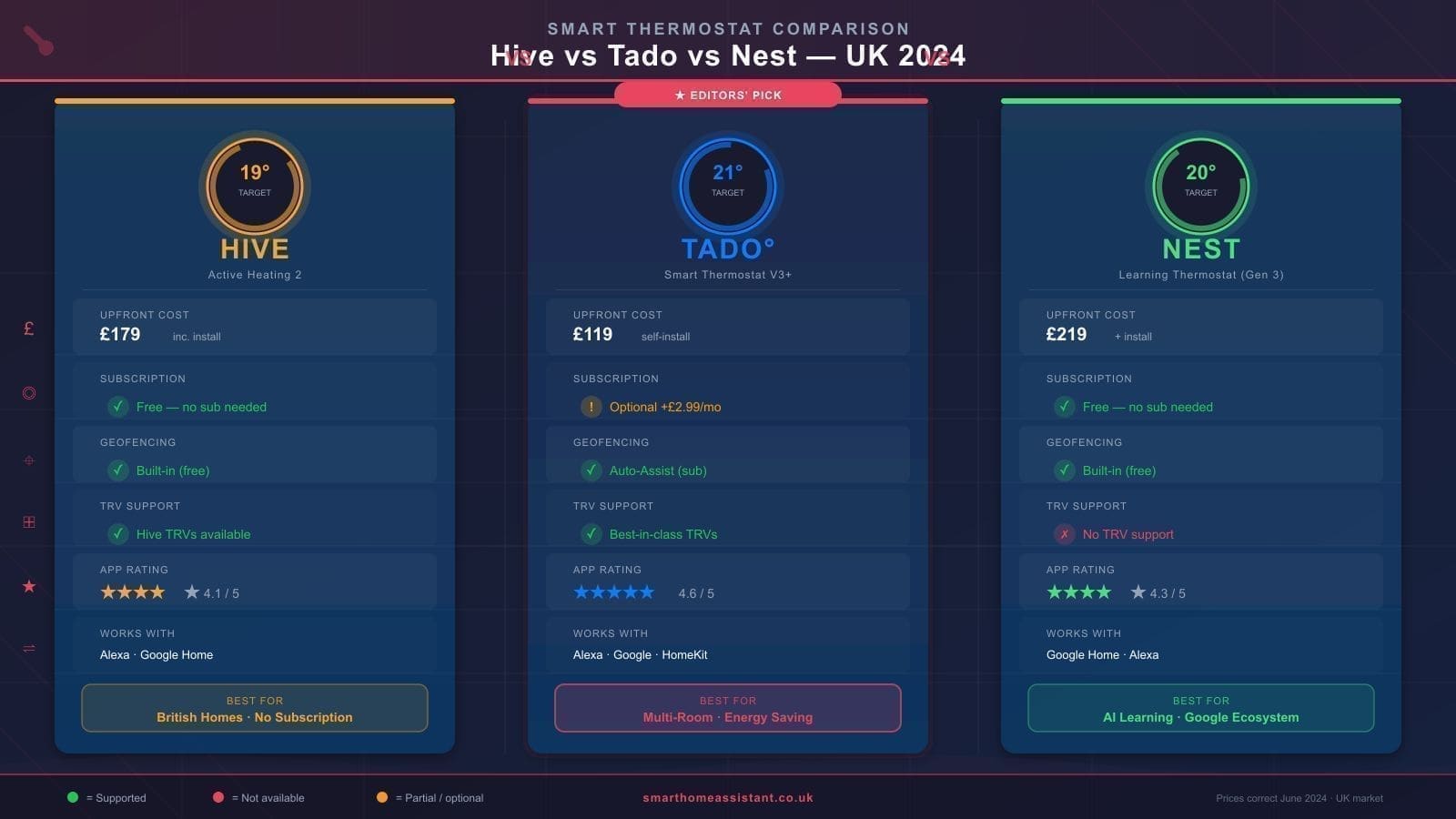
- Nest Thermostat (4th gen, 2024): Around £119.99 RRP from the Google Store. A slim, mirror-finish design with a touch strip for control, remote scheduling via the Google Home app, and Eco Temperatures for automatic energy saving. Best for most households wanting a straightforward upgrade.
- Nest Learning Thermostat (3rd gen): Around £219 RRP. Learns your schedule automatically after a week of manual adjustments, has a premium stainless-steel finish, and displays the temperature on a high-resolution display without needing to open the app. Best for tech enthusiasts or anyone who values a hands-off, self-programming experience.
For a full breakdown of the Learning Thermostat, see our Nest Learning Thermostat UK review. If you want to compare Nest against other brands before buying, our best smart thermostat UK guide covers the leading alternatives.
Is your boiler compatible?
Nest thermostats work with most UK central heating systems, including combi boilers, S-plan (two-zone) systems, and Y-plan systems. However, there are some important exceptions:
- Not compatible: Electric storage heaters, electric panel heaters, underfloor heating that lacks a compatible relay, and some older gravity-fed heating systems without a pump.
- Neutral wire (N wire): Some installations require a neutral wire at the thermostat location. The 4th-gen Nest Thermostat uses a power-sharing approach that reduces this need, but you should still run the compatibility checker at nest.com/uk before purchasing.
- OpenTherm: The Nest Learning Thermostat supports OpenTherm, which allows modulating boilers to run more efficiently. Not all combi boilers have an OpenTherm port — check your boiler manual or manufacturer's website.
Compatibility questions are also a good reason to use Google's Pro installation service: the engineer can assess your wiring before any purchase commitment.
Not sure if a smart thermostat is worth the investment at all? Our guide on whether smart heating is worth it in the UK runs the numbers honestly.
How to install the Nest Thermostat yourself (step-by-step overview)
This is an overview only. Always follow the official instructions supplied with the product and check nest.com/uk for wiring diagrams specific to your system type.
- Turn off the power. Switch off your boiler and isolate the thermostat circuit at the consumer unit. Never work on wiring with the power on.
- Remove the old thermostat. Unscrew the faceplate, photograph the wiring (label each wire if you can), then disconnect the wires carefully.
- Fit the Nest base. Feed your existing wires through the base, then screw the base to the wall.
- Connect the wires. Match each wire to the correct connector on the Nest base using the in-app wiring guide or the diagram at nest.com/uk. The app will generate a personalised wiring diagram based on your system type.
- Attach the display. Click the Nest display onto the base.
- Run setup in the app. Download Google Home, follow the prompts to add your Nest, and enter your heating system details. The app will run a test to confirm the boiler responds correctly.
- Restore power. Switch the circuit back on and confirm the boiler fires up on demand.
Is it worth it? Savings and payback period
Smart thermostats can meaningfully reduce heating bills when used properly. A Nest-commissioned study found that Nest thermostats saved an average of around 16% on heating and cooling bills for users in the study — though this figure comes from manufacturer research conducted primarily in North America and should be treated as an indicative upper bound rather than a guaranteed UK saving.
UK energy usage patterns differ (shorter cooling seasons, older housing stock, varied boiler types), so real-world savings will vary. A conservative estimate of 10–15% on your heating bill is reasonable if you currently heat on a fixed schedule and are regularly away from home during heating hours.
At current gas prices, a typical UK household spending around £900 per year on heating could save £90–£135 annually. At those savings, a DIY Nest Thermostat (around £120) pays for itself in roughly one to one-and-a-half years; a professionally installed Nest Thermostat (around £240 all-in) pays back in two to three years.
If you want to compare Nest against competitors like Hive or Tado before committing, see our Hive vs Tado comparison and our Hive Active Heating review. For radiator-level control that works alongside a smart thermostat, our Tado smart radiator valve review covers the leading option.
Related: Google Nest Thermostat 4th gen review, Tado vs Nest UK comparison, and best smart thermostat UK.