
What Changed in Home Assistant 2026.6, and What Should You Do?
- What changed: Home Assistant 2026.6 removed the legacy
platform: templateapproach for 10 entity types. The six-month deprecation window (started 2025.12) has now closed. - Am I affected: Yes, if your
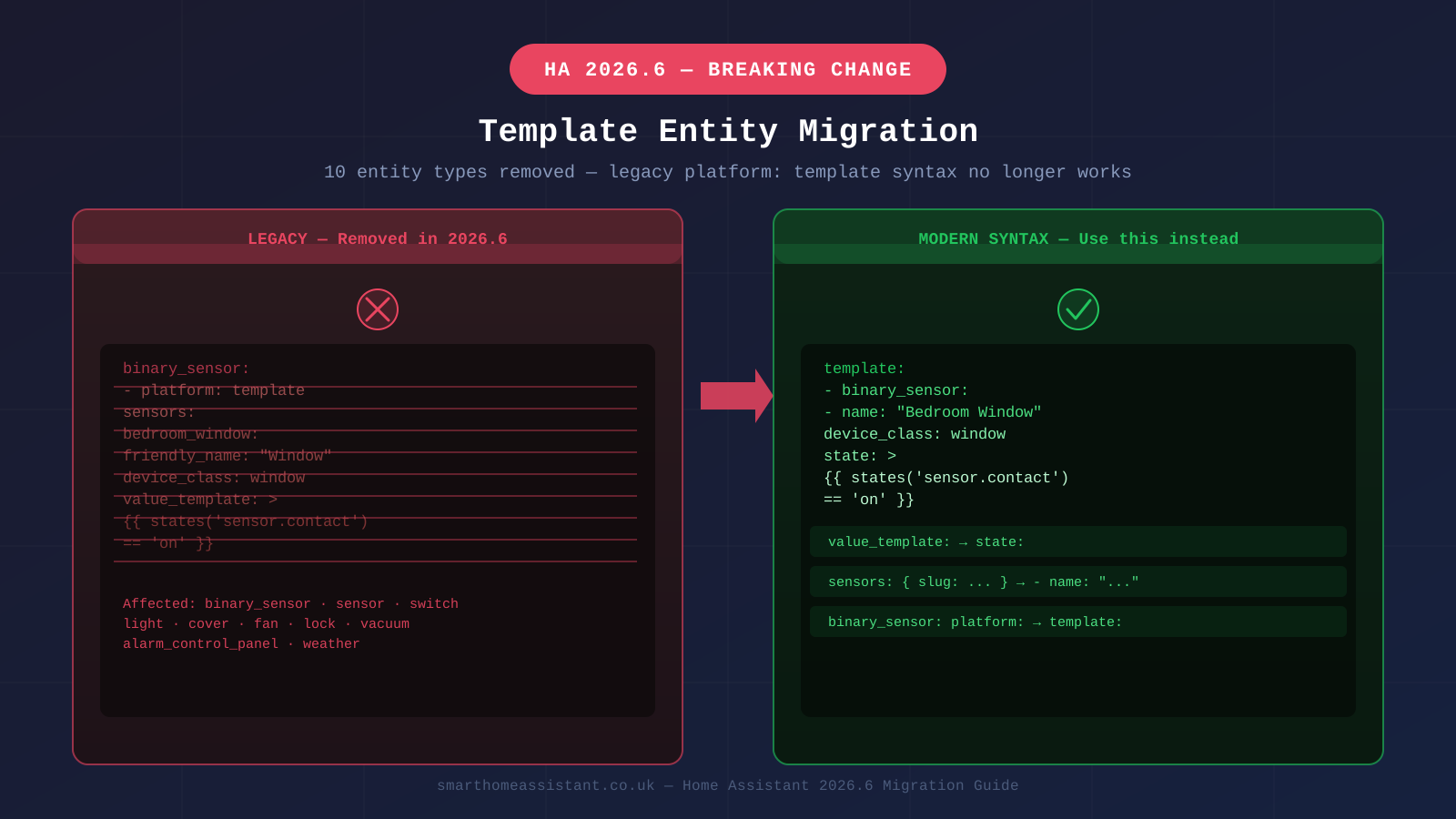
configuration.yaml(or any included file) still declares a template binary_sensor, sensor, switch, light, cover, fan, lock, vacuum, alarm_control_panel, or weather usingplatform: template. Affected entities are now broken or missing. - The fix: Move each definition under a single top-level
template:key, renamevalue_templatetostate(orlevel/positionfor cover and fan), and replace the old sub-key entity name with aname:key. See the side-by-side examples below for binary sensors, sensors, and switches. - Also check: Labs users who used
trigger_mode: anyortrigger_mode: lastneed to rename these toeachandall— details further down.
Which Ten Entity Types Are Affected?
The following entity types no longer accept platform: template declarations. Any existing configuration using this pattern will produce an error in the Home Assistant logs and the entity will not load:
- alarm_control_panel
- binary_sensor
- cover
- fan
- light
- lock
- sensor
- switch
- vacuum
- weather
The media_player template platform was already removed in an earlier release and is not part of this batch. If you rely on template button or number entities, those were added directly to the modern platform and never had a legacy equivalent, so they are unaffected.
What Was Removed, and Why?
The legacy template entity system dated back to the early years of Home Assistant. Each entity type had its own integration that accepted a platform: template declaration inside its domain block — so a template binary sensor lived under binary_sensor: in your YAML, a template switch lived under switch:, and so on. Over time this created a fragmented authoring experience: every domain had slightly different YAML keys, different nesting structures, and independent documentation pages.
The modern template: platform, introduced in Home Assistant 2020.12 and steadily expanded since, consolidates all template entities under a single top-level key. One block can define binary sensors, sensors, switches, lights, and more — all sharing the same YAML structure and the same feature set. The old per-domain approach could not receive new features without duplicating work across ten separate integrations, so the team deprecated it in December 2025 with a planned removal date of 2026.6.
The official 2026.6 changelog lists ten discrete removal PRs — one per affected entity type — and the release blog confirms that the six-month warning period has now closed. The community forum migration thread has attracted hundreds of replies from users working through their configurations, making this the most-discussed breaking change of the 2026.6 cycle.
How Do You Identify Broken Configurations?
Open your configuration.yaml and any files it includes via !include or !include_dir_merge_list. Search for blocks that match this pattern — a domain name followed by a platform: template key:
binary_sensor:
  - platform: template
    sensors:
      my_window:
        friendly_name: "Bedroom window open"
        value_template: "{{ states('sensor.window_contact') == 'on' }}"
If you see any domain from the list above followed by platform: template, that block needs to be migrated. Home Assistant will also log a warning during startup that names each affected entity — check Settings → System → Logs and filter for "template" to see a precise list. The log entries will include the entity ID and the configuration file where each deprecated declaration was found.
Split configurations (where sensors live in a separate sensors.yaml and switches in switches.yaml, for example) are particularly prone to missing this change — be sure to grep through every included file, not just configuration.yaml.
The Migration: Old Syntax vs New Syntax
The modern syntax moves all template entity definitions under a top-level template: key. Each entity type becomes a list within that block, and the individual entity definition uses a flatter structure with cleaner key names. Here is a side-by-side comparison for the most common types.
Binary Sensor
Legacy (removed in 2026.6):
binary_sensor:
  - platform: template
    sensors:
      bedroom_window:
        friendly_name: "Bedroom window open"
        device_class: window
        value_template: "{{ states('sensor.window_contact') == 'on' }}"
Modern syntax:
template:
  - binary_sensor:
      - name: "Bedroom window open"
        device_class: window
        state: "{{ states('sensor.window_contact') == 'on' }}"
Note the key change: value_template becomes state, and the slug-style entity ID under sensors: is replaced by a name: key. Home Assistant derives the entity ID automatically from the name.
Sensor
Legacy (removed in 2026.6):
sensor:
  - platform: template
    sensors:
      average_temperature:
        friendly_name: "Average temperature"
        unit_of_measurement: "°C"
        value_template: >-
          {{ ((states('sensor.living_room_temp') | float
             + states('sensor.bedroom_temp') | float) / 2) | round(1) }}
Modern syntax:
template:
  - sensor:
      - name: "Average temperature"
        unit_of_measurement: "°C"
        state: >-
          {{ ((states('sensor.living_room_temp') | float
             + states('sensor.bedroom_temp') | float) / 2) | round(1) }}
Switch
Legacy (removed in 2026.6):
switch:
  - platform: template
    switches:
      heating_mode:
        friendly_name: "Heating mode"
        value_template: "{{ is_state('input_boolean.heating', 'on') }}"
        turn_on:
          service: input_boolean.turn_on
          entity_id: input_boolean.heating
        turn_off:
          service: input_boolean.turn_off
          entity_id: input_boolean.heating
Modern syntax:
template:
  - switch:
      - name: "Heating mode"
        state: "{{ is_state('input_boolean.heating', 'on') }}"
        turn_on:
          action: input_boolean.turn_on
          target:
            entity_id: input_boolean.heating
        turn_off:
          action: input_boolean.turn_off
          target:
            entity_id: input_boolean.heating
For switches, note that service and entity_id at the top level of action blocks are themselves deprecated — the modern equivalent uses action: and target: { entity_id: ... }. You may see both deprecation warnings simultaneously if your legacy switch templates use the old service call syntax.
Other Entity Types
The pattern is consistent across all ten affected types. The key changes are always:
value_template:→state:(orlevel:/position:for cover and fan entities)- The named sub-key under
sensors:/switches:/ etc. → aname:key inside the list entry - The domain block (
binary_sensor:,sensor:, etc.) moves insidetemplate:as a nested list key
The Home Assistant documentation for the template integration has full reference tables for every entity type, including cover position/tilt templates, fan speed and oscillation, lock code templates, and the weather integration attributes. For entity types you are less familiar with, the docs are the quickest reference for the correct key names in the modern syntax.
Also in 2026.6: Automation Trigger Rename for Labs Users
Template entity migration is the biggest breaking change in 2026.6, but Labs early adopters face a second issue. The automation editor in Labs renamed two behaviour options on purpose-specific triggers: any has been renamed to each, and last has been renamed to all. If you hand-wrote YAML automations using these trigger modes while the Labs feature was active, those automations will silently use the wrong behaviour until you update the key names. Check any automation YAML that includes trigger_mode: any or trigger_mode: last and update to each and all respectively.
This rename only affects users who opted into the relevant Labs feature; standard automations using trigger: lists without explicit trigger modes are unaffected. Our Home Assistant automations guide has been updated to reflect the new naming.
After Migrating: What to Check
Once you have updated your YAML, restart Home Assistant and open Settings → System → Logs immediately. Any remaining template errors will appear within seconds of startup. A clean log with no template-related warnings confirms the migration is complete.
Check your dashboards and verify that entity states match what you expect — pay particular attention to binary sensors and template sensors that feed automations, since a mis-migrated state: template that returns an unexpected type will cause automations to fire incorrectly rather than produce a visible error.
If you previously used template entities to create calculated sensors that are now straightforward — for example, a template sensor that simply renames an existing entity or applies a fixed unit — consider whether a Helper entity would be simpler. Helper number entities, input selects, and utility meters cover many use cases that previously required template YAML, with the added benefit of a UI editor rather than hand-written configuration.
Finally, verify your automations. Template entities often appear as triggers or conditions in automations, and an entity ID change during migration (which can happen if the name: key produces a different slug than your old sub-key did) will silently break those automations. The Developer Tools → Template panel is useful for testing individual template expressions before committing them to your config.
Further Reading
For background on how template entities work — including Jinja2 syntax, available template functions, and the availability: key — see our complete template guide. For general Home Assistant setup, including where to find your configuration files and how to split a growing config across multiple files, the UK setup guide covers the basics. The official community forum migration thread includes a crowdsourced collection of before-and-after examples for less common entity types such as vacuum and alarm control panel — worth bookmarking if your configuration uses those.