
How do you set up and use the Third Reality Smart Soil Moisture Sensor Gen2?
The sensor is a single moulded probe with a marked "fill line" — push it into the compost up to that line and it's ready to pair. There's no separate hub or base station: it's a standard Zigbee end device, so it joins whatever Zigbee network your Home Assistant instance already runs, whether that's a ZHA-managed USB stick or a Zigbee2MQTT coordinator.
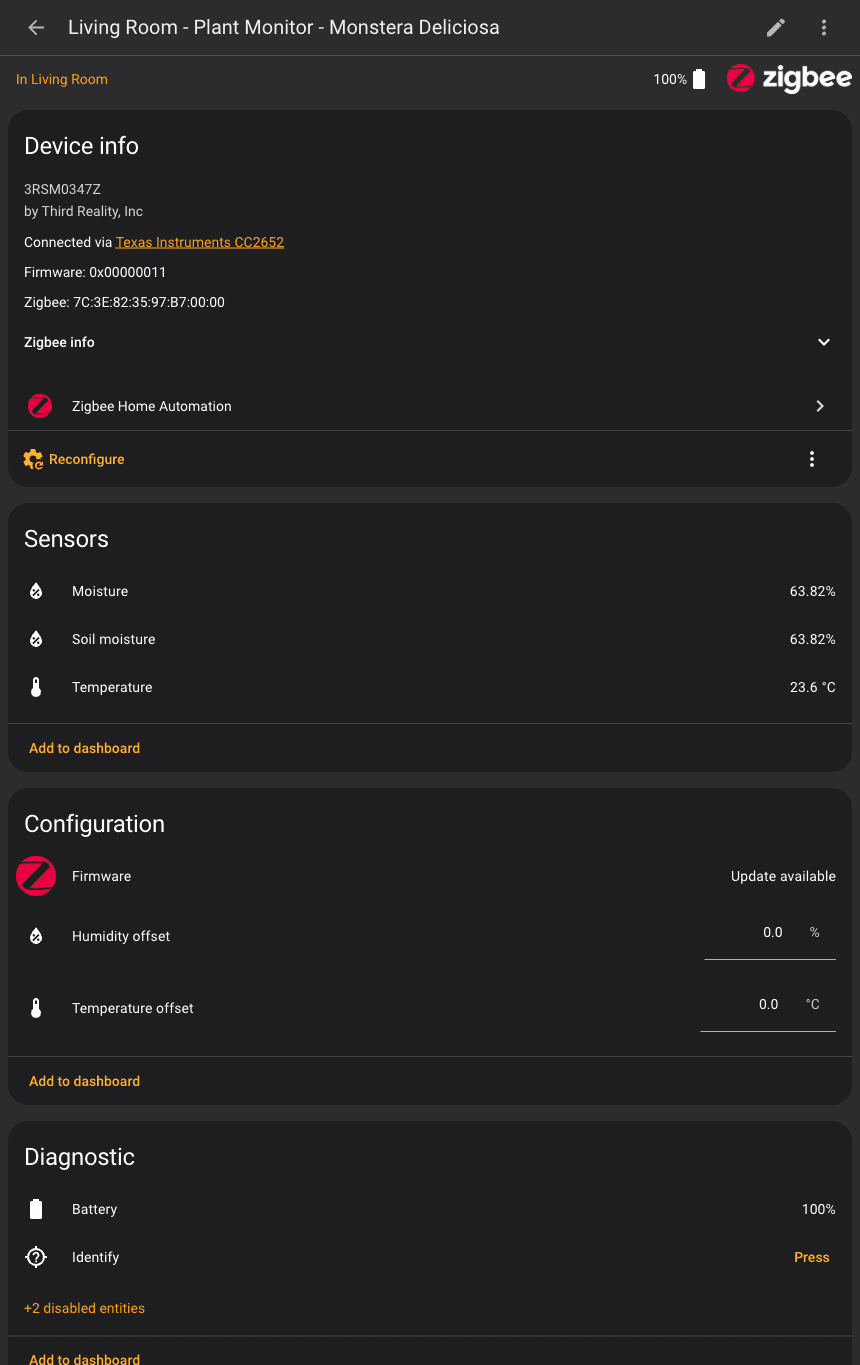
Pairing took under a minute in testing — put the coordinator into pairing mode, press the sensor's reset/identify button, and it appears as a new device with a handful of sensor entities. One thing worth doing properly at this stage: Home Assistant slugifies whatever name you give the device into every entity ID it creates. Name the device something like "Living Room - Plant Monitor - Monstera" and you get entity IDs such as sensor.living_room_plant_monitor_monstera_moisture automatically. Rename the device later and the old entity IDs stay stale until you manually update them — so get the room and plant name right before you start building automations on top of it, not after.
Readings update on the device's own reporting interval rather than continuously, which is the right trade-off for something running on a single AA cell — soil moisture doesn't change fast enough to need second-by-second polling. In testing on a tropical houseplant, the sensor consistently read in the 60s% for soil moisture and the low-to-mid 20s°C for ambient temperature, comfortably inside the healthy range for that species.
Does the Third Reality Smart Soil Moisture Sensor Gen2 work with Home Assistant?
Yes — natively and locally, via either the ZHA integration or Zigbee2MQTT, with no cloud account or Third Reality app required for the sensor to function inside Home Assistant. Once paired, the device exposes a moisture percentage sensor, a duplicate soil_moisture sensor (effectively an alias of the same reading — pick one and automate against it consistently), an ambient temperature sensor, a battery-percentage diagnostic, and calibration offset entities for correcting readings that drift high or low over time.
Building a watering and temperature reminder automation
The genuinely useful part is turning those entities into a reminder that only speaks up when something's actually wrong. The automation below checks the sensor three times a day (morning, afternoon, evening) rather than reacting the instant a reading crosses a threshold — a continuous trigger would nag every time the moisture value hovered near the cutoff, which gets ignored fast. If soil moisture drops below 35% or the room temperature falls outside roughly 18–27°C — reasonable defaults for a tropical houseplant like a Monstera, though a cactus wants a much lower moisture threshold — it announces over an Alexa speaker via media_player.play_media with media_content_type: tts and sends a phone push notification. On a normal day, the whole block is wrapped in an if condition, so it checks the sensors and does nothing at all — no false alarms.
alias: "Plant Care - Watering & Temperature Reminders"
description: >-
  3x daily (9am, 2pm, 7pm) check of a plant monitor. Announces on Alexa speakers and
  sends a phone notification if soil moisture is low, and complains if temperature is
  outside the ideal range for the plant.
triggers:
  - trigger: time
    at: "09:00:00"
  - trigger: time
    at: "14:00:00"
  - trigger: time
    at: "19:00:00"
conditions: []
actions:
  - variables:
      moisture: "{{ states('sensor.YOUR_PLANT_MONITOR_moisture') | float(0) }}"
      temperature: "{{ states('sensor.YOUR_PLANT_MONITOR_temperature') | float(0) }}"
      needs_water: "{{ states('sensor.YOUR_PLANT_MONITOR_moisture') | float(0) < 35 }}"
      temp_bad: >-
        {{ states('sensor.YOUR_PLANT_MONITOR_temperature') | float(0) < 18
           or states('sensor.YOUR_PLANT_MONITOR_temperature') | float(0) > 27 }}
  - if:
      - condition: template
        value_template: "{{ needs_water or temp_bad }}"
    then:
      - variables:
          message: >-
            {% set parts = [] %}
            {% if needs_water %}
              {% set parts = parts + ['The plant needs watering. Soil moisture is ' ~ moisture ~ ' percent.'] %}
            {% endif %}
            {% if temp_bad %}
              {% set parts = parts + ['Also, the temperature is ' ~ temperature ~ ' degrees, which is '
                ~ ('too cold' if temperature | float < 18 else 'too hot') ~ ' for this plant.'] %}
            {% endif %}
            {{ parts | join(' ') }}
      - action: media_player.play_media
        target:
          entity_id: media_player.YOUR_ALEXA_GROUP
        data:
          media_content_id: "{{ message }}"
          media_content_type: "tts"
      - action: notify.YOUR_MOBILE_APP_SERVICE
        data:
          title: "Plant care reminder"
          message: "{{ message }}"
mode: single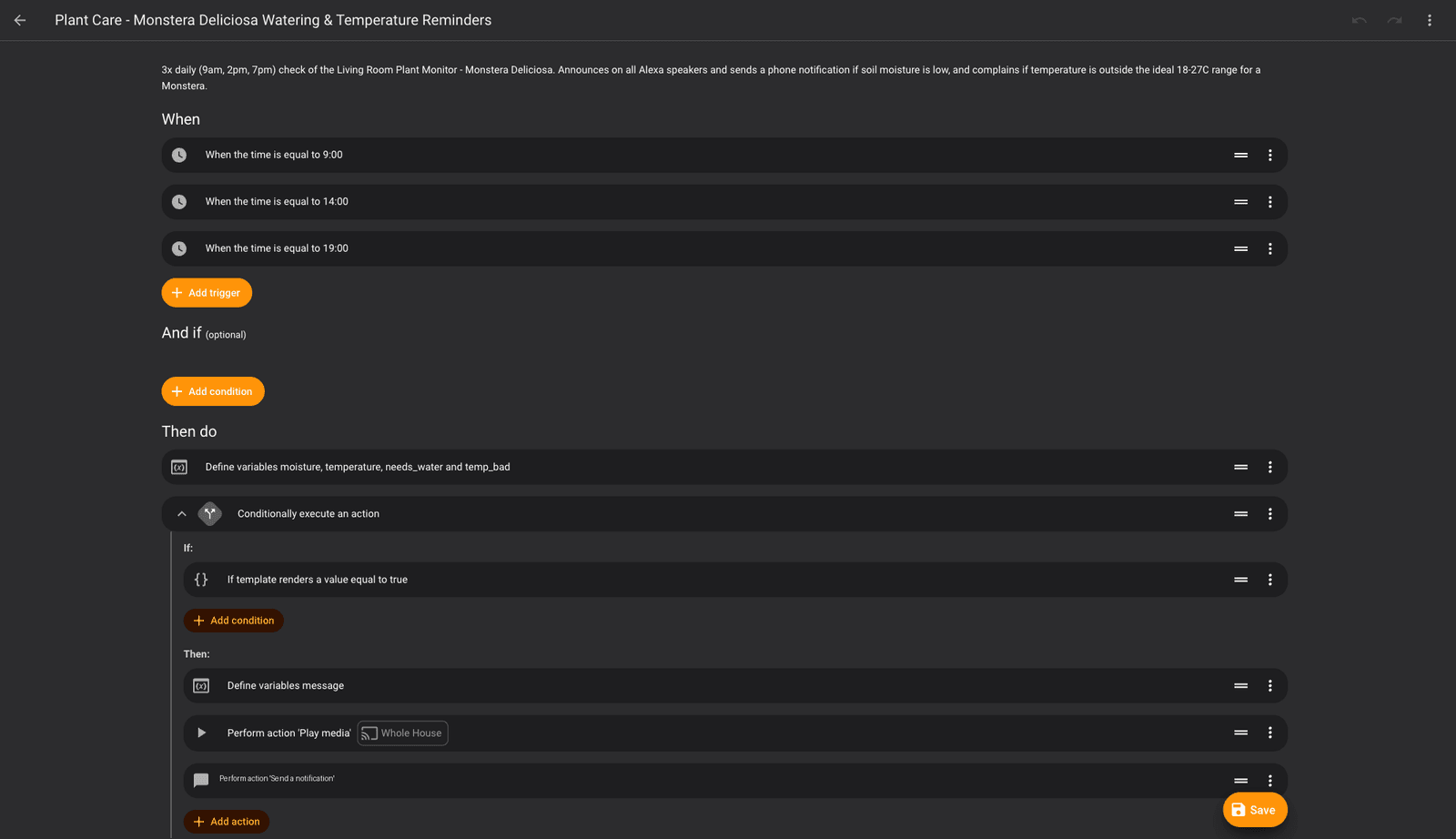
Swapping the whole-house Alexa group for a single room's speaker is a one-line change — just point the target: entity_id at a different media_player. The variables step computes the moisture and temperature checks once and reuses them in both the condition and the message, so the thresholds live in one place if you want to tune them for a different plant later.
To verify the logic without spamming the house with test announcements, open the automation, use "Run actions", then check its Trace. The trace shows the rendered variable values and whether the if condition passed or was skipped — enough to confirm the whole chain works correctly on a day the plant is fine, without needing to actually trigger Alexa. For an end-to-end test, call the media_player.play_media and notify.* actions directly from Developer Tools → Actions with a test message, bypassing the condition entirely.
If you'd rather have Home Assistant act on a low reading instead of just announcing it, Third Reality's own Smart Watering Kit Pro can use this sensor's moisture reading to trigger actual watering — a natural pairing for anyone who wants to go from "nag me" to "just water it" once the alert version proves reliable.
How does it compare to other soil moisture sensors?
The Third Reality sensor's main edge is being a plain, hub-agnostic Zigbee device that joins your existing Home Assistant Zigbee network with no extra gateway. A few alternatives worth knowing about:
- Ecowitt WH51 — a well-regarded capacitive soil sensor, but it depends on Ecowitt's own proprietary gateway rather than joining a Zigbee network directly, which adds a device to manage even after you've integrated it into Home Assistant.
- Generic Tuya-based Zigbee soil sensors — often cheaper on marketplaces, but Home Assistant support varies sensor to sensor and firmware batch to firmware batch; check the specific listing against Zigbee2MQTT's supported-devices list before buying rather than assuming compatibility.
- A DIY ESPHome capacitive probe — the cheapest option by parts cost and fully local, but it's a soldering-and-flashing project rather than a plug-and-pair sensor, so it only makes sense if you already have ESPHome hardware on hand.
Who should buy the Third Reality Smart Soil Moisture Sensor Gen2?
It's aimed at Home Assistant users who already have a Zigbee network running and want plant care to stop being guesswork, without adding a new hub or app to manage. Anyone with a handful of houseplants worth protecting — the ones that sulk visibly within a day of drying out — gets the most value, since the low price means you can afford one per plant rather than sharing a single reading across a whole windowsill. It's less of a fit if you only have one or two low-maintenance plants that tolerate neglect, or if you don't already run a Zigbee coordinator and don't want to set one up just for this.
Verdict
The Third Reality Smart Soil Moisture Sensor Gen2 (3RSM0347Z) does exactly what a good sensor should: it disappears into the compost, reports clean moisture and temperature data into Home Assistant, and gets out of the way. Built into an automation with a sensible guard condition, it turns plant care into a once-a-day glance rather than constant checking — the only real caveat is Third Reality's silence on battery life, so budget for checking the diagnostic battery sensor occasionally rather than trusting it to run forever unattended.