What is in the box, and what does the label say?
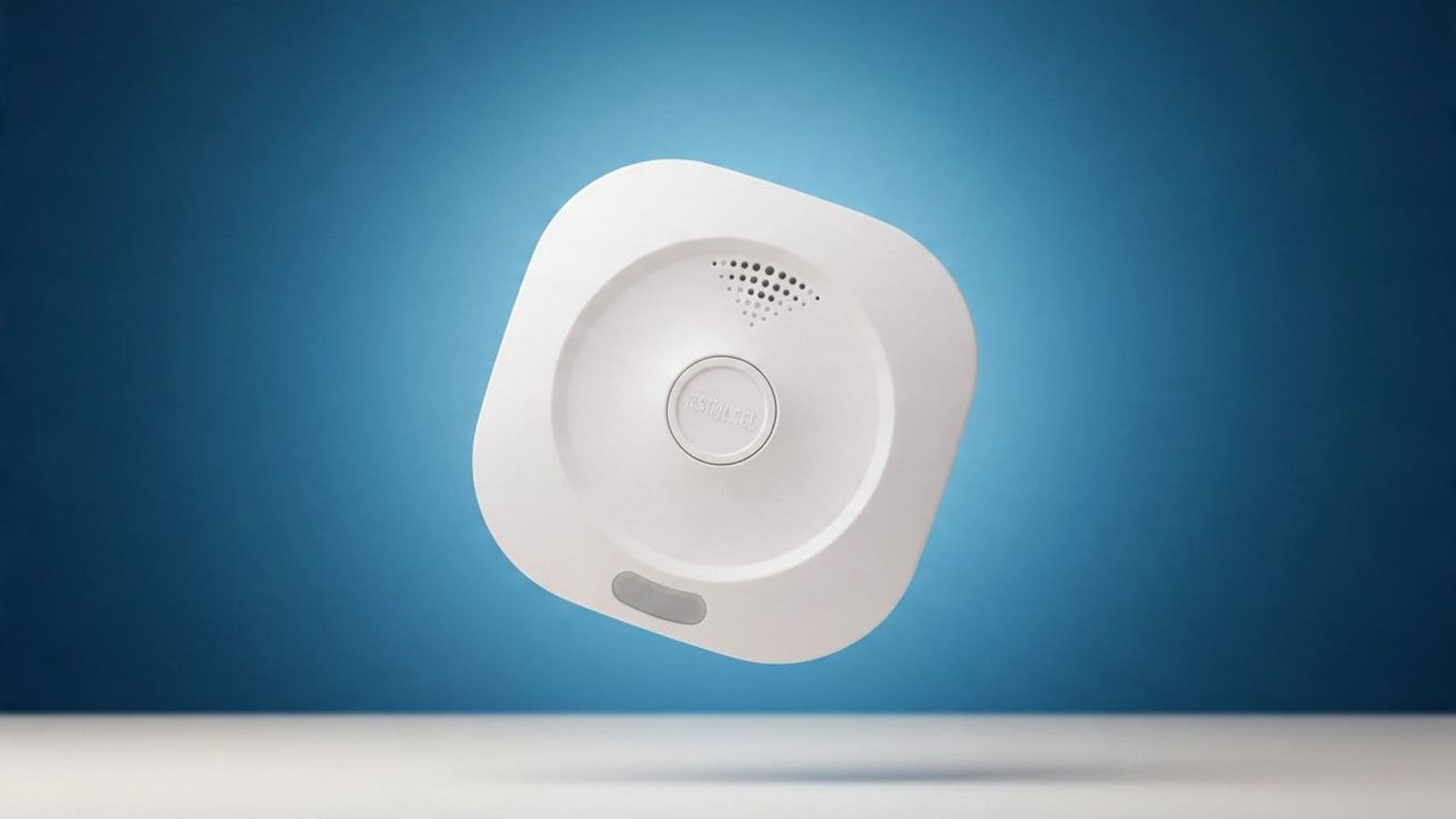
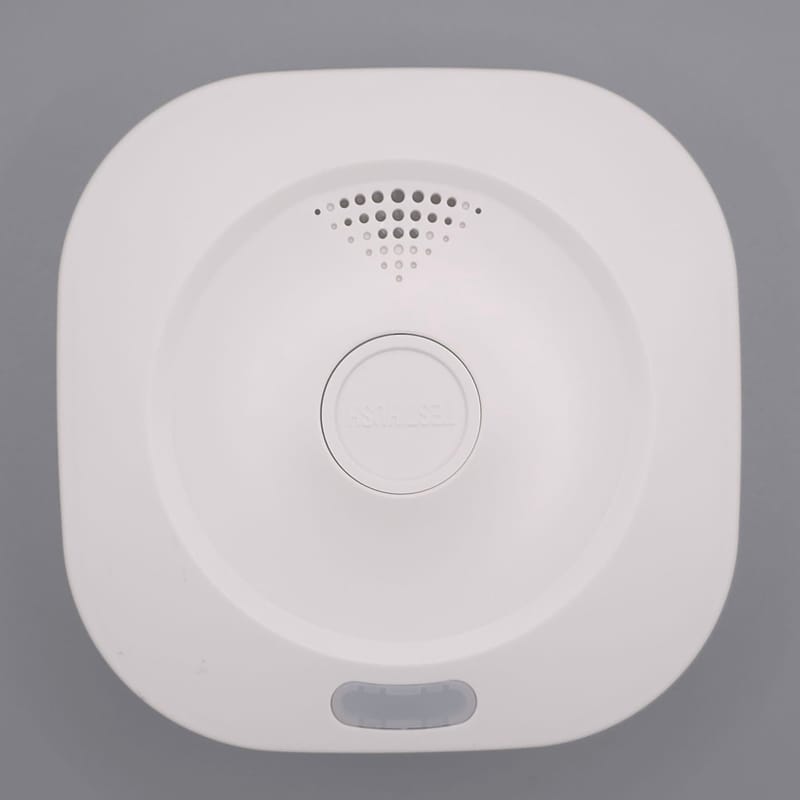
The box holds the alarm, a mounting plate, two screws with wall plugs, a manual and a warranty card. The alarm is a plain white square with a large Test/Hush button in the middle, so it looks like a conventional alarm rather than a gadget.
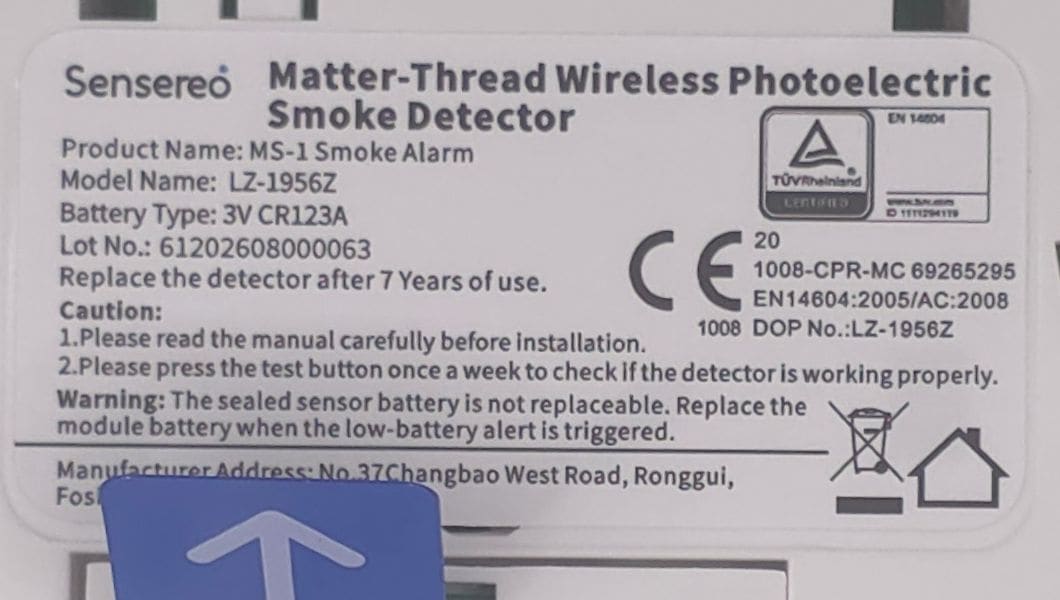
The back is where the interesting details sit. A pull tab protects the battery of the Matter module, and the Matter QR code and numeric setup code are printed on that module, which is why they are cropped out of our photos. The product label gives the model as LZ-1956Z, the module battery as a 3 V CR123A, and an instruction to replace the detector after 7 years of use. It also tells you to press the test button once a week, which is stricter than the manual, which recommends testing at least monthly.
Does the Sensereo MS-1 Interlink work with Home Assistant?
Yes. The MS-1 Interlink joins Home Assistant through the Matter integration, over Thread, with no Sensereo app, account or cloud involved. The one prerequisite is a Thread border router, because the alarm is a low-power Thread device that needs something to bridge it onto your network. Our Matter setup guide covers the Matter server, and our Thread guide explains border routers.
How did pairing go?
Pairing was a standard Matter commissioning. Our border router is a Home Assistant Connect ZBT-2 running an OpenThread Border Router container, which publishes the Thread network that Home Assistant prefers.
- Power the module. Pull the plastic tab from the Matter module battery on the back. Sensereo's manual says the module LED then flashes green while it waits to be paired.
- Add the device. In the Home Assistant app, go to Settings, then Devices & services, then Add device, then Add Matter device. Say it is a new device and scan the QR code on the back.
- Let it join Thread. The phone passes the Thread network credentials to the alarm, which then appears in Home Assistant as a Matter device.
- Name it. Give each alarm a room name straight away. Both of ours arrived called "Sensereo MS1 Smoke Alarm", which makes automations and alerts ambiguous.
Both alarms appeared in Home Assistant within seconds of scanning their codes. Sensereo's manual recommends finishing pairing before you screw the alarm to the ceiling, and we agree: the QR code is on the back of the module. If pairing fails, the manual describes a button-and-switch reset sequence that returns the alarm to pairing mode. Home Assistant can also share the alarm to Apple Home or Google Home through "Share device", and a Matter device has to support at least five of these fabrics.
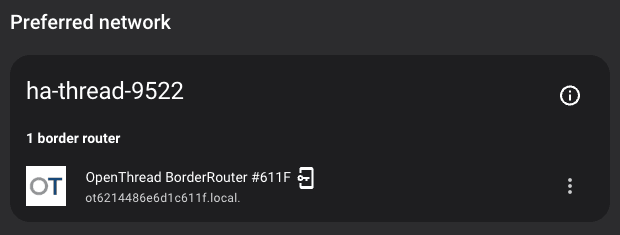
Range is worth planning for. Matter Alpha lists the standard MS-1 as a sleepy end device (Sensereo's Interlink page does not state the Thread role), and Raspberry.tips confirms that battery devices do not relay for others. Your border router, plus any mains-powered Thread routers nearby, decides how far the alarms reach. Our Thread network visualiser guide shows how to check what each device is connected through.
What entities does it create?
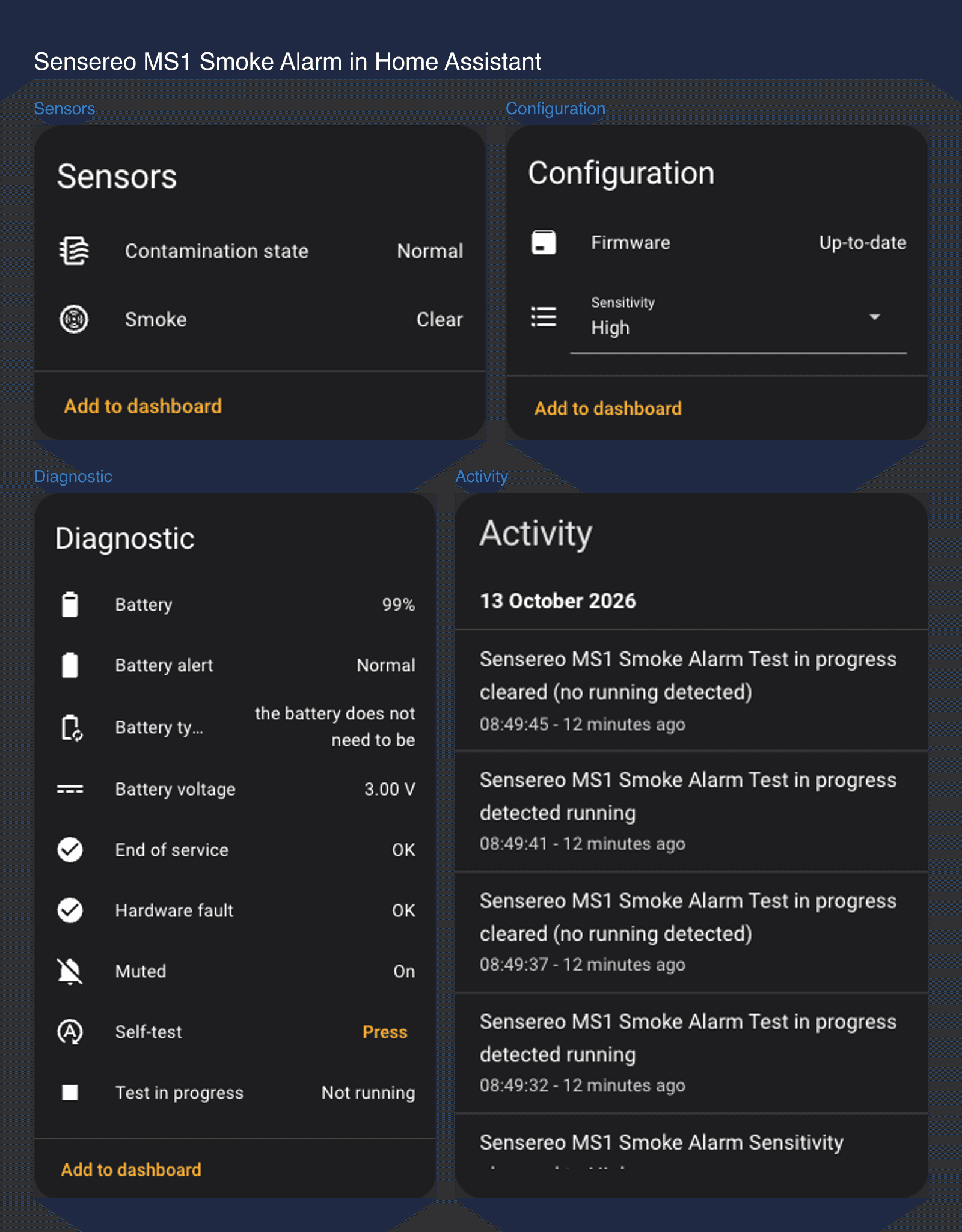
Each alarm created 13 entities: six binary sensors (smoke, muted, test in progress, battery alert, end of service and hardware fault), a self-test button, a sensitivity selector, battery percentage and voltage, a battery-type text sensor, a contamination-state sensor and a firmware update entity. The smoke binary sensor is the one that matters, and it uses the standard smoke device class, so Home Assistant's dashboards, voice assistants and templates already understand it.
What quirks did we see?
The integration works, but it is not flawless, and a safety device deserves an honest list.
- A brief hardware fault on joining. The second alarm briefly reported a hardware fault right after it joined, then cleared it by itself.
- Different battery readings. One alarm shows 99% battery. The other shows 0% with "coin battery" as the type, yet neither has a battery alert. We have not found the cause, so watch it.
- "Muted" reads On at rest. Both alarms report Muted as On when idle. Raspberry.tips saw unmounted units stay muted too, so do not be alarmed if you see it.
- Cut-off battery text. The second alarm's battery-type sensor reads "the battery does not need to be…", which matches the truncated text Raspberry.tips reported.
- Self-test is only a flag. Pressing the Home Assistant self-test button flipped "Test in progress" on for a few seconds. SmartHomeScene reports the remote self-test does not sound the siren, so you still need the physical button each week.
Does the Sensereo MS-1 Interlink work when there is a real fire?
It did in our test. We tested the first alarm by burning a few sheets of kitchen paper in the sink. The alarm detected the smoke and Home Assistant registered it as Detected, exactly as expected. We are not publishing a detection-time figure, because this was a quick sanity check rather than a controlled test, and a sink fire is not something we would recommend anyone repeat.
Only the first alarm was paired with Home Assistant when we ran the fire test, so we cannot say how the second behaves in a fire, or what a linked alarm reports to Home Assistant when it sounds.

How should you test a smoke alarm instead?
Do not copy our fire test. Use the Test/Hush button: hold it for three seconds and you should hear loud beeps and see the red LED flash. Cheshire Fire and Rescue advises testing weekly in the same way, and the label on our units says weekly too, although Sensereo's MS-1 manual says at least monthly. The button checks the sounder and circuit rather than the smoke sensor, so for that, reviewers used a purpose-made smoke-alarm test aerosol, and that is what we would use next time. Tell everyone in the house first, and press Hush only when there is no real fire risk. Hush silences the siren for 8 to 10 minutes, and the alarm sounds again if smoke remains.
Other reviewers found a range of detection times, depending on the method. Most of them tested the standard MS-1 or the MSC-1, which do not interlink, so they say little about linking. The only Interlink coverage we found is an August 2026 overview from Geeky Gadgets, which is not a hands-on test.
| Reviewer | Date | What they found |
|---|---|---|
| HomeKit News | 1 Jun 2025 | Tested in Apple Home with a smoke-test tool; the alarm sounded within about 10 seconds. Overall a capable device, with no way to hush it from the app. |
| The Smart Home Blog | 31 Oct 2025 | Burned cardboard in a wood burner; the MS-1 and a Nest Protect both alarmed in 10 to 20 seconds. |
| SmartHomeScene | 3 Dec 2025 | Home Assistant entity walk-through; cigarette smoke triggered it in about 5 seconds. No way to trigger it from outside. |
| Raspberry.tips | 19 Sep 2026 | Sensereo supplied samples. Home Assistant commands took 2 to 10 seconds on the MS-1, and two of three detectors dropped offline near 2.4 GHz Wi-Fi at first. |
| BreatheSafeAir | 13 Oct 2026 | Mixed verdict. Test spray took about 5 seconds, a real fire about 45 seconds, and it warns against use where the alarm is not certified. |
| Geeky Gadgets (MS-1 Interlink) | 17 Aug 2026 | An overview of the Interlink model rather than a hands-on test: smoke in one alarm sounds all of them over a local Thread network, a Thread border router is required, and it says the original MS-1 is not compatible for linking. No figures given. |
The spread, roughly 5 to 45 seconds, mostly reflects how each reviewer made smoke, not a difference between alarms, which is why we would not quote any single number.
Is the Sensereo MS-1 Interlink certified for UK homes?
Partly. Our units have a genuine EN 14604 certificate behind them, but nothing UK-specific states that the alarm is approved for UK homes. Sensereo publishes a TÜV Rheinland certificate (number TA 50656512 0001) that certifies photoelectric smoke alarms to EN 14604:2005 and EN 14604:2005/AC:2008. It is issued to the manufacturer, Guangdong Isafenest Co., Ltd., whose address matches our label, and its model list includes LZ-1956Z, the model on our units. EN 14604 is published in the UK as BS EN 14604:2005, and Sensereo's Interlink page also lists CE, RoHS and Matter certification.
The certificate does not mention UK law or any UK-specific mark, and it shows no expiry date. It also lists a service life of more than 10 years where the label and manual say 7, so we follow the manufacturer's shorter figure. Our label carries a CE mark with a CPR (construction products) number, and the government has said that CE marking continues to be recognised for construction products in Great Britain, so a missing UKCA mark is not a gap in itself. What we did not find is a Kitemark, or any statement from Sensereo that it is approved for UK homes.
Reviewers disagree. HomeKit News said in 2025 that the standard MS-1 was certified for the EU and UK, but its 2026 review of the sibling MSC-1 says only the EU. BreatheSafeAir lists the EU and UK, yet warns against using it anywhere it is not certified. For landlords in England, gov.uk's guidance requires a smoke alarm on every storey of rented homes. You may see BS 5839-6 mentioned in landlord guidance, but that is a code of practice for how a home's alarm system is designed and installed, not a standard an individual alarm is certified to. The product standard is BS EN 14604, which these units meet. We would still treat the MS-1 Interlink as a connected extra layer, not your only alarm, until Sensereo confirms UK suitability. Our best smart smoke detectors UK guide covers certified options, and since the MS-1 Interlink is smoke only, see the smart carbon monoxide detector guide for CO.
Do Sensereo MS-1 Interlink alarms link together?
Yes, and ours did. With two alarms on the same Thread network, one going off made the other sound as well, with no Home Assistant automation involved and nothing for us to switch on. That is what Sensereo says the MS-1 Interlink is for: when one unit detects smoke it sounds and flashes red, and every other unit sounds too.
Sensereo's own description sets out the rules. Interlink runs over Thread between MS-1 Interlink units on the same network, is on by default, and needs no pairing between alarms, because each one joins automatically. It needs a Matter Thread hub, and without one each alarm still works on its own. Three presses of the rear Interlink button toggle it off until the alarm restarts. The standard MS-1 cannot join an Interlink group, so do not mix them and expect linking. Sensereo gives no maximum number of alarms or range, saying coverage follows your Thread mesh.
Two practical points. Silencing one alarm does not silence the one that detected smoke, so you have to find the source. And the label on our units says only MS-1 and model LZ-1956Z, with Home Assistant showing "Sensereo MS1 Smoke Alarm", so look for the word Interlink in the product name when you order. The link and our automation do different jobs: the link sounds every siren, and the automation tells you about it on your phone and Echo speakers. We have not checked whether the linked alarm also reports smoke to Home Assistant when it sounds, so our automation watches each alarm's own smoke sensor.
In Scotland, the standard for every home needs interlinked smoke alarms plus a heat alarm in every kitchen. Sensereo sells no heat alarm, so the MS-1 Interlink alone does not meet it.
How do you get smoke alarm alerts on your phone and Alexa?
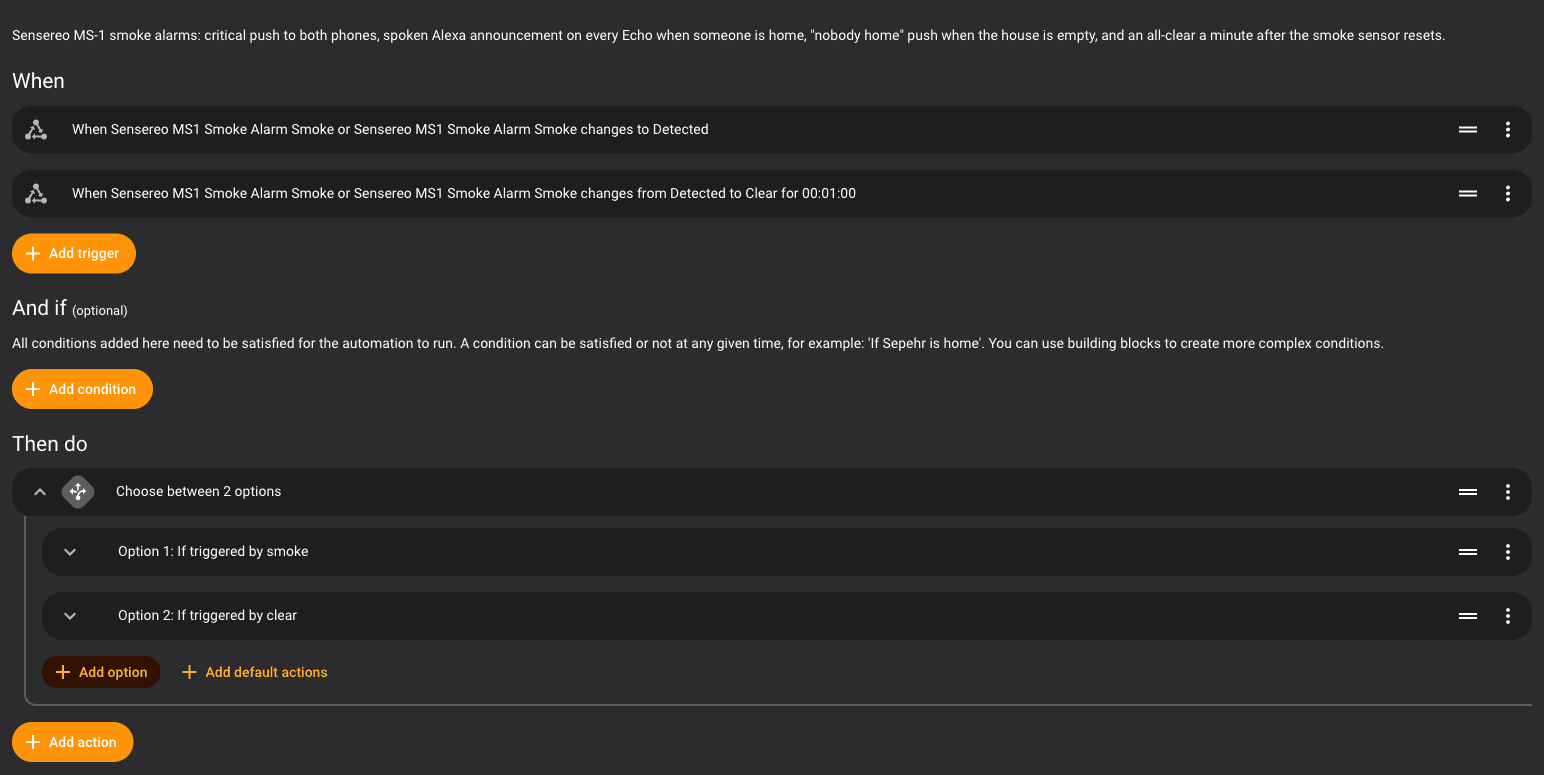
Build one Home Assistant automation that watches both smoke sensors and sends a critical push to every phone, plus a spoken announcement on every Echo when someone is home. We built and tested exactly this.
What does the automation do?
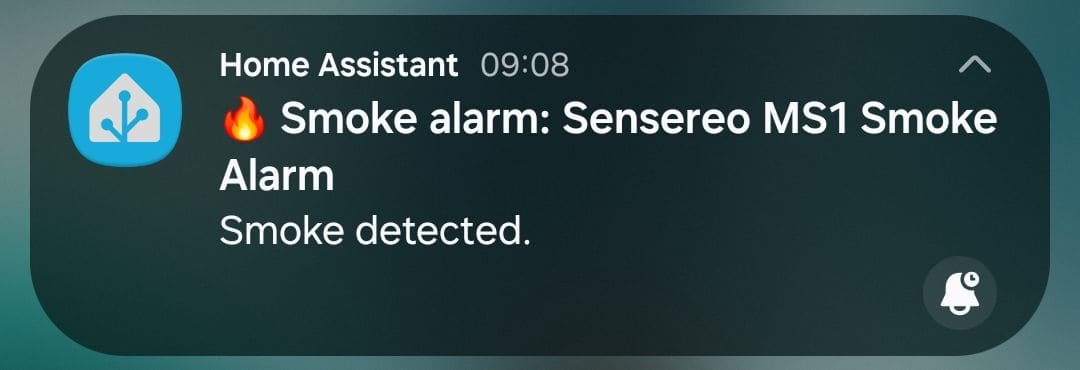
- Smoke detected: a high-priority push to both phones, with the alarm's room name in the title.
- Someone home: an Alexa announcement on every Echo, "The smoke alarm in the hallway has detected smoke".
- Nobody home: the phone message changes to "Smoke detected and nobody is home", and Alexa stays quiet.
- All clear: a calm push once the smoke sensor has been clear for a minute.
What is the YAML?
Paste this into a new automation (three-dot menu, then Edit in YAML). Swap the two notify.mobile_app_… services for your own phones, and the person entities for the people in your house. Those are the only changes from the version we ran, and you can find your notify service names in Developer tools, under Actions.
alias: Smoke alarm – alert phones and Alexa
description: >-
  Sensereo MS-1 smoke alarms: critical push to both phones, spoken Alexa
  announcement on every Echo when someone is home, "nobody home" push when
  the house is empty, and an all-clear a minute after the smoke sensor resets.
mode: parallel
max: 10
triggers:
  - trigger: state
    id: smoke
    entity_id:
      - binary_sensor.sensereo_ms1_smoke_alarm_smoke
      - binary_sensor.sensereo_ms1_smoke_alarm_smoke_2
    to: "on"
  - trigger: state
    id: clear
    entity_id:
      - binary_sensor.sensereo_ms1_smoke_alarm_smoke
      - binary_sensor.sensereo_ms1_smoke_alarm_smoke_2
    to: "off"
    from: "on"
    for: "00:01:00"
variables:
  where: >-
    {{ area_name(trigger.entity_id)
       or device_attr(trigger.entity_id, 'name_by_user')
       or device_attr(trigger.entity_id, 'name') }}
  someone_home: >-
    {{ is_state('person.you', 'home') or is_state('person.partner', 'home') }}
actions:
  - choose:
      - conditions:
          - condition: trigger
            id: smoke
        sequence:
          - parallel:
              - action: notify.mobile_app_your_android_phone
                data:
                  title: "🔥 Smoke alarm: {{ where }}"
                  message: >-
                    {{ 'Smoke detected.' if someone_home
                       else 'Smoke detected and nobody is home.' }}
                  data:
                    channel: alarm_stream
                    importance: high
                    priority: high
                    ttl: 0
                    tag: smoke-alarm
                    sticky: "true"
                    push:
                      interruption-level: critical
                      sound:
                        name: default
                        critical: 1
                        volume: 1.0
              - action: notify.mobile_app_your_iphone
                data:
                  title: "🔥 Smoke alarm: {{ where }}"
                  message: >-
                    {{ 'Smoke detected.' if someone_home
                       else 'Smoke detected and nobody is home.' }}
                  data:
                    tag: smoke-alarm
                    push:
                      interruption-level: critical
                      sound:
                        name: default
                        critical: 1
                        volume: 1.0
              - if:
                  - condition: template
                    value_template: "{{ someone_home }}"
                then:
                  - action: notify.alexa_media_everywhere
                    data:
                      message: >-
                        Warning. The smoke alarm in {{ where }} has detected
                        smoke. Check the house now.
                      data:
                        type: announce
      - conditions:
          - condition: trigger
            id: clear
        sequence:
          - action: notify.mobile_app_your_android_phone
            data:
              title: "Smoke alarm cleared: {{ where }}"
              message: The smoke sensor has been clear for a minute.
              data:
                tag: smoke-alarm
          - action: notify.mobile_app_your_iphone
            data:
              title: "Smoke alarm cleared: {{ where }}"
              message: The smoke sensor has been clear for a minute.
              data:
                tag: smoke-alarm
How does it work?
Triggers and the all-clear. The first trigger fires the moment either smoke sensor turns on. The second only fires once a sensor has been clear for a minute, so a flickering sensor does not spam you. Each trigger has an id, and the choose block uses a trigger condition to pick the right branch. mode: parallel lets two alarms alert at once instead of one waiting for the other.
Which alarm. The where variable uses the alarm's area if it has one, then the name you gave the device, so name your alarms by room first or every alert will just say "Sensereo MS1 Smoke Alarm".
Phones. The Home Assistant Companion app has a documented route for loud alerts. On iOS, push with interruption-level: critical and a critical sound uses Apple's critical alerts, which are designed to bypass silent mode and Do Not Disturb. On Android, channel: alarm_stream, ttl: 0 and priority: high send it on the alarm volume stream and deliver it straight away. A tag lets the all-clear replace the alert on the lock screen. Our Home Assistant notifications guide covers the Companion app in more detail.
Alexa. The announcements use the community Alexa Media Player integration, installed through HACS, which adds a notify.alexa_media_everywhere service. With type: announce it plays a chime and then speaks the message on your Echo devices. This is a different route from the official Alexa smart home skill covered in our Home Assistant Alexa integration guide. It is unofficial and depends on an Amazon login that can expire, so treat the Echo announcement as a convenience, never as the safety system.
Did we test it?
Yes, with one caveat. We built the automation after the fire test, so a real alarm has not triggered it yet. To test it end to end, we forced one alarm's smoke entity on through the Home Assistant API, then back off. The phones received the alert, the Echo devices spoke the announcement, and the all-clear followed a minute later. We have not tested the nobody-home branch, so check it in the automation's trace before you rely on it, and tell the household before you test.
How does the MS-1 Interlink compare with the Heiman, Aqara and Aico alarms?
The MS-1 Interlink is a good Matter-over-Thread alarm, but there are alternatives with different strengths.
- Heiman HS1SA-M. A cheaper Matter-over-Thread photoelectric alarm that Raspberry.tips pointed to, and SmartHomeScene's review lists EN 14604, CE, TÜV and UKCA among its certifications. We could only find euro pricing, about €25 at one French retailer.
- Aqara Smoke Detector. A Zigbee 3.0 alarm at about £45 from a UK retailer, listed with EN 14604 and a 10-year battery. It speaks Zigbee rather than Thread, so it needs a Zigbee hub or coordinator instead of a border router.
- X-Sense SD19-W. Links wirelessly without rewiring for about £25 to £35, according to our best smart smoke detectors UK roundup, so wireless linking on its own is not unique to Sensereo.
- Aico Ei3016. The mains-wired option in the same roundup at about £45 to £60, but it typically adds £150 to £300 of electrician time for a whole house, and its smart features need a gateway of roughly £180 to £230.
- Nest Protect. No longer an option: Google ended production in March 2025.
The MS-1 Interlink's niche is a Thread-native, self-linking alarm for Home Assistant users with a border router. The price is hard to fault; the open question is UK suitability, not cost.
Is the Sensereo MS-1 Interlink worth the money?
Yes. At £39.99 on Sensereo's shop for UK visitors (US$59.99 in the US), it is good value for what it does. Our best smart smoke detectors UK guide puts smart alarms at roughly £25 to £70 each, so £39.99 sits comfortably below the middle of that range. The money buys Matter support, wireless linking over Thread that needs no cloud account, a replaceable module battery and a 7-year warranty. We did not check delivery costs, and the alternatives above show where it is cheaper or dearer.
Who should buy the Sensereo MS-1 Interlink?
Buy it if you run Home Assistant with a Thread border router, want linked alarms that also send alerts to your phone and speakers without a vendor cloud, and already have certified alarms in your home. It suits a bedroom, landing or hallway as a second, connected layer. Do not fit it in a kitchen, garage or workshop: Sensereo rates it for 0 °C to +50 °C, which an unheated garage or workshop can fall outside, and Cumbria Fire and Rescue says kitchens need a heat alarm instead.
Skip it if the MS-1 Interlink would be your only alarm in a rented property, if you want it to link with standard MS-1 alarms you already own (it cannot), or if you want carbon monoxide detection, for which Sensereo sells the separate MSC-1, which we have not tested.
Verdict
The Sensereo MS-1 Interlink does the connected part very well: it pairs in minutes, links to its twin without any setup, exposes everything to Home Assistant, and registered our fire test as Detected. At £39.99 it is good value for a Matter-native, self-linking alarm, though not the cheapest way to link alarms. We would still hold back on making it a home's only alarm, because Sensereo does not state that it is approved for UK homes, and it lasts 7 years. Buy it as a smart, linked extra layer, not a replacement for certified mains alarms, and buy the Interlink version for every alarm, because Sensereo says the standard MS-1 cannot join an Interlink group.