How we chose these smart weather stations
Our first test was the path into Home Assistant, because that decides whether a station keeps working when the internet or the manufacturer's servers do not. We favoured stations with an official integration, and we noted whether it runs locally or through a cloud. After that we compared what the outdoor sensor actually measures, how much has to be bought on top of the base kit, and whether a UK buyer can get one without importing it. We left out anything with no documented Home Assistant route. Prices are UK list prices or single-retailer figures seen in October 2026 and move often, so treat them as bands. If you only need temperature and humidity, our guide to the best smart temperature and humidity sensors is the cheaper route.
Which smart weather station works best with Home Assistant?
A station that pushes data to Home Assistant on your own network is the most dependable choice, so the Ecowitt Wittboy and the WeatherFlow Tempest come out ahead of cloud-only models. Home Assistant classes both integrations as local push, while the Netatmo integration is cloud polling and needs an internet connection and a Netatmo account. A cloud route is not unusable, but readings stop if the service does.
The best smart weather stations for UK homes
1. Ecowitt Wittboy — best overall
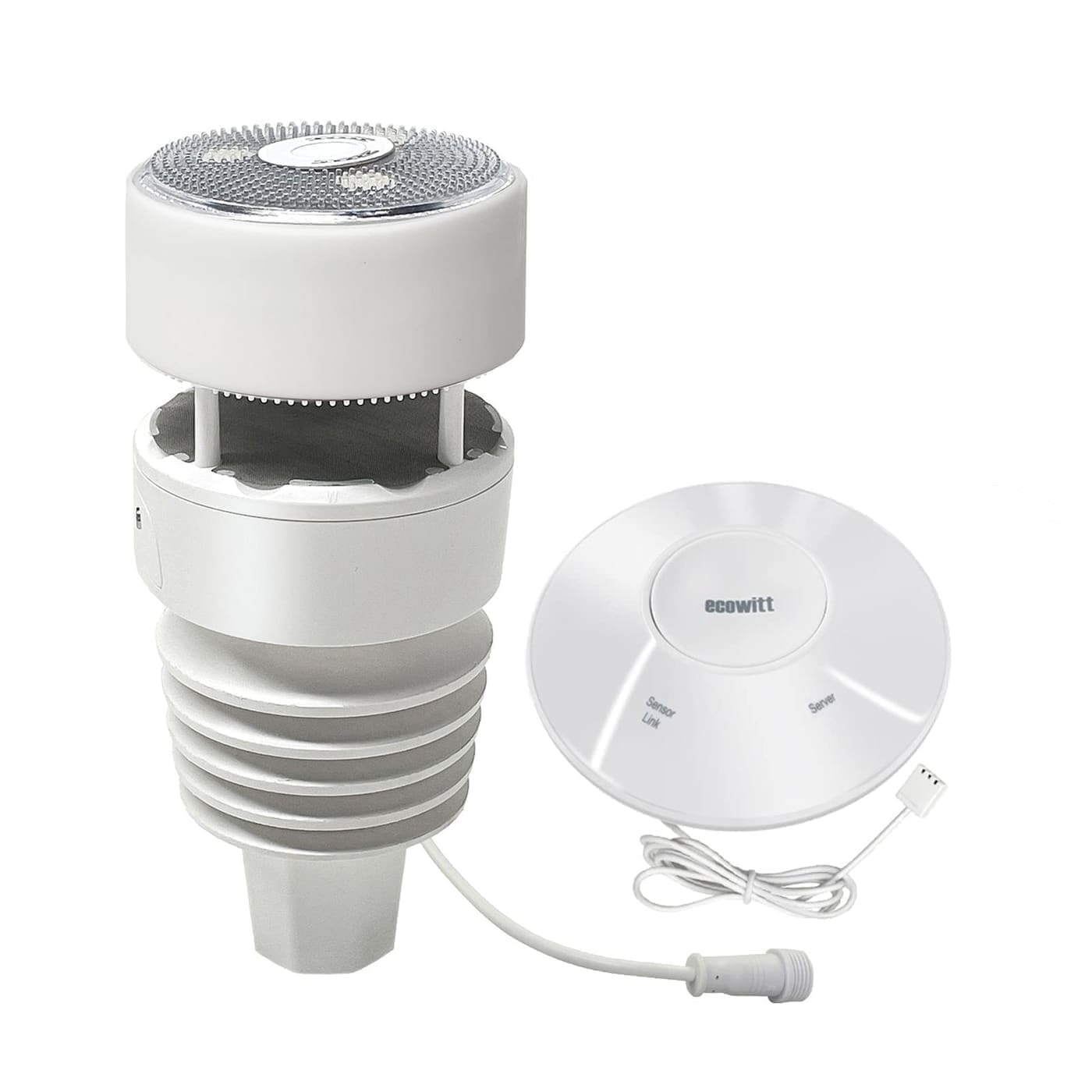
Who it's for: anyone who wants a proper garden weather station with local control and does not mind a little setup. The Wittboy pairs a Wi-Fi gateway with a solar-powered 7-in-1 outdoor sensor with an anti-vibration haptic rain sensor, so there is no tipping bucket to clog with leaves. Home Assistant's Ecowitt integration lists the WS90 7-in-1 sensor among its supported sensors and the GW2000, GW1200 and GW3000 among the supported gateways.
Home Assistant exposes temperature, humidity, pressure, dew point, wind speed, gust and direction, rain rate and rainfall totals, UV index and solar radiation, depending on which sensors are connected. Setup is a one-off: you add the integration, then enter the server address, path and port it shows into the Ecowitt app under its customised upload server settings.
The catch: Ecowitt devices do not support HTTPS, so Home Assistant must be reachable over plain HTTP on your network, and a HTTPS-only setup needs a reverse proxy. Also, Ecowitt's own store ships directly from the US and lists 915MHz products only, so in the UK buy the 868MHz version from a UK retailer. Check which gateway model a listing includes, since the GW2001 sits alongside the GW2000 in the current range.
See the 868MHz Wittboy bundle at YPC
2. Netatmo Smart Weather Station — best for simplicity
Who it's for: a household that wants a tidy indoor display of temperature, humidity, pressure and air quality, plus an outdoor reading, with an app that works from day one. Netatmo's UK page prices the base station at £129.99. The indoor module is mains-powered and shows CO₂ levels with a coloured light, and the outdoor module runs on AAA batteries and talks to it wirelessly.
It is a sensible upgrade path too: the rain gauge (£69.99), anemometer (£99.99) and extra indoor modules (£69.99) are sold separately, and a base kit with a rain gauge costs £179.99. Home Assistant's Netatmo integration reads the weather station and the indoor air quality monitor.
The catch: the integration is classed as cloud polling, so it needs an internet connection and a Netatmo account, and Home Assistant's page notes that weather stations do not get instant webhook updates. Wind and rain are paid extras, so the base kit is closer to an indoor and outdoor thermometer than a full weather station. For a dedicated indoor air-quality build, see our air quality monitor roundup.
3. WeatherFlow Tempest — best with no moving parts
Who it's for: someone who wants a low-maintenance, compact station that avoids the spinning cups and tipping buckets that jam or wear out. WeatherFlow describes the Tempest as a design with no moving parts, and says it currently ships to the US, Canada and the UK, with a two-year warranty and no subscription required for lifetime weather data.
Home Assistant's WeatherFlow integration is local-only and UDP-based. It exposes temperature, humidity, pressure, wind speed, gust and lull, rain amount and intensity, UV index, illuminance, and lightning strike count and distance, plus event entities for lightning strikes and rain starting, which are handy as automation triggers.
The catch: the local integration needs Home Assistant and the Tempest hub on the same subnet and receiving UDP traffic on port 50222, so VLANs can cause trouble. Home Assistant's page also warns that the hub sends each update once, so Wi-Fi can miss readings, and that a wired connection is more reliable. We could not find a current UK price, so check the retailer before you commit.
What about Ambient Weather stations?
Ambient Weather stations work with Home Assistant, but through the cloud. Home Assistant's Ambient Weather Station integration is classed as cloud push and needs both an application key and an API key from your Ambient dashboard. Its own page points people wanting a local route to ecowitt2mqtt or to Ecowitt devices, which is another reason we put Ecowitt first.
Who should skip a smart weather station?
Skip one if all you need is today's temperature or a rain warning, because a free forecast app does that without hardware. A station only makes sense when a reading from your own garden changes what your home does, such as watering, ventilation or blinds. If that is the goal, start with our guides to smart irrigation controllers and smart blinds, then add a station that feeds them. For long-term charts, pair it with the InfluxDB and Grafana setup.