
Smart Home Assistant

Home Assistant Connect ZBT-2 UK Review: £38, Zigbee or Thread

SepehrBy Sepehr· 8 October 2026· Updated 8 October 2026· 5 min read
✓ Independent — no paid placements✓ UK-tested in real homes✓ Cited sources
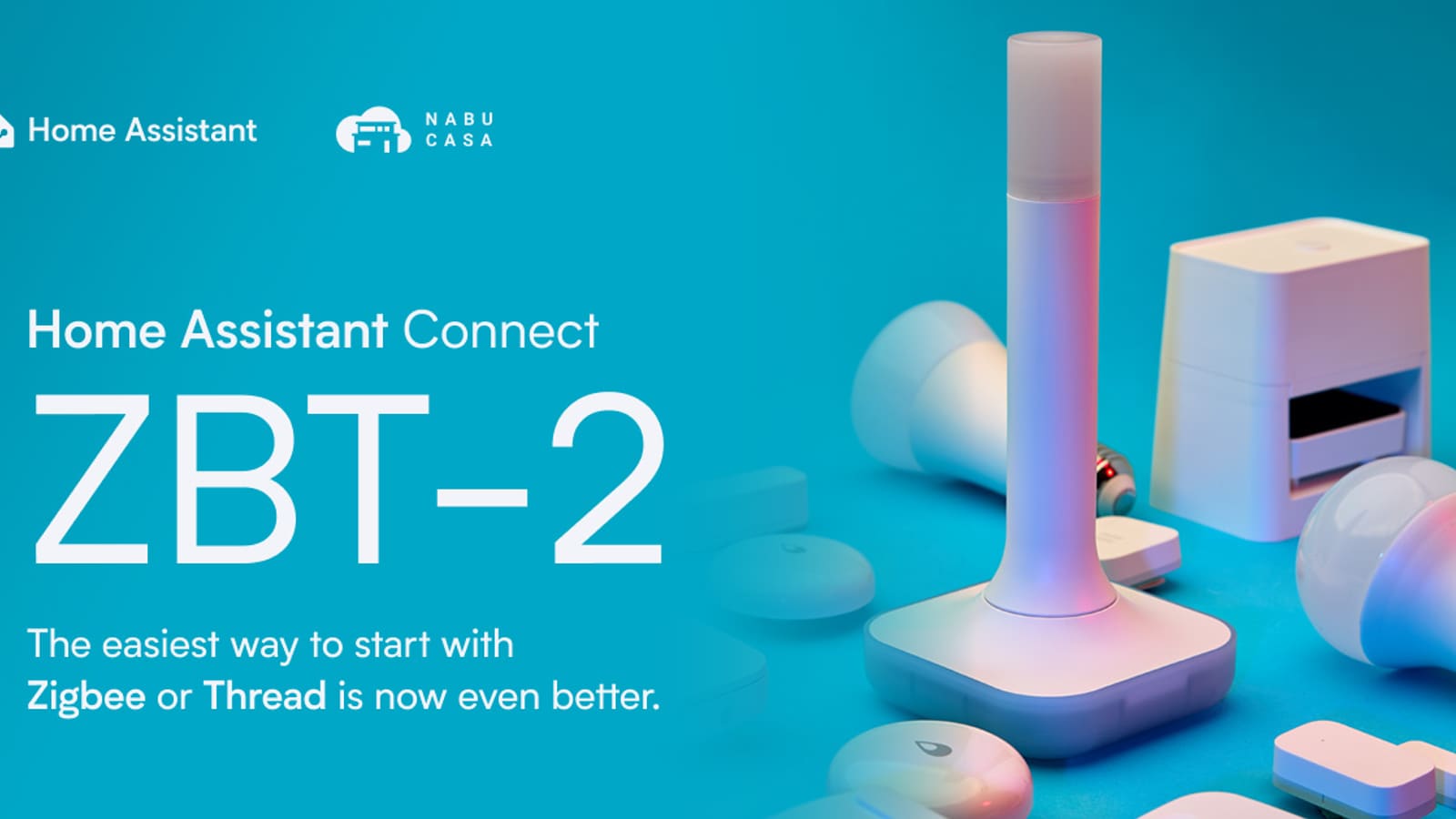
Home Assistant Connect ZBT-2 tall white pillar antenna stick surrounded by smart bulbs and sensors on a teal background

Key takeaways

  • The Home Assistant Connect ZBT-2 is Nabu Casa's official Zigbee and Thread USB adapter, priced at £38 at The Pi Hut in the UK.
  • The ZBT-2 runs Zigbee or Thread, not both at once, because Nabu Casa found multiprotocol firmware unstable on the earlier ZBT-1.
  • It uses a Silicon Labs MG24 chip and a 4.16 dBi external antenna, replacing the discontinued Connect ZBT-1 (SkyConnect).
  • ZHA is the easiest route, but Zigbee2MQTT also works with the ZBT-2, so you can pick either.
On this page[tap to expand]

The Home Assistant Connect ZBT-2 is Nabu Casa's official USB radio for Zigbee or Thread, and at £38 from The Pi Hut it is the easiest coordinator to set up in the UK. The catch: it runs one protocol at a time, so Zigbee and Thread together need two radios.

Verdict: BuyHome Assistant Connect ZBT-2 USB Zigbee and Thread adapter
Nabu CasaHome Assistant Connect ZBT-2✓ Works natively via ZHA, Thread and Matter; also usable with Zigbee2MQTT
  • Official hardware with one-click setup and firmware updates inside Home Assistant
  • Silicon Labs MG24 radio and a tall external antenna, for £38 in the UK
Check price at The Pi Hut →

Pros

  • First-party Nabu Casa hardware, so ZHA, Thread and Matter support in Home Assistant is built around it
  • Newer Silicon Labs MG24 chip and an external pillar antenna (4.16 dBi peak gain), a clear step up from the old ZBT-1's small internal antenna
  • Switch between Zigbee and Thread firmware from inside Home Assistant, with migration wizards for older adapters
  • Works with Zigbee2MQTT as well as ZHA, so you are not locked in
  • Stocked by UK retailers at around £38, with a USB-C cable included

Cons

  • One protocol at a time: Zigbee or Thread, never both on the same stick
  • It is not a standalone Thread border router; it needs Home Assistant to run it
  • Large for a USB stick (about 83 × 83 × 179 mm with the stand), and USB only, with no Ethernet or PoE option
  • Dearer than a Sonoff ZBDongle-E if all you want is a basic Zigbee coordinator
SpecHome Assistant Connect ZBT-2
Radio chipSilicon Labs MG24 (Zigbee/Thread), with an ESP32-S3 handling USB
ProtocolsZigbee or Thread, one at a time
AntennaExternal omnidirectional pillar, 4.16 dBi peak gain
ConnectionUSB-C, cable included
Serial speed460,800 baud (ZBT-1: 115,200)
ReplacesConnect ZBT-1 / SkyConnect (discontinued)
UK price£38 at The Pi Hut (varies by retailer)
Recommended MSRP$49 / €45

What is the Home Assistant Connect ZBT-2?

The ZBT-2 is the second-generation Connect adapter from Nabu Casa, the company behind Home Assistant, and it replaces the Connect ZBT-1 (originally sold as SkyConnect), which is now discontinued. Plug it into the machine running Home Assistant and it gives you a Zigbee coordinator or a Thread radio, depending on the firmware you choose.

Against the ZBT-1, Nabu Casa lists an upgraded Silicon Labs MG24 chip in place of the MG21, a much faster serial link, and a purpose-built antenna on a stand instead of a small internal one. The case opens without clips or glue and exposes the pins, which suits anyone who wants to reflash it. The extension cable question still applies: keep the stick away from USB 3.0 ports and drives, which sit in the same 2.4 GHz band.

Zigbee or Thread: can the ZBT-2 do both?

No. The ZBT-2 runs either Zigbee or Thread, not both at the same time. The hardware could in theory be shared, but Nabu Casa says its testing of "multiprotocol" (MultiPAN) on the ZBT-1 produced inconsistent behaviour and device stability problems, and it does not plan to implement it on the ZBT-2.

In practice, pick the protocol your devices need. Choose Zigbee if you run sensors, bulbs and plugs from Aqara, IKEA, Sonoff and similar brands; our best Zigbee hub guide covers the wider coordinator options. Choose Thread if your priority is battery-powered Matter devices; our Thread guide explains what is on sale in the UK. If you want both networks, buy two radios: a ZBT-2 for one and a second adapter, or a border router you already own, for the other. Thread on the ZBT-2 is run through Home Assistant, so it is not a standalone border router you can use without it.

How much is the ZBT-2 in the UK and where can you buy it?

The ZBT-2 costs £38 including VAT at The Pi Hut at the time of writing, against a recommended MSRP of $49 / €45. Prices move with stock and exchange rates, so check the live offer before buying. Compare it with the other coordinators in our best Zigbee stick for Home Assistant UK roundup, or see current offers on the Connect ZBT-2 finder page.

For context, that places it close to the ConBee III and well under the £61 SMLIGHT SLZB-06M, but about double the price of a Sonoff ZBDongle-E. You are paying for the official support, the newer radio and the antenna.

ZHA or Zigbee2MQTT: which should you run on the ZBT-2?

Start with ZHA if you want the shortest route. It is built into Home Assistant, and the ZBT-2 is designed around it: Home Assistant discovers the stick, walks you through a setup wizard and offers one-click firmware updates. Our ZHA setup guide covers pairing in detail.

Zigbee2MQTT works too. Nabu Casa says many people run the ZBT-2 with it and publishes migration documentation for moving to a new adapter. You will need the Mosquitto broker and the Zigbee2MQTT add-on, and you point it at the stick's serial port. Our Zigbee2MQTT guide walks through that, and ZHA vs Zigbee2MQTT helps you decide which suits your device list. Moving from an old stick is the part to plan: Home Assistant offers migration wizards for Zigbee and Thread, though some adapters (ConBee sticks, for example) need specific firmware first.

Does the ZBT-2 work with Home Assistant?

Yes, and it is the reference hardware for Home Assistant's own Zigbee and Thread work. In Zigbee mode it appears in the ZHA integration; in Thread mode it provides the radio for Home Assistant's Thread network, which is how battery-powered Matter-over-Thread devices connect. Integration entities include a permit-join switch, a firmware version sensor, the active channel and a connection status indicator. Treat the bundled USB cable as mandatory rather than optional.

How does the ZBT-2 compare with the ZBDongle-E and SLZB-06M?

Pick the Sonoff ZBDongle-E (about £19 on Amazon UK) if you want the cheapest proven Zigbee-only stick and are happy to forgo Thread. Pick the SMLIGHT SLZB-06M (£61 from Zigbee Smart UK) if your Home Assistant box lives in a cupboard and you would rather run a network cable to a central spot using Ethernet or PoE. Pick the Phoscon ConBee III (around £37) only if you rely on the deCONZ software. The ZBT-2 wins when you want official support and the option of Thread later. Our full Zigbee stick comparison has the detail.

Who should buy the Connect ZBT-2?

Buy it if you are starting a Home Assistant install, replacing a ZBT-1, or want official hardware that Nabu Casa will keep updating. It is also a good second radio if your Zigbee coordinator is already in place and you want to add Thread. Skip it if you only need the cheapest working Zigbee stick, or if your Home Assistant server sits somewhere with poor radio coverage and you would rather mount a PoE coordinator centrally.

Verdict

For most UK Home Assistant users, the ZBT-2 at £38 is the safest default coordinator: official, well supported and easy to set up. The one thing to remember is that it is Zigbee or Thread, never both, so buy a second radio if you want both networks.

Buy the picks in this guide

Recommended for Home Automation

See all devices →

Frequently asked questions

Can the Home Assistant Connect ZBT-2 run Zigbee and Thread at the same time?
No. The Home Assistant Connect ZBT-2 runs either Zigbee or Thread at any one time. Its Silicon Labs MG24 chip could theoretically support both through multiprotocol (MultiPAN) firmware, but Nabu Casa tested that approach on the earlier ZBT-1 and found it inconsistent, causing stability problems for devices, so it does not plan to ship it for the ZBT-2. In practice you dedicate the stick to one protocol from inside Home Assistant and can switch later by reflashing the firmware. If you want a Zigbee network and a Thread network together, the simplest answer is two radios: a ZBT-2 for one protocol and a second adapter or an existing Thread border router for the other. Plan for that before you buy, particularly if you are mixing Zigbee sensors with Matter-over-Thread devices.
How much does the Home Assistant Connect ZBT-2 cost in the UK?
The Home Assistant Connect ZBT-2 costs £38 including VAT at The Pi Hut at the time of writing, which compares with Nabu Casa's recommended MSRP of $49 or €45 before local taxes and retailer margins. That puts it at roughly the same price as a Phoscon ConBee III, below the £61 SMLIGHT SLZB-06M, and about double a basic Sonoff ZBDongle-E. UK prices move with stock levels and exchange rates, so check the current listing on our Connect ZBT-2 finder page or at the retailer before ordering. The extra money buys official Nabu Casa support, the newer MG24 radio and the external antenna. If you only need a basic Zigbee coordinator on a budget, a cheaper stick will do the job, but you give up the one-click Home Assistant experience.
Should I use ZHA or Zigbee2MQTT with the ZBT-2?
Use ZHA with the ZBT-2 if you want the quickest, simplest setup, because it is built into Home Assistant and the ZBT-2 is designed to work with it, including a setup wizard and one-click firmware updates. Zigbee2MQTT also works with the ZBT-2, and Nabu Casa notes that many people run it that way and links migration documentation, so you are not locked in. Zigbee2MQTT needs the Mosquitto broker and its own add-on, which is more to maintain, but it is popular with people who want to expose every device setting or run Zigbee separately from Home Assistant. If you are unsure, start with ZHA and migrate later if you hit a device it does not handle well. Our ZHA versus Zigbee2MQTT comparison goes through the trade-offs in more detail.

Sources

Sources verified 2026-10-08

  1. Home Assistant — Home Assistant Connect ZBT-2
  2. The Pi Hut — Home Assistant Connect ZBT-2
  3. Home Assistant — ZHA integration
  4. Zigbee2MQTT — Supported adapters
  5. Home Assistant — Home Assistant Connect ZBT-2 (hero image)
›How we researched this

Claims in this article are checked against primary sources — manufacturer specifications, official documentation, Which? research, Ofgem guidance, or gov.uk — rather than forum threads or video reviews. Where the author has direct hands-on experience with a product (most Home Assistant, Zigbee, and home-networking gear is running in his own homelab), that is stated explicitly in the text.

For categories outside that personal setup — such as boilers, heat pumps, and other areas that are traditionally a heating engineer's domain — verdicts are built from cross-referenced manufacturer data, published lab results, and vetted expert and owner reviews rather than a claim of personal hands-on testing. See the editorial policy for the full methodology.

Sepehr

Written by

Sepehr

10+ years hands-on with Home Assistant & networking · Research-backed elsewhere · No brand deals

Smart home specialist with 10+ years running a self-hosted Home Assistant setup — Zigbee2MQTT, Frigate NVR, and local-first automations. Independent coverage for UK homes, no brand deals.

LinkedIn →

Citing this page? Please use a dofollow link back to the original article — it helps us keep the data on this page accurate and up to date.

Related reading