What is ZHA?
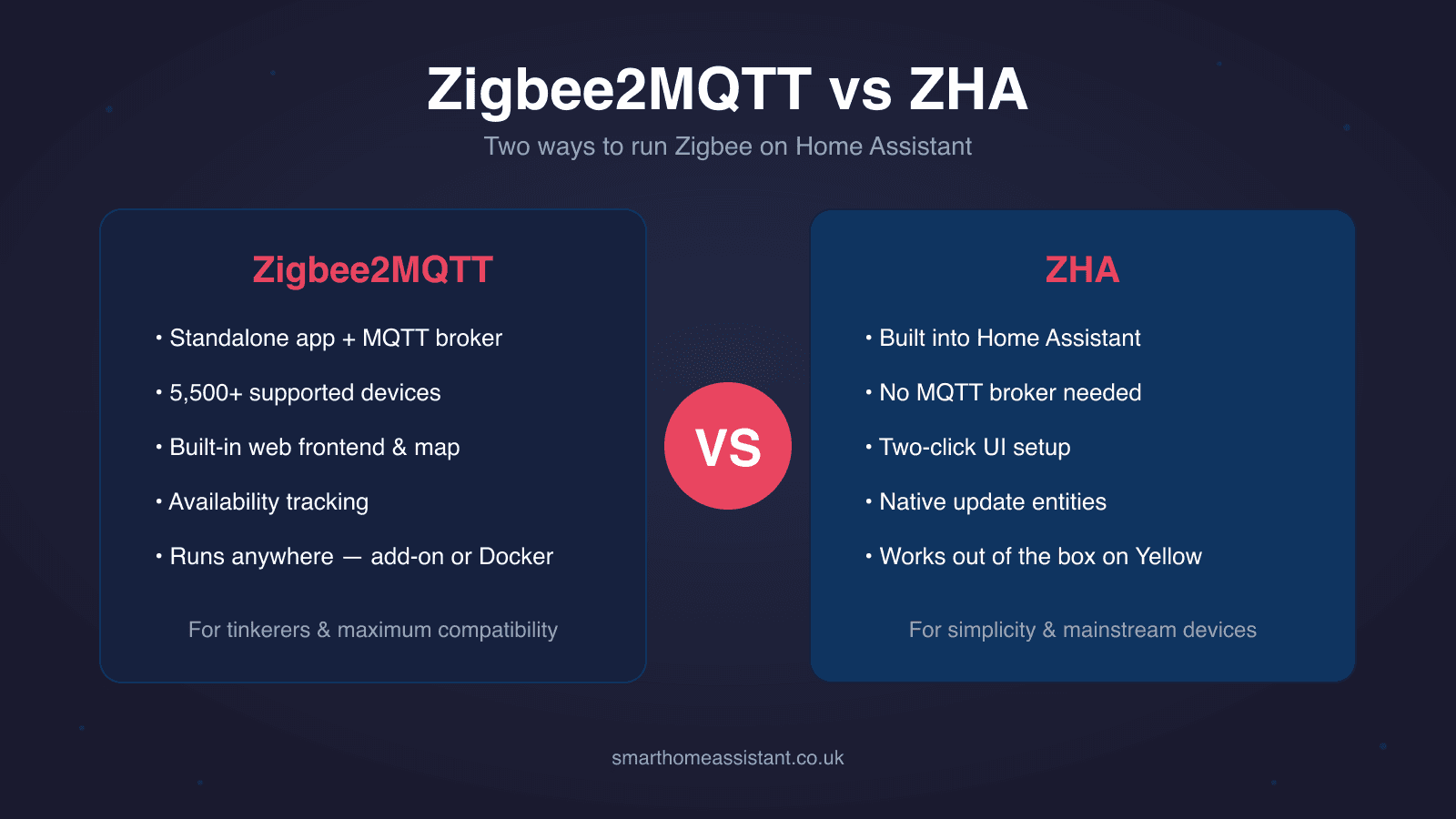
ZHA (Zigbee Home Automation) is Home Assistant's native Zigbee integration. It ships inside Home Assistant itself — there is nothing extra to install. Plug in a supported coordinator and Home Assistant can auto-discover it; setup is a UI config flow that takes a couple of minutes. Under the bonnet ZHA uses an open-source Python library called zigpy, so any coordinator compatible with zigpy works with ZHA.
Because it is native, every device you pair lands directly in Home Assistant as a proper device with entities — no broker, no bridge, no extra moving parts. For devices that don't follow the Zigbee spec cleanly, ZHA relies on a companion project called ZHA Device Handlers (better known as "quirks") to patch over manufacturer oddities. If you're new to Zigbee entirely, start with our ZHA setup guide and our roundup of the best Zigbee sticks for Home Assistant.
What is Zigbee2MQTT?
Zigbee2MQTT (often shortened to Z2M) is a standalone application that bridges your Zigbee network to MQTT. It runs as a Home Assistant add-on, in Docker, or on a separate Linux machine entirely, and it requires an MQTT broker — the project recommends Mosquitto, which is available as an official Home Assistant add-on that generates its credentials automatically. Devices then appear in Home Assistant through MQTT discovery, which Zigbee2MQTT supports out of the box.
That extra plumbing buys you independence: because Z2M is decoupled from Home Assistant, you can restart Home Assistant without touching your Zigbee network, run the Zigbee radio on a different machine, or even use Z2M with other platforms. It also ships a built-in web frontend for pairing, mapping and managing devices. We walk through the full install in our Zigbee2MQTT setup guide, and the broker side in our Home Assistant MQTT guide.
Device support: Z2M's headline advantage
Zigbee2MQTT publishes a supported-device list of more than 5,500 devices from over 580 vendors, and it grows constantly thanks to a very active community adding new converters. If you buy a lot of budget kit — Tuya-based sensors, Aqara, Sonoff, IKEA, Lidl — the odds that an obscure device "just works" are highest on Z2M.
ZHA doesn't publish an equivalent count. Standard, spec-compliant devices work fine, and the quirks library covers many popular non-compliant ones, but new or unusual devices tend to gain full support on Zigbee2MQTT first. If your shopping list is mainstream — IKEA, Philips Hue, Aqara staples — ZHA will handle it. If you like ordering mystery sensors from AliExpress, Z2M is the safer bet. Either way, pair your coordinator choice with our guide to the best Zigbee hubs in the UK.
Adapter and coordinator support
Both platforms support the same major radio families, with slightly different emphasis. ZHA (via zigpy) supports Silicon Labs EmberZNet adapters (EFR32MG21/MG24 — including Home Assistant's own Connect ZBT-1 and the radio built into Home Assistant Yellow), Texas Instruments Z-Stack adapters (CC2652, CC1352), ConBee/deCONZ sticks, ZiGate and Digi XBee.
Zigbee2MQTT recommends Texas Instruments zStack-based and Silicon Labs EmberZNet-based adapters, supports ConBee, treats Nordic ZBOSS adapters as experimental, and no longer maintains ZiGate support. One practical Z2M tip from the adapter docs: TI chips whose model ends in "P" have a power amplifier supporting up to 20 dBm output versus 5 dBm on the "R"/"RB" variants — worth knowing for larger homes.
The practical takeaway: buy a CC2652-based or EFR32-based stick and you keep both doors open. Sticks based on either chip are the de-facto community standard and work well on both platforms.
Features compared
Setup and day-to-day management
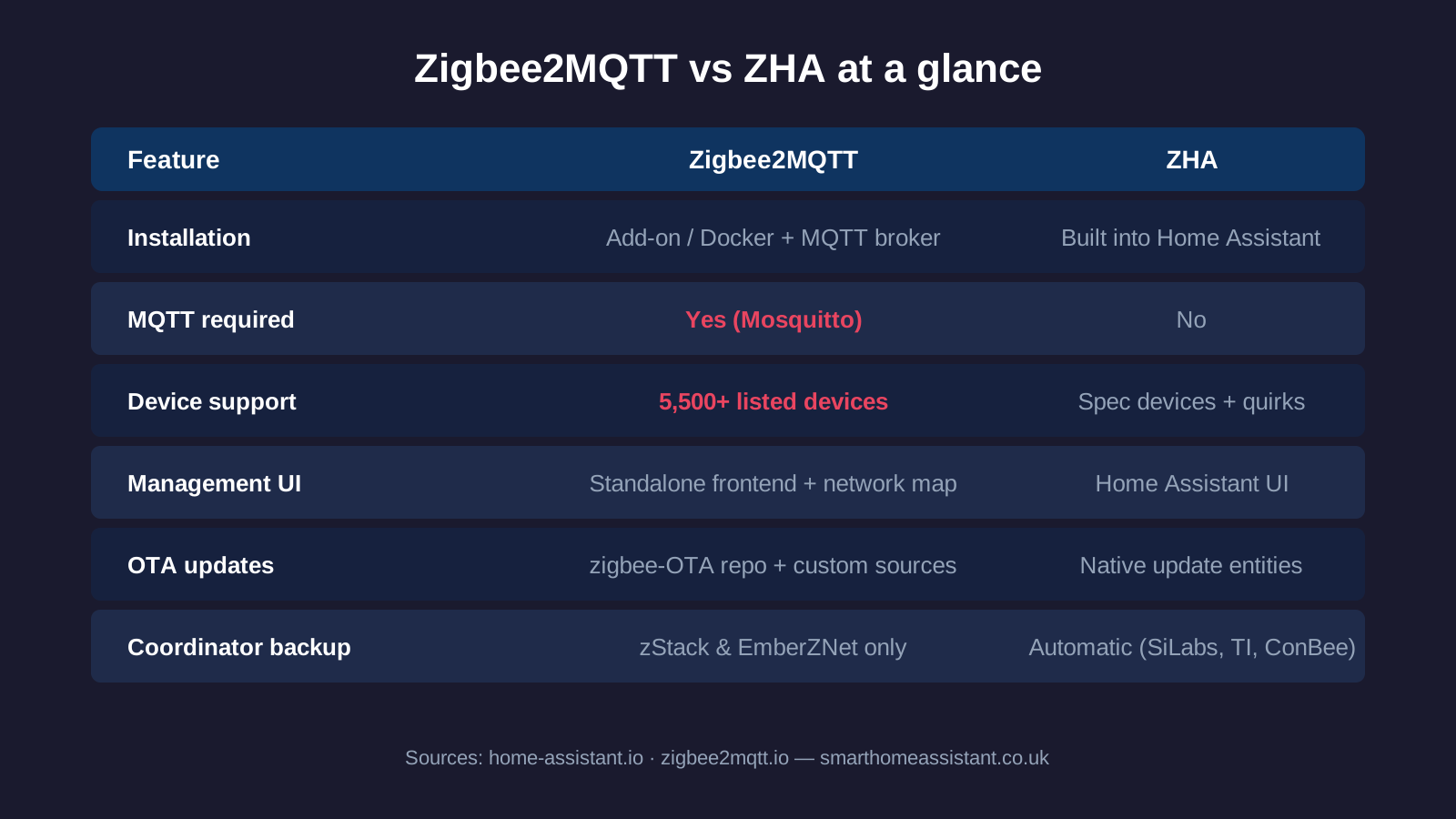
ZHA wins on simplicity. It's a couple of clicks from Settings → Devices & Services, with no YAML and no broker. Zigbee2MQTT needs the Mosquitto add-on, the Z2M add-on and a small amount of configuration before your first device pairs — not hard, but unmistakably more steps. Once running, Z2M's dedicated frontend is genuinely excellent: a live network map, per-device settings, converter debugging and pairing all in one place.
OTA firmware updates
Both platforms can update device firmware over the air. Zigbee2MQTT matches devices against the community zigbee-OTA image repository by default and lets you point at custom firmware sources. ZHA exposes firmware updates through Home Assistant's native update entities, with images from selected manufacturers enabled by default. Z2M generally offers coverage for more brands; ZHA's approach is tidier inside the Home Assistant UI.
Groups and binding
Both support Zigbee groups and direct device binding. Groups let one command control many devices at once (essential for banks of bulbs); binding lets a remote control a light directly, with no software in the middle — automations keep working even if your server is down. Z2M exposes binding through a dedicated Bind tab in its frontend; ZHA handles groups and binding natively in the Home Assistant UI.
Availability tracking
Zigbee2MQTT can actively track whether devices are online, though it's disabled by default: mains-powered devices are expected to check in every 10 minutes (and are pinged if not), while battery devices are given 25 hours before being marked offline. It's a genuinely useful early-warning system for dead batteries and flaky mains devices.
Migration and lock-in
Think about migration before you commit, because a Zigbee coordinator can only serve one application at a time — the ZHA docs are explicit that the coordinator "cannot already be connected or used by any other application", so you cannot trial both against one stick simultaneously.
Within each platform, moving to a new stick is well supported on the popular chips: ZHA supports migrating a network between Silicon Labs, Texas Instruments and ConBee/RaspBee adapters and takes automatic backups, while Zigbee2MQTT supports coordinator backup and restore on zStack and EmberZNet adapters only. Between the two platforms, however, neither project documents a supported migration path — so if you switch from ZHA to Z2M (or back), plan to re-pair your devices and rebuild any groups and bindings. That's tedious with 60 devices, which is exactly why it pays to choose deliberately at the start.
Verdict: which should you use?
Choose ZHA if you want the shortest path to a working Zigbee network. It's built in, needs no broker, pairs mainstream devices without fuss, and its OTA updates and backups are neatly integrated into Home Assistant. For a typical UK smart home built on IKEA, Hue, Aqara and Sonoff staples, ZHA is entirely sufficient — and it's the obvious choice on Home Assistant Yellow or with a Connect ZBT-1, which it supports out of the box.
Choose Zigbee2MQTT if you want maximum device compatibility and control. The 5,500+ device list, the standalone frontend, availability tracking and the ability to run the radio separately from Home Assistant make it the enthusiast's pick — the trade-off is an MQTT broker and a slightly longer setup. If you're unsure which camp you're in, be honest about your appetite for tinkering: people who enjoy the network map usually know who they are. Whichever you pick, a quality CC2652 or EFR32 coordinator from our Zigbee stick guide keeps the other option open.
For a practical device pick rather than a coordinator-software choice, see our best smart radiator valve for Home Assistant UK guide, covering which Zigbee TRVs are confirmed to work cleanly under both ZHA and Zigbee2MQTT.