

Smart Home Assistant

Innr FL 250 C LED Strip Review UK: Home Assistant Zigbee, No Hub Needed

SepehrBy Sepehr· 6 September 2026· Updated 7 September 2026· 6 min read
✓ Independent — no paid placements✓ UK-tested in real homes✓ Cited sources
Innr FL 250 C LED Strip Review UK: Home Assistant Zigbee, No Hub Needed
On this page[tap to expand]
Buy the picks in this guide

Recommended for Smart Lighting

See all devices →
Shop these picks on our Amazon storefront →

This Innr LED strip review UK tests the FL 250 C, a 5m Zigbee 3.0 RGBW strip that pairs directly to Home Assistant with no bridge, no app account, and no cloud dependency.

Verdict: Buy Innr FL 250 C LED strip lit in warm white, coiled on its reel
Innr FL 250 C LED Strip ✓ Works via ZHA or Zigbee2MQTT — no hub needed
  • Pairs straight to a Zigbee coordinator, fully local
  • Full RGB, colour temperature and on-device colour loop effect
Check price at Innr →

Pros

  • No hub, bridge, or manufacturer app required to use it with Home Assistant
  • Fully local control over ZHA — nothing leaves the network
  • Genuine RGBW: a separate white channel alongside colour, so whites don't look pink or green
  • On-device colour loop effect runs without any Home Assistant automation

Cons

  • Firmware version reports as "Unknown" in Home Assistant — no way to confirm you're up to date
  • \1\n
  • No Apple HomeKit, Hue Entertainment or Hue Secure support, even when paired to a Hue Bridge
SpecInnr FL 250 C
ConnectivityZigbee 3.0 — Innr lists Hue Bridge, Home Assistant (ZHA or Zigbee2MQTT), Homey, SmartThings, Google Assistant, Alexa and Echo speakers with a built-in Zigbee hub, plus its own bridge
Length5m, cuttable
Brightness2,800 lumens (the shorter 3m FL 230 C is rated 2,200 lumens)
Colour range16 million colours (RGB) plus a separate white channel, roughly 1,000K–20,000K
Power24V DC power supply, up to 24W
Typical priceAround £56 (€64.99) from European stockists — no mainstream UK listing for the 5m at the time of writing

Dimming is smooth rather than steppy — Innr rates the dimming range at 1–100%, low enough at the bottom end to work as ambient lighting rather than just a bright accent. Innr’s flex light strips have also been noted to darken much faster than comparable strips as you pull the brightness down, so a small slider movement near the bottom of the range can drop the light more than expected — worth nudging gently rather than dragging. The rated lifespan is over 50,000 hours, in line with most LED strips on the market, so longevity isn't a concern here.

Design and setup

The strip ships on a reel with the driver and Zigbee control unit already attached, plus a UK three-pin power adapter. There's no separate hub or dongle in the box — the small white control module in-line with the strip is the Zigbee radio, not a bridge. That module also carries a physical button, so the strip can be switched on and off by hand without a hub, app or voice assistant involved at all.

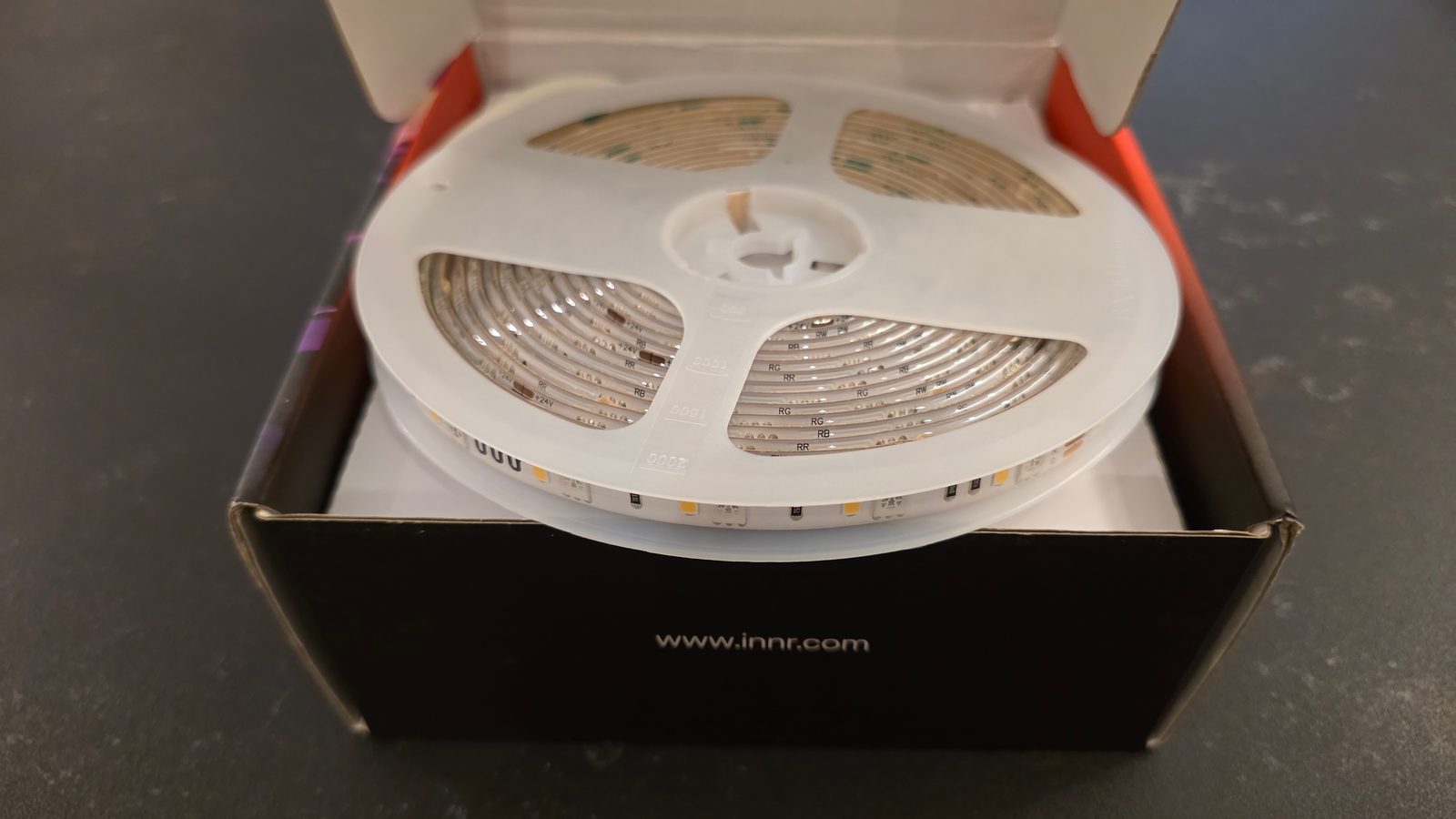
Innr FL 250 C box contents: LED strip reel, Zigbee control module, and UK power adapter
Everything in the box: the 5m strip, its Zigbee control unit, and a UK power adapter — no separate bridge.
Innr FL 250 C LED strip reel sitting in its packaging box before unspooling
The strip ships wound on its reel, sitting directly in the retail box — no extra padding or separate accessory tray.

Physical installation is the same as any adhesive LED strip: clean the surface, peel the backing, and press it into place, cutting at the marked points if you need a shorter run. Because it's a single 24V run rather than individually addressable segments, you get one uniform colour along the whole strip rather than Govee-style per-segment effects — a trade-off for the simpler, hub-free protocol.
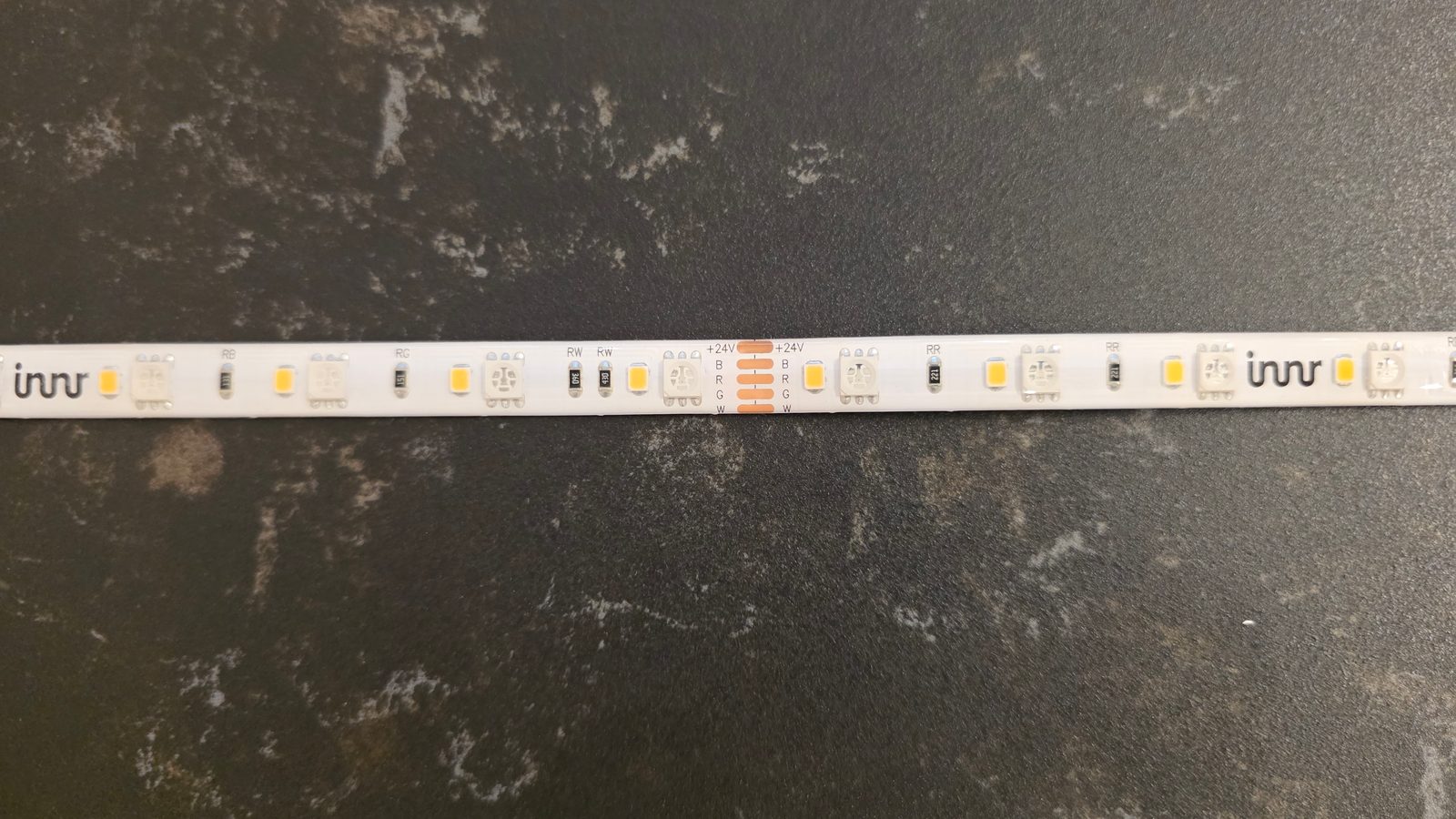
Close-up of the Innr FL 250 C strip showing RGBW solder pads and marked cut points
A close-up of the strip itself: RGBW solder pads and the marked cut points, spaced roughly every few LEDs along the run.

The 24V driver sits inline near the plug end rather than at the strip itself, which keeps the visible cabling to a minimum once it's tucked behind furniture or along a skirting board. At 5m and up to 24W, one strip comfortably covers a run behind a TV unit, along a shelf, or around a room's coving without needing a second controller — something Wi-Fi strips with shorter maximum runs often can't manage in a single length.

Running it at 100% brightness in white draws close to the full 24W, which at the 26.32p/kWh Ofgem price cap unit rate for October 2026 works out to roughly 0.6p an hour — in line with any other LED strip of this length and unremarkable either way. Left on a dim colour loop for ambient lighting, draw drops well below that, since brightness and colour saturation both affect current draw on an RGBW strip like this one.

Does the Innr FL 250 C work with Home Assistant?

Yes — natively, and without any bridge. We paired it to a Home Assistant instance running ZHA on a Texas Instruments CC2652-based Zigbee coordinator, and it joined the network in under a minute with no manual configuration.
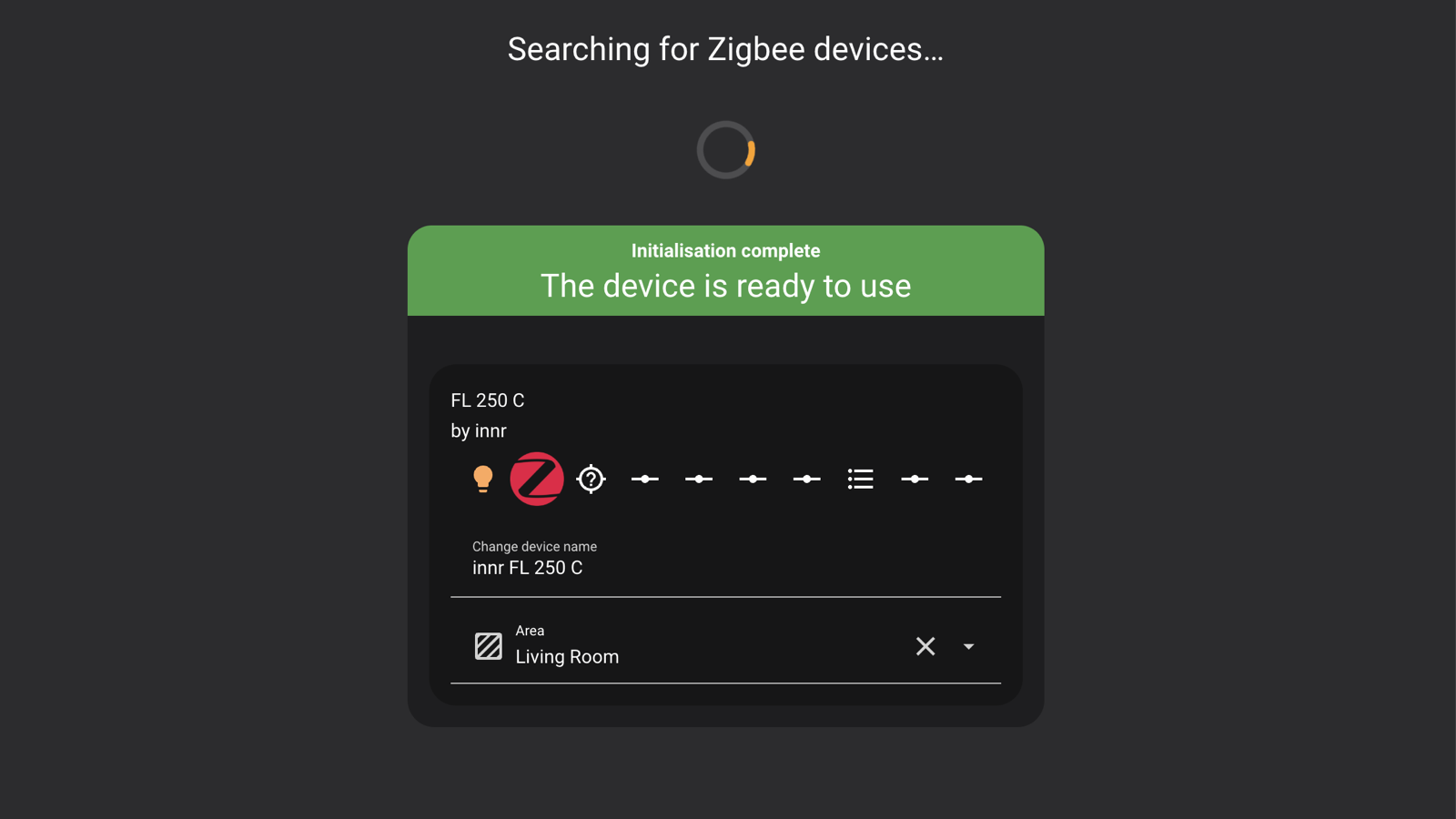
Home Assistant ZHA add device screen showing the Innr FL 250 C paired and ready to use
ZHA identifies the strip immediately as an Innr FL 250 C and exposes it as a standard light entity.

Once paired, it shows up as a single light entity with brightness, an RGB colour wheel, and a colour-temperature slider for warm-to-cool white — all three sit behind the tab strip at the bottom of the light's more-info dialog.
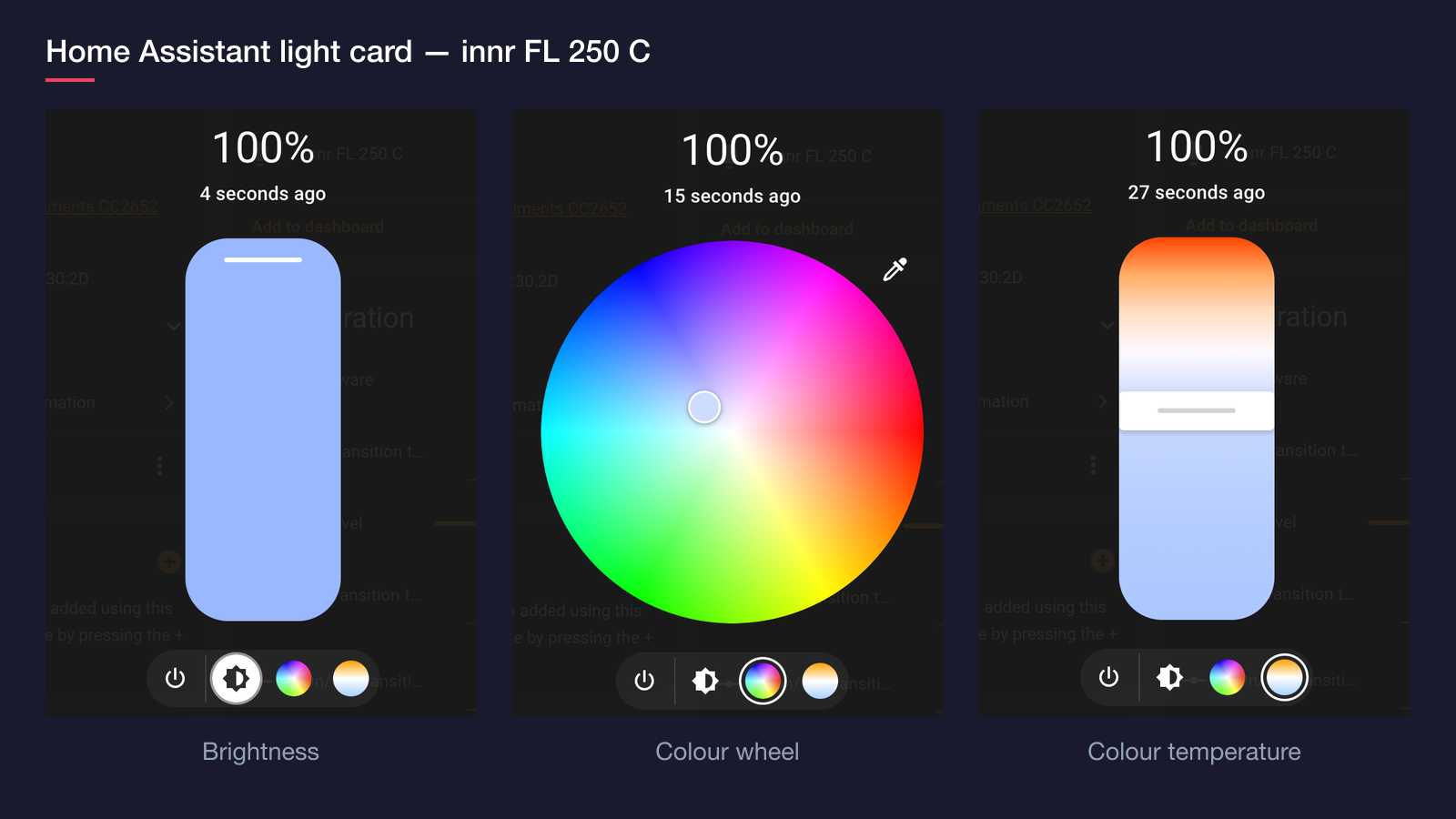
Home Assistant more-info dialog for the Innr FL 250 C showing the brightness, colour wheel, and colour temperature tabs side by side
All three control modes in Home Assistant's light card: brightness, full RGB colour, and warm-to-cool white — no manufacturer app involved.

Home Assistant also exposes a built-in colour loop effect that runs entirely on the device — pick it from the light's more-info dialog and the strip cycles through colours on its own, with no automation or polling needed on the Home Assistant side.
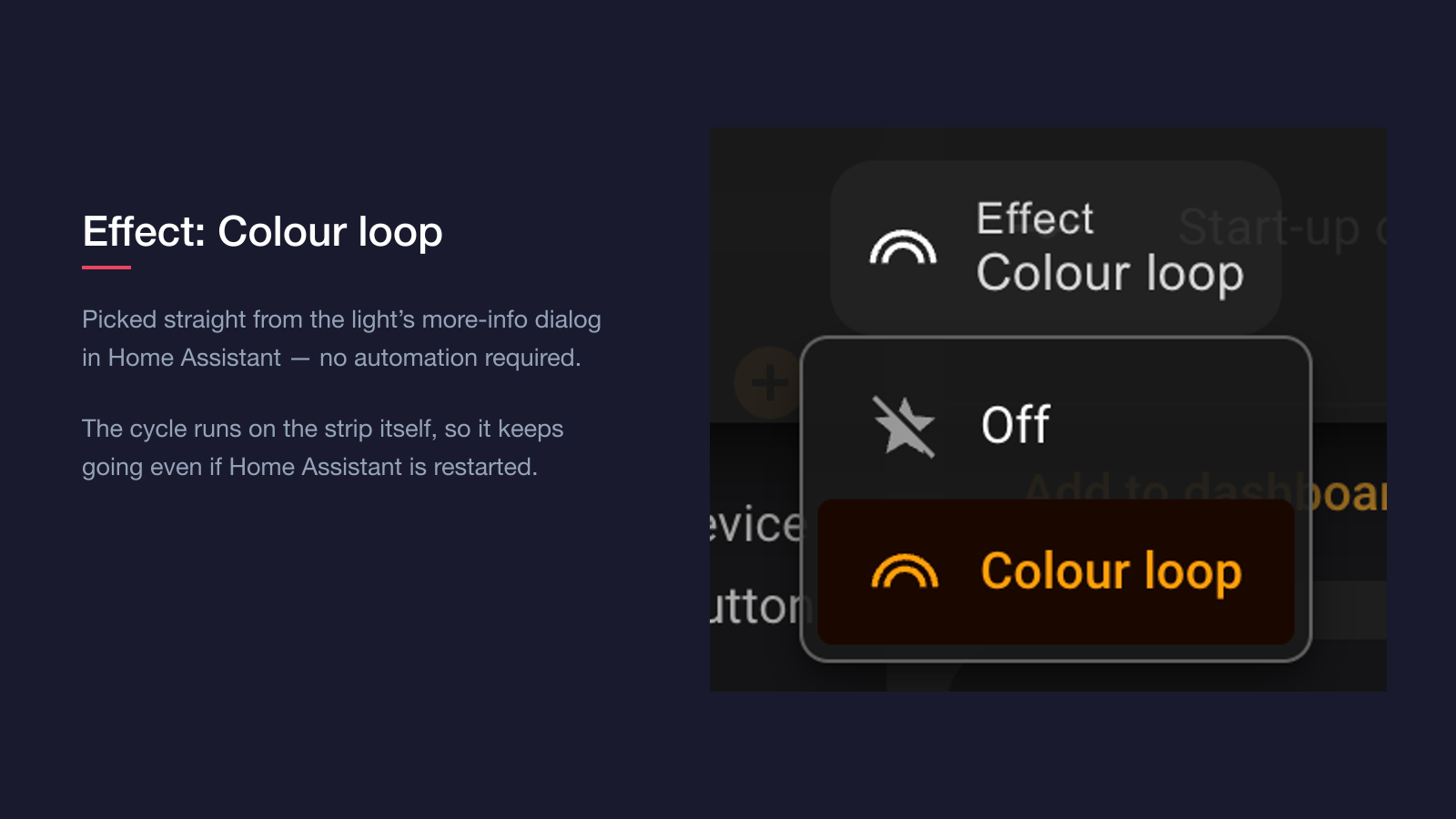

Home Assistant effect picker for the Innr FL 250 C with the Colour loop effect selected
The effect list on the light's more-info dialog — selecting "Colour loop" hands the cycling over to the strip itself.
Innr FL 250 C LED strip cycling through colours using its built-in colour loop effect
The on-device colour loop effect in action, selectable directly from the Home Assistant light card.

The device page also exposes proper ZHA configuration entities rather than hiding them behind a manufacturer app: off/on transition time, on-level, power-on behaviour (defaults to turning back on after a power cut), power-on brightness level, and start-up colour temperature. Everything is adjustable from the Home Assistant UI, with no YAML required.
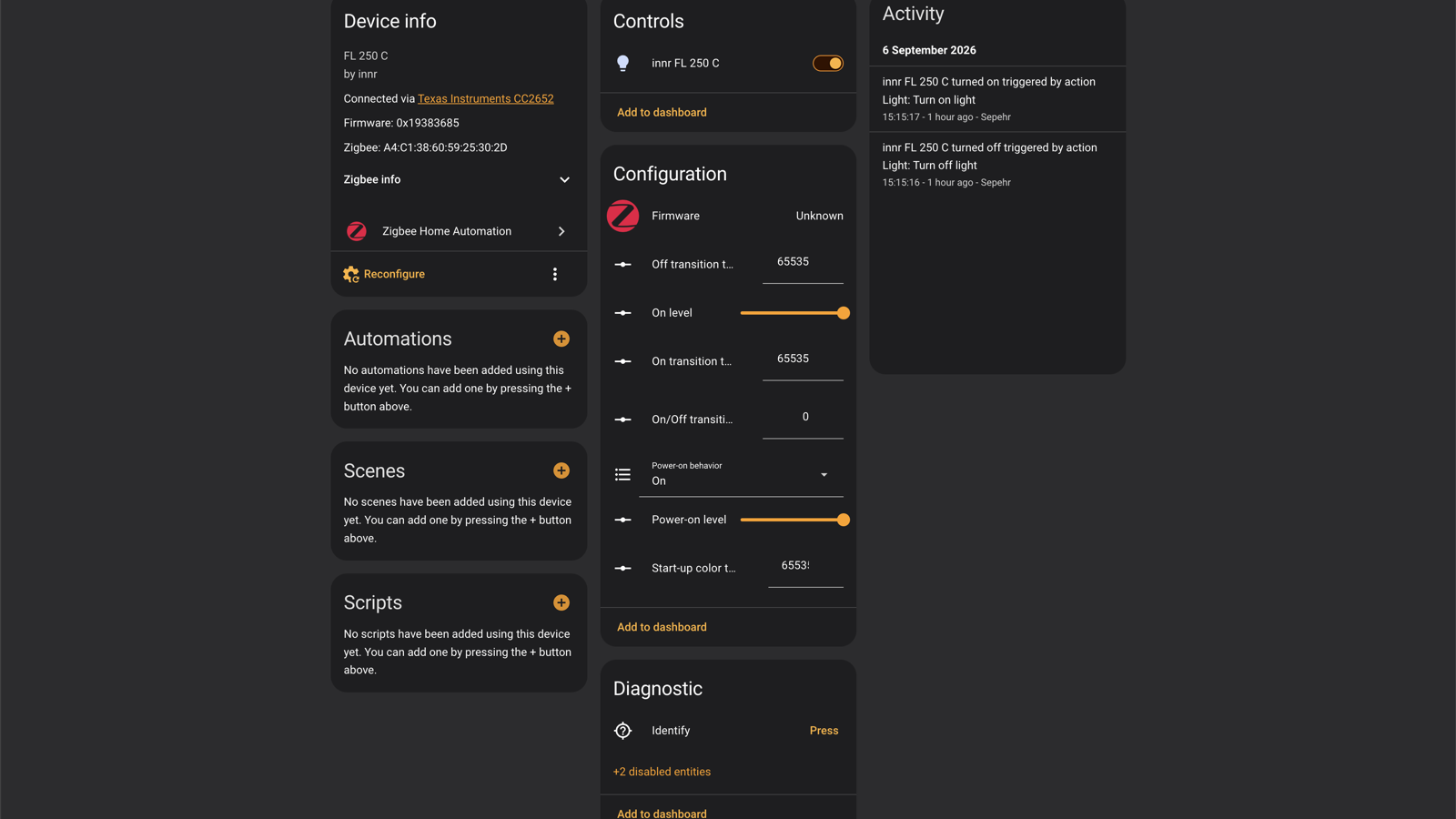
Home Assistant device page for the Innr FL 250 C showing controls, ZHA configuration entities, and activity log
The full ZHA device page: controls, on-device configuration options, and activity history.

The one rough edge: the device page reports firmware as "Unknown" rather than a version number, so there's no straightforward way to confirm whether you're running the latest release. If you'd rather avoid ZHA's local-only radio setup, the strip is also a listed Zigbee2MQTT device, so both of Home Assistant's major Zigbee integrations are covered — see our Zigbee2MQTT vs ZHA comparison if you're deciding which to run.

Because everything runs through the Zigbee coordinator rather than a manufacturer cloud service, automations built around the strip keep working during an internet outage — turning it on at sunset, syncing it to another light's colour, or triggering the colour loop from a script all continue to fire locally. That's the main practical benefit of the ZHA-first approach over a Wi-Fi strip tied to a vendor's servers.

Who should buy the Innr FL 250 C?

It suits anyone already running a Zigbee coordinator for Home Assistant who wants ambient colour lighting without adding another app or cloud account to the mix. That covers most households that already own an Innr, Hue, or IKEA Zigbee bulb — adding this strip to the same mesh takes minutes and doesn't introduce a second ecosystem to manage. If you want per-segment rainbow effects or music-reactive lighting, Govee's Wi-Fi strips do that better. If you're all-in on Hue and want strip lights that gradient smoothly along their length, Hue's own strip is the more polished (and pricier) choice. And if you don't yet own any Zigbee coordinator or hub at all, factor in the cost of one — around £22 for a SONOFF ZBDongle-E, up to £38 for Home Assistant’s own Connect ZBT-2 — before comparing prices against hub-free Wi-Fi strips.

Verdict

The Innr FL 250 C is an easy recommendation for a Home Assistant household that wants straightforward, local Zigbee colour lighting without hub tax or app clutter — it paired instantly over ZHA, exposed full brightness, colour, and colour-temperature control, and even runs its own colour loop effect without any automation. The lack of per-segment effects and patchy UK stock are the only real caveats; if those don't matter to you, it's a dependable strip that fits straight into an existing Zigbee network.
Frequently asked questions

Does the Innr FL 250 C LED strip need a hub?
No. The Innr FL 250 C is a Zigbee 3.0 device, so it pairs directly to any Zigbee coordinator without a dedicated Innr hub or app. In testing it joined a Home Assistant instance running ZHA in under a minute via a Texas Instruments-based USB coordinator, showing up as a standard light entity with brightness, RGB colour, and colour-temperature control. Innr lists the Philips Hue Bridge, Home Assistant, Homey, Samsung SmartThings, Google Assistant, Alexa, Echo speakers with a built-in Zigbee hub, and its own bridge as supported. Apple HomeKit, Hue Entertainment and Hue Secure are ruled out, even via a Hue Bridge. The control unit also has a physical button, so the strip can be switched on and off without any hub at all — though you need a Zigbee coordinator for colour, dimming and automation. It can't be controlled over Wi-Fi on its own, and there's no standalone Innr app to fall back on.
Can you cut the Innr FL 250 C LED strip to a shorter length?
Yes. The Innr FL 250 C is sold as a 5m reel with marked cut points spaced every few LEDs along its length, visible as copper pads printed with the RGBW wiring labels. Cutting along one of these lines shortens the strip to fit a specific run — behind a TV unit, along a shelf, or around a doorframe — without damaging the remaining LEDs, provided you cut exactly on the marked line rather than between them. The strip cannot be extended beyond its original 5m, and cut-off sections cannot be reused elsewhere — if you need a longer run the answer is a second strip on its own power supply, not splicing. If a shorter length leaves the driver or Zigbee control module too far from the cut end, route the excess low-voltage cable behind furniture rather than cutting nearer the plug, since the control electronics themselves aren't user-serviceable.

Sources

Sources verified 2026-09-07

  1. Innr — Innr Zigbee Strip Light Colour (FL 250 C) product page
  2. Hueblog — Innr Flex Light: first impressions of the new light strip
  3. Zigbee2MQTT — Innr FL 250 C device page
  4. Home Assistant — ZHA integration documentation
  5. Ofgem — Energy price cap unit rates and standing charges
  6. Innr — Works with — supported platforms and bridges
How we researched this

Claims in this article are checked against primary sources — manufacturer specifications, official documentation, Which? research, Ofgem guidance, or gov.uk — rather than forum threads or video reviews. Where the author has direct hands-on experience with a product (most Home Assistant, Zigbee, and home-networking gear is running in his own homelab), that is stated explicitly in the text.

For categories outside that personal setup — such as boilers, heat pumps, and other areas that are traditionally a heating engineer's domain — verdicts are built from cross-referenced manufacturer data, published lab results, and vetted expert and owner reviews rather than a claim of personal hands-on testing. See the editorial policy for the full methodology.

Sepehr

Written by

Sepehr

10+ years hands-on with Home Assistant & networking · Research-backed elsewhere · No brand deals

Smart home specialist with 10+ years running a self-hosted Home Assistant setup — Zigbee2MQTT, Frigate NVR, and local-first automations. Independent coverage for UK homes, no brand deals.

LinkedIn →

Citing this page? Please use a dofollow link back to the original article — it helps us keep the data on this page accurate and up to date.

Related reading