
Why build a rain alert for open windows?
A forgotten window is cheap to fix when you are home and expensive when you are not. Rain through a gap soaks sills, curtains and flooring, and a window left open while the house is empty is also a security gap. Our window open, heating off guide already uses the same sensors to save energy; this alert reuses them to protect the house from weather.
Home Assistant can only warn you about windows it can see, so a contact sensor on each window you open regularly is the starting point. If you have none yet, see our best smart window sensors round-up.
What do you need before you start?
- A contact sensor on each window you open, showing in Home Assistant as a binary sensor. For the
windowdevice class, on means open and off means closed, so give each sensor that device class under Settings → Devices & services → Entities if it is not already set. - A weather entity. The Met Office and the built-in Meteorologisk institutt (Met.no) integrations both give UK coverage and appear as a
weather.entity. The examples useweather.home; swap in yours. - The Companion app on each phone that should be alerted. The mobile app guide explains setup.
- Person entities if you want a leaving-the-house rule, covered in our presence detection guide.
Step 1: Group your window sensors into one "any window open" sensor
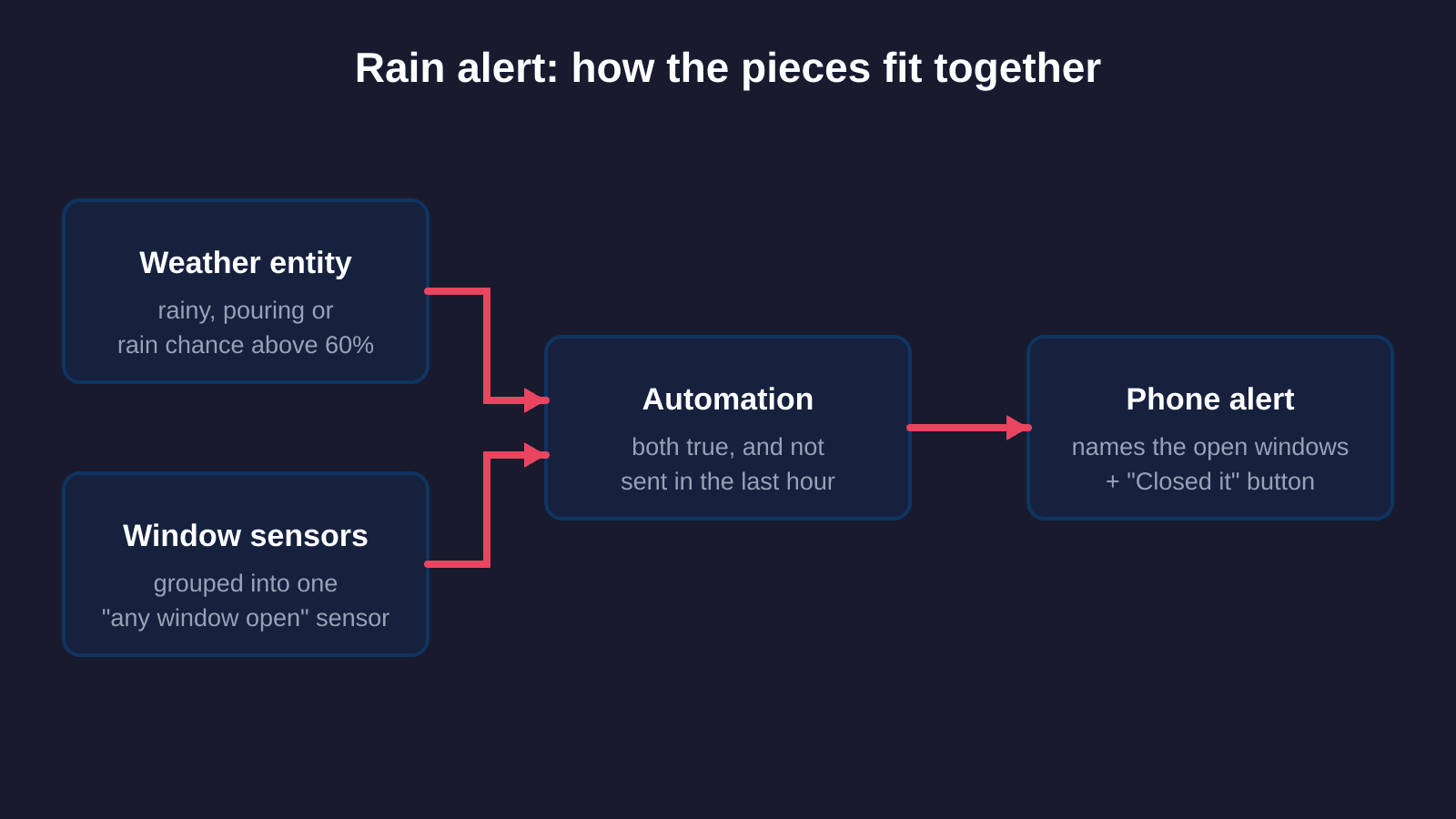
Rather than listing every window in every automation, create one helper. Go to Settings → Devices & services → Helpers → Create helper → Group → Binary sensor group, name it "Windows", tick every window sensor, and leave "All entities" off. The group then turns on when any member is open, and off only when all are closed. It gets the entity ID binary_sensor.windows used below.
Add a new window later and you edit one helper, not a stack of automations. If you have patio doors or a roof window, include them: rain does not care what the glass is called.
Step 2: Decide what "rain" means with a weather state and a forecast
The weather entity's current state is one of a fixed set of conditions. Three matter here: rainy, pouring and lightning-rainy. That covers rain that has already started. To warn before it arrives, you also want the hourly forecast.
Home Assistant exposes forecasts through the weather.get_forecasts action, which returns the forecast as a response variable. A trigger-based template sensor can call it every 15 minutes and keep the highest rain probability over the next three hours. Add this to your configuration.yaml (or the equivalent YAML for your setup):
template:
  - trigger:
      - trigger: time_pattern
        minutes: "/15"
      - trigger: homeassistant
        event: start
    actions:
      - action: weather.get_forecasts
        data:
          type: hourly
        target:
          entity_id: weather.home
        response_variable: hourly
    sensor:
      - name: "Rain chance next 3 hours"
        unit_of_measurement: "%"
        state: >
          {{ hourly['weather.home'].forecast[:3]
             | map(attribute='precipitation_probability')
             | reject('none') | list | max(default=0) }}
Not every weather provider fills in precipitation_probability for every hour. If your sensor stays at 0 while the forecast clearly shows rain, check what your provider returns in Developer tools → Actions by running weather.get_forecasts yourself and reading the response. Some providers give a rain amount instead, in which case swap the attribute.
Step 3: Build the alert that names the open windows
Now the automation. It has two triggers: the weather state turning rainy, and the forecast chance crossing 60%. A condition checks that at least one window is open, and a last-triggered check stops it repeating every few minutes.
alias: Window open and rain coming
triggers:
  - trigger: state
    entity_id: weather.home
    to:
      - "rainy"
      - "pouring"
      - "lightning-rainy"
  - trigger: numeric_state
    entity_id: sensor.rain_chance_next_3_hours
    above: 60
conditions:
  - condition: state
    entity_id: binary_sensor.windows
    state: "on"
  - condition: template
    value_template: >
      {{ this.attributes.last_triggered is none
         or (now() - this.attributes.last_triggered).total_seconds() > 3600 }}
actions:
  - action: notify.mobile_app_your_phone
    data:
      title: "Rain and an open window"
      message: >
        Rain is {{ 'falling' if states('weather.home') in ['rainy','pouring','lightning-rainy'] else 'forecast' }}.
        Open: {{ state_attr('binary_sensor.windows','entity_id')
          | select('is_state','on')
          | map('state_attr','friendly_name') | join(', ') }}.
      data:
        tag: rain-window
The message builds its list from the group's member entities, keeping those currently open. The tag means a later alert replaces this one rather than stacking up. Set the 60% threshold to taste: a lower number warns earlier but fires more often, and the one-hour gap keeps even an eager setting tolerable.
Step 4: Add a "Closed it" button and an away-from-home version
The Companion app documentation says an actions list under data adds buttons to a notification, each with an action identifier and a title, and the app fires a mobile_app_notification_action event when you tap one. A simple use: offer a button that confirms you have shut them, and re-check a few minutes later. Replace the final action in Step 3 with this block:
  - action: notify.mobile_app_your_phone
    data:
      title: "Rain and an open window"
      message: "Rain is coming and a window is open."
      data:
        tag: rain-window
        actions:
          - action: "REMIND_RAIN_WINDOW"
            title: "Remind me in 10 min"
  - wait_for_trigger:
      - trigger: event
        event_type: mobile_app_notification_action
        event_data:
          action: "REMIND_RAIN_WINDOW"
    timeout:
      minutes: 30
    continue_on_timeout: false
  - delay:
      minutes: 10
  - if:
      - condition: state
        entity_id: binary_sensor.windows
        state: "on"
    then:
      - action: notify.mobile_app_your_phone
        data:
          title: "Window still open"
          message: "It is still open and rain is on the way."
          data:
            tag: rain-window
For the house-is-empty case, add a second automation that triggers when person.you changes to not_home while the group is on and the rain sensor is above 40%. An open window with nobody home is worth a firmer message than "close it when you can". If several people live there, check each person entity so it only fires when all are away.
Step 5: Test it without waiting for a storm
Open Developer tools → States, pick sensor.rain_chance_next_3_hours, and temporarily set a high value in the state field, then open a window. The numeric state trigger fires when the value crosses 60, so set it below 60 first, then above. States set this way reset on the next real update, which is fine for a test. Check that the notification names the right window, then confirm the one-hour limit holds by triggering it again straight away. Our notifications guide covers testing the delivery side if nothing arrives.
Common problems and fixes
The alert fires for a window I open on purpose: add a condition excluding that sensor, or use a separate group for windows that should count. Bathroom and kitchen windows opened for ventilation are the usual culprits.
The rain sensor always reads 0: your provider may not return a precipitation probability. Run weather.get_forecasts in Developer tools and look at the attributes actually returned.
It fires every time the weather state flickers: weather states can bounce between cloudy and rainy. The one-hour condition handles most of this; add a for of five minutes to the state trigger for the rest.
The message lists nothing: the group's entity_id attribute only holds the member sensors, so make sure the members have friendly names and are not unavailable.
No notification at all: check battery optimisation for the Companion app on the phone and test the notify action directly from Developer tools.
What should you build next?
If the house is empty when the rain hits, the same sensors can drive a "forgot to lock up" check: see our garage door left open notification for the pattern. Pair this alert with the heating cut-out in the window open, heating off guide, and the open-window group you built here is ready for both.
Window sensors are also useful at bedtime: a goodnight script can list every window still open before you turn in.